 Go up
Go up


Managing Projects in SimplyAnalytics
Posted on Dec 08, 2017 by Admin
Good afternoon, readers! This week we’re going to talk about project management in SimplyAnalytics and how to best take advantage of it.
Why are projects needed?
Many users have multiple unique projects going on at the same time. For example, you could be doing: personal research, patron/student assistance, research for a presentation, etc. Projects help keep these unique activities separate from one another to avoid confusion.
What is stored in each project?
All of the locations, variables, business searches, favorites, views, etc. that you use are saved with the project - so each time you login, you can pick up right where you left off.
Getting Started:
The first recommendation we have is to rename your project. You can do this by selecting the “New Project” default title towards the top left of your screen.
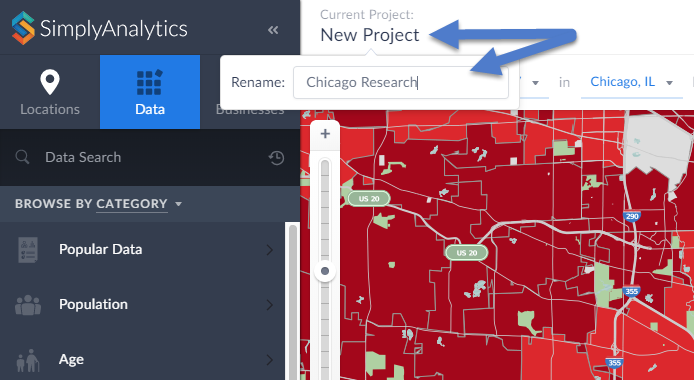
Enter a new name within the available text field and hit Enter to save your current project.
Managing Your Project:
Select Manage Project from the top-right of your screen. From here you will have some editing options available:
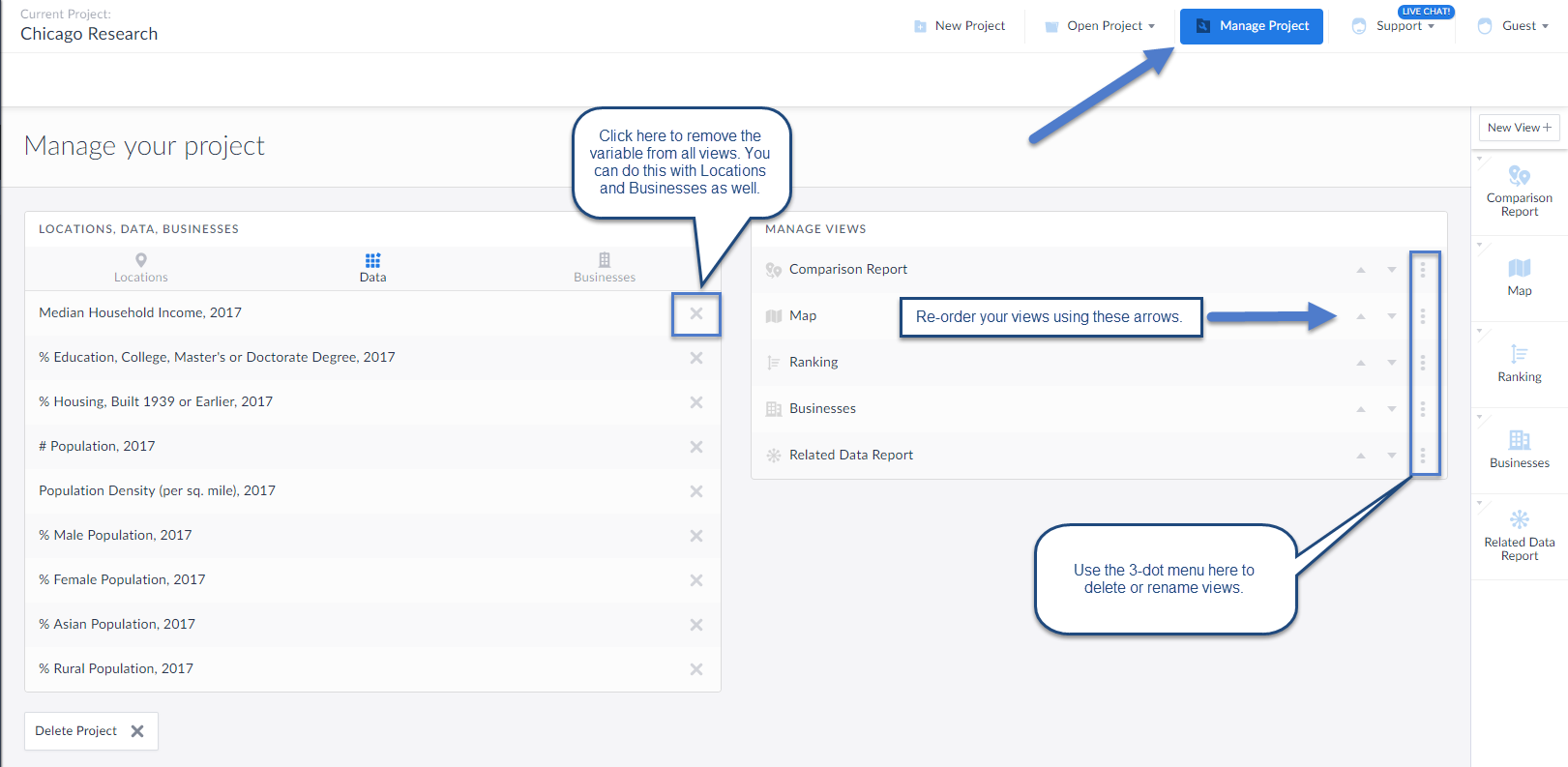
You can choose to remove any locations, data variables or searches within your project using the options available towards the left of your workspace. This will remove those items from all views they reside in along with removing them from the Edit View screen.
Manage Views: The three-dot menu within this area will allow you to delete or rename the view. Additionally, the up and down arrows will allow you to arrange your views in order of how they appear on the right-hand side of the interface.
Creating a New Project: Select New Project to get started with a brand new project (no locations, variables, searches).
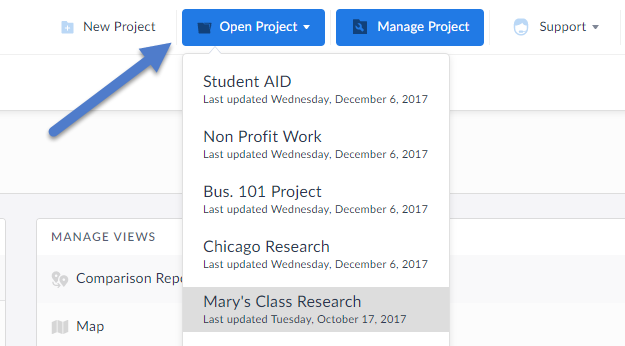
You can always select Open Project to toggle back to older projects.
That’s it for this week’s blog, stay tuned for more!
More from SimplyAnalytics


Posted on Dec 02, 2014 by Admin
Today we take a look at one of the more advanced features in SimplyMap - editing the map legend. Editing the map legend is a great way to not only customize how the data is distributed on...
Posted on Nov 28, 2012 by Admin
Come visit the SimplyMap team at the ALA Midwinter Meeting, January 25 - 28, 2013 in Seattle, WA. We will be in Booth 1307, and as always we look forward to meeting with customers new and...
Posted on Oct 29, 2015 by Admin
Did you know that SimplyMap allows you to search for businesses by NAICS or SIC codes? Searching by these codes is a great alternative to the general keyword search. Using the keyword sea...
Posted on May 24, 2023 by Admin
SimplyAnalytics is excited to attend. Swing by booth 1733 for a brief demo, and discover how our user-friendly demographics, business, health & marketing data analytics and visualizat...
Posted on Aug 02, 2016 by Admin
Did you know that you can use SimplyMap to identify which make and model of vehicle is most prevalent within any location in the United States? In this week’s SimplyMap report, we’ll take...
Posted on Mar 30, 2016 by Admin
In previous blog entries we highlighted the usefulness of viewing multiple years of data for the same variable. In short, analyzing the same variable across multiple years allows users to...
Posted on Oct 07, 2024 by Admin
We're headed to Charleston! Come visit the SimplyAnalytics team on November 12th at the Gaillard Center at booth 41. We'll be doing live demonstrations of the database, answering question...
Posted on Feb 01, 2009 by Admin
Want to know the top 10 wealthiest ZIP codes in your state? How about the top 25 counties with the most elderly residents? Duke University students can now easily answer these questions a...
Posted on Dec 19, 2016 by Admin
Stop by the Geographic Research booth [#T8] at the Ontario Library Association Super Conference to get a hands-on look at our latest and greatest SimplyMap offering. The conference will t...
Posted on May 06, 2016 by Admin
Visit us at booth #775 at the ALA 2016 annual conference to meet the SimplyMap team and learn more about the features and functions behind SimplyMap. Have a Ghirardelli Chocolate while we...