 Go up
Go up


Ranking the Highest Population Densities in the US
Posted on Mar 18, 2015 by Admin
Can you guess which US city has the most residents per square mile? Today we’re going to use SimplyMap to answer this question for all cities, as well as cities with a population greater than 100,000. The variable we will be using is a Census Variable, Population Density (per sq. mile), 2014.
First, create a new Ranking Report, and set the geography to USA. Next, navigate through this path to select the variable mentioned above: Census Data » In 2010 Geographies » People and Households » Population » Total.
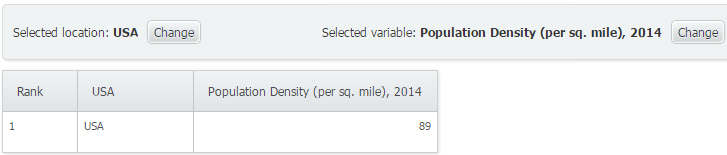
As a benchmark, the USA comes in with a density of 89 people per square mile.
To change how we analyze the variable by, utilize the Analyze Data By feature to analyze USA by States. Doing so yields the following:
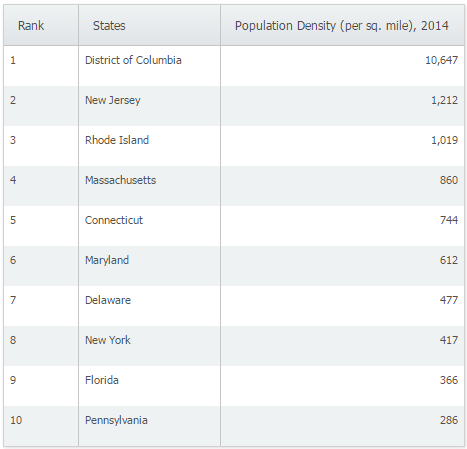
Not surprising, DC comes in first at a density of 10,647 with New Jersey coming in a far off 2nd place at 1,212. Next, we will analyze this variable by city. Unfiltered results yields the following top 10 cities:
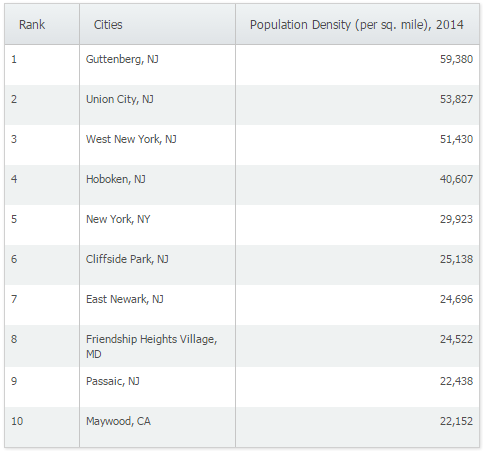
Guttenberg, NJ is the most densely populated incorporated place in the country with a staggering 59,380 people per square mile. A little research into Guttenberg, NJ reveals that the town itself is only 4 blocks wide, with a population of 11,176! It’s easy to see how Guttenberg would be ranked first overall in the United States.
Lastly, apply a population filter to only reveal cities with a population greater than 100,000. The results are shown below:
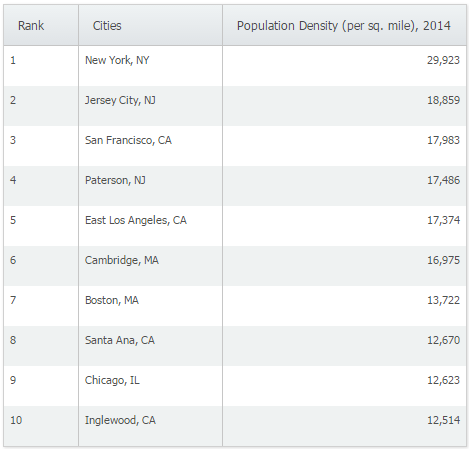
New York, NY and Jersey City, NJ rank first and second respectively as the highest population density per sq. mile for larger cities.
Are there any reports that you would personally like to see? Feel free to let us know in the comments below!
Have you already entered for your chance to win an iPad or Kindle Fire? We will be holding the drawing on April 17, 2015. To enter, simply follow us on Twitter and Like Us on Facebook to get your name in consideration.
More from SimplyAnalytics


Posted on Nov 24, 2014 by Admin
In this week’s report, we research America’s most educated cities. SimplyMap contains a total of 111 educational attainment variables, including general population and by race. We used th...
Posted on Feb 23, 2012 by Admin
Geographic Research, Inc. will be exhibiting at the Public Library Association (PLA) Conference. Visit us at Booth 2329 to learn more about SimplyMap and enter our raffle for a new com...
Posted on Nov 20, 2015 by Admin
In a previous blog we demonstrated the power of utilizing multiple years for the same variable. We found that the usage of Amazon.com had grown substationally from 2008-2014. In this week...
Posted on Dec 08, 2010 by Admin
The GRI team will be attending the American Library Association Midwinter meeting this year at the San Diego Convention Center. Visit us in booth 1055 in the exhibit hall from January 7 -...
Posted on Feb 02, 2024 by Admin
We are excited to be back exhibiting at PLA this April in Columbus, OH. Join us at Booth #2631 to discover how SimplyAnalytics can help libraries understand their service area, assist sma...
Posted on Nov 23, 2012 by Admin
Men's Health magazine is charting vanity in US cities, with help from SimplyMap. What did they find? The Sunshine State, with a long history of going to great lengths to look good, tops t...
Posted on Dec 11, 2023 by Admin
Hello readers! We have some fantastic news to share. SimplyAnalytics is thrilled to announce the addition of 2020 Election data to our expanding collection of powerful datasets. With this...
Posted on Jan 29, 2016 by Admin
In a previous blog entry, we highlighted the benefits of having multiple years of data available for the same variable. This allows users to identify trends over time. Keeping with the sa...
Posted on Nov 29, 2009 by Admin
The ALA 2010 Midwinter Meeting will be held on January 15-19, 2010 at the Boston Convention and Exhibition Center. (Note that this is not the Hynes Convention Center). Geographic Research...
Posted on Dec 09, 2014 by Admin
In this week’s SimplyMap blog post, we set out to discover which large US cities spend the most money per year on their pets. To find this out we used the variable, “Pets, Household Avera...