 Go up
Go up


View Spotlight: Quick Report
Posted on Mar 21, 2018 by Admin
The Quick Report is one of the newest features added to SimplyAnalytics - let’s take a look at how it can support your research.
This report instantly provides you with a curated list of key data variables for any location or locations of your choosing. You can specify the report content you wish to view for your locations, such as a Demographic Overview or a Housing Overview.
When To Use: Use the Quick Report to quickly gain insight into your target locations. If you’d like to quickly view many key data variables for your locations this is a fantastic way to get started on your analysis and only takes a few seconds!
How to Use: There’s only three steps to create a Quick Report.
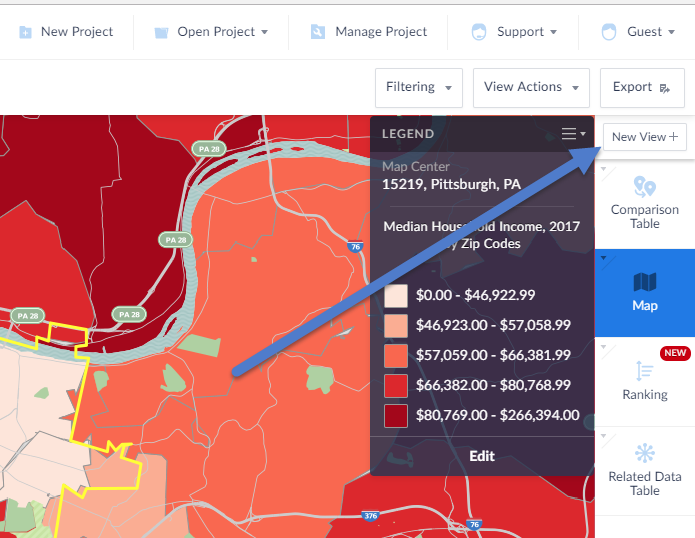
- Select “New View” from the top right of the user interface:
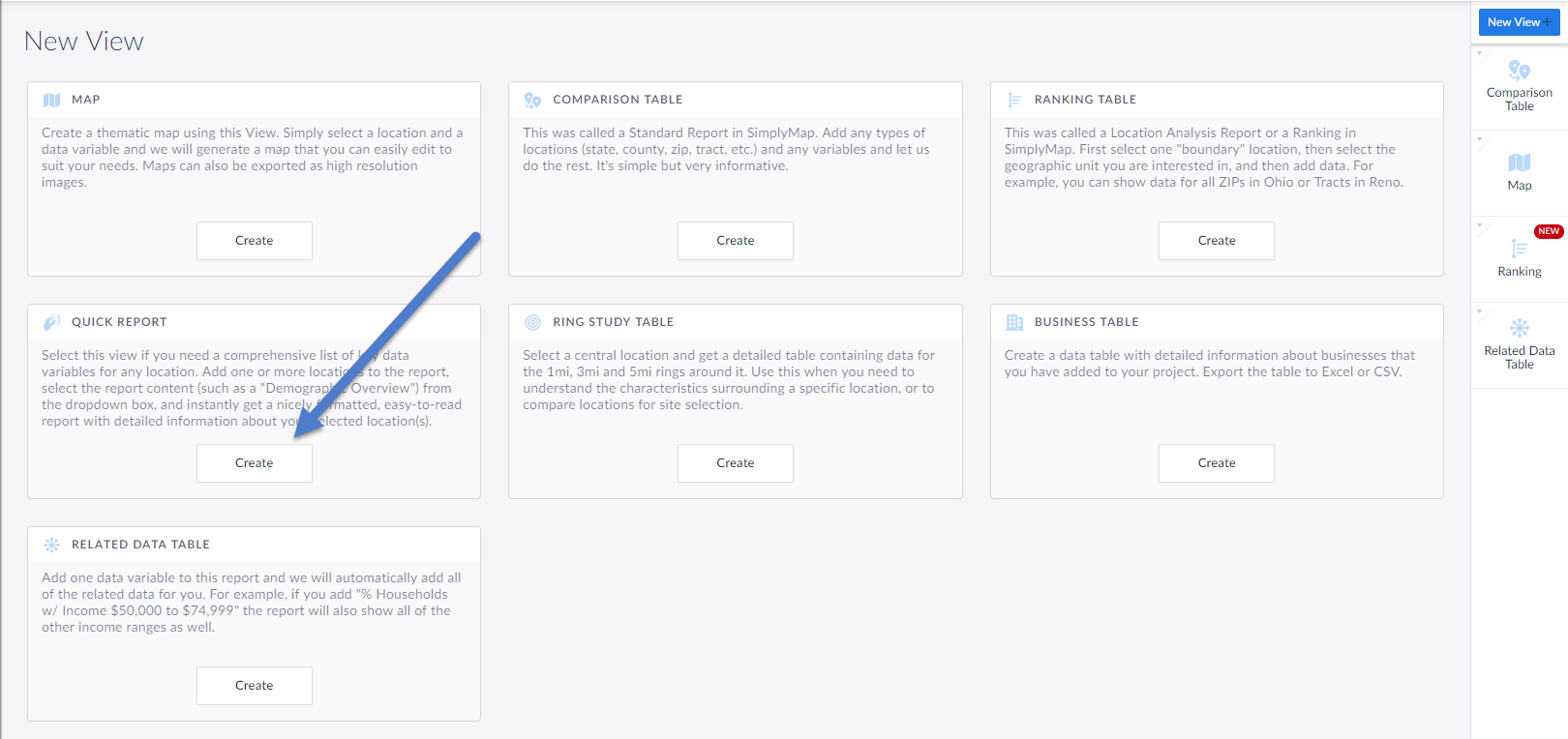
2. Click on Create in the Quick Report box in the View Menu
3. Select the locations you would like in the report and click done (you can always add or remove locations later).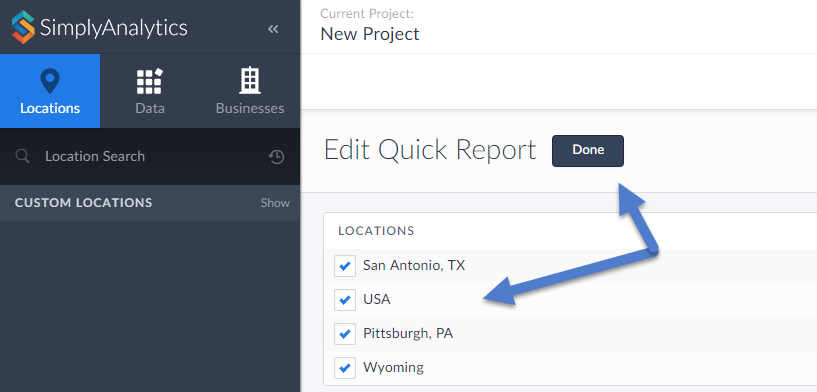
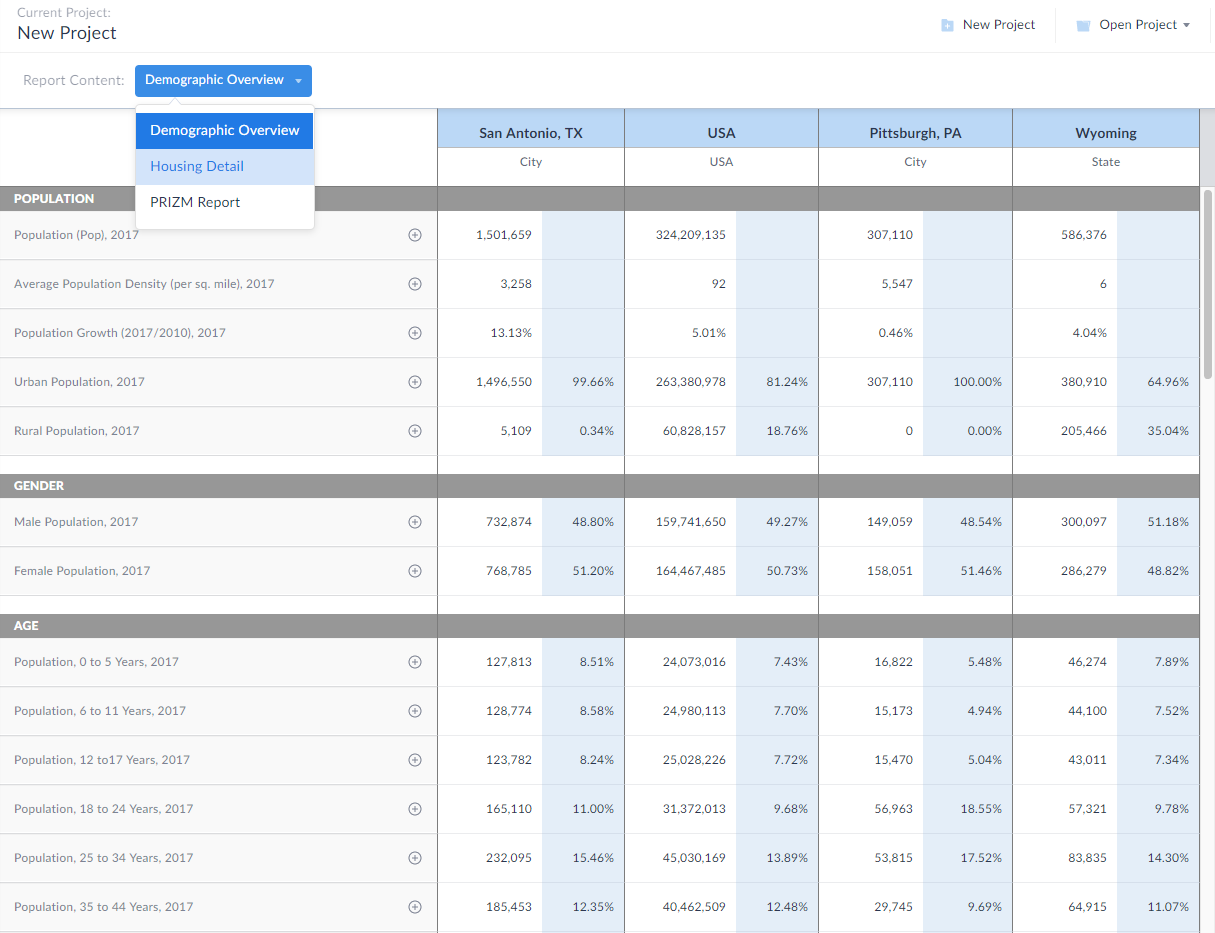
The report will automatically generate for you showing the Demographic Overview content by default. Feel free to select the “Report Content” dropdown at the top of the report to change the content you see.
We hope you enjoy this new view. Stay tuned for more updates and see you at the PLA conference next week!
More from SimplyAnalytics


Posted on May 19, 2016 by Admin
Drop by booth #215 at the SLA 2016 conference to chat with us and get the latest info on SimplyMap. We look forward to seeing our customers, friends, and all others interested in learning...
Posted on May 31, 2011 by Admin
Kenneth Johnson of the Science, Industry, and Business Library at the New York Public Library recently provided a "boot camp" on the library's market research resources to budding entrep...
Posted on Aug 26, 2015 by Admin
Most people in the United States could probably guess which cities are popular amongst tourists - Los Angeles and New York. But can you guess how much money is spent in novelty and souven...
Posted on Jan 12, 2020 by Admin
Happy New Year! SimplyAnalytics will be exhibiting at the ALA Midwinter meeting, held this year at the Pennsylvania Convention Center in Philadelphia on January 24th-27th. If you attend, ...
Posted on Mar 11, 2024 by Admin
We're thrilled to announce that SimplyAnalytics will be exhibiting at the ALA Annual Conference in San Diego! We can't wait to connect with library professionals, share insights, and show...
Posted on Apr 30, 2020 by Admin
We find ourselves in the middle of an unprecedented crisis the likes of which most of us have never experienced before, and hopefully won’t have to experience again. There is the occasion...
Posted on Jun 02, 2017 by Admin
We will be exhibiting at SLA in Phoenix, AZ on June 18th-20th. You can find the SimplyAnalytics team at Booth #905. Stop by and check out our groundbreaking new interface, have a chocolat...
Posted on Oct 02, 2015 by Admin
In this week’s SimplyMap tip, we wanted to do a quick write up reminding users about the Saved Tabs feature within SimplyMap. Did you know that SimplyMap will automatically save all of yo...
Posted on Oct 22, 2008 by Admin
Excerpt from University of Iowa Library blog: In your marketing class, you may be developing a marketing plan for a pre-made meals restaurant specializing in vegetarian menus in Chicagola...
Posted on Jul 24, 2013 by Admin
Registration is now open for the North Carolina Library Association Conference! Visit us at the 60th biennial conference (Booth #45) through October 15 - 18, 2013. We have beautiful ca...