 Go up
Go up


Browsing & Searching for Businesses in SimplyAnalytics
Posted on Oct 27, 2017 by Admin
Welcome to our first ever SimplyAnalytics blog! Every Friday we’ll post a write up on a specific feature or highlight some interesting data in SimplyAnalytics. The goal of these posts is to make you more comfortable with the program and teach some interesting tips & tricks along the way.
Today we’ll take a look at the 3 methods of browsing and searching for businesses, and how to take advantage of each. Let’s get started!
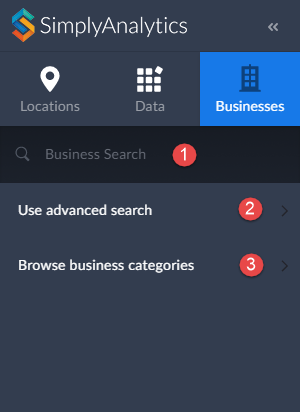
To overlay businesses onto a map or create a Business report, first ensure you have the Businesses tab selected as shown here.
As noted above, there are three ways of adding businesses.
1. A general keyword search
2. Advanced search / query
3. Browse by NAICS/SIC codes
Method #1 - General Keyword Search
The quickest and easiest method for adding businesses.
How to Use It - Simply type in a keyword such as “coffee” or a business name such as “Starbucks” in the available box shown above and hit enter on your keyboard.
Method #2 - Advanced Business Search
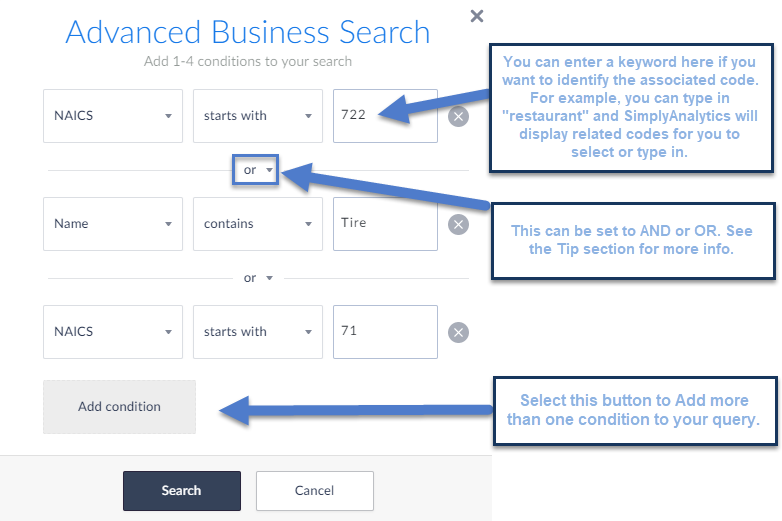
The most advanced method. This search allows you to build a business query using up to 4 total conditions. While this method is a bit more advanced, the tradeoff is you’re able to build a query to your specs.
How to Use It - select Use Advanced Search shown above, and from there you can build out your query. Below I am searching for NAICS starts with 722 (Food Services and Drinking Places) OR Name Contains: Tire OR NAICS starts with 71 (Arts & Entertainment).
Method #3 - Browse by NAICS/SIC Codes
If you want to browse for specific industry codes, this is your go to. This method allows you to jump into subcategories within a major industry so you’re able to browse for the code you had in mind.
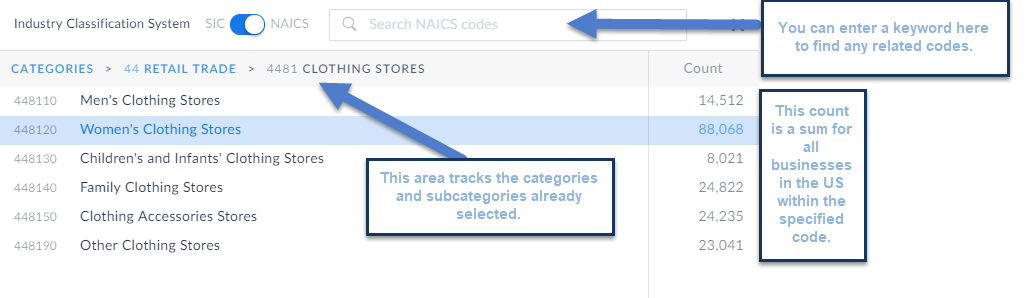
How to Use It - Select Browse Business categories and specify at the top if you are browsing for NAICS or SIC Codes (NAICS is the default). From there, you can jump into categories and subcategories by making an initial selection.
The example below went from: Retail Trade (44) to Clothing Stores (4481) and lastly within clothing stores you can specify which clothing store type you are looking for.
That’s it for our inaugural SimplyAnalytics blog post - we hope this post helped clarify the Business search. Stay tuned for more!
More from SimplyAnalytics


Posted on Dec 15, 2014 by Admin
Custom Locations allow SimplyMap users to combine several locations into one larger region. For example, you can use this feature to combine three adjacent ZIP Codes to create your study ...
Posted on Feb 19, 2016 by Admin
Drop by booth #857 at PLA 2016 to meet the SimplyMap team and learn more about the features and functions behind SimplyMap. Have a Ghirardelli Chocolate while we present SimplyMap and off...
Posted on Apr 27, 2015 by Admin
In this week’s write up we want to share some quick tips and tricks that you might not yet know about in SimplyMap. TIP #1 Did you know that you can share your work? SimplyMap allows you ...
Posted on Mar 30, 2016 by Admin
In previous blog entries we highlighted the usefulness of viewing multiple years of data for the same variable. In short, analyzing the same variable across multiple years allows users to...
Posted on Nov 06, 2013 by Admin
SimplyMap includes a number of helpful support tools; guided wizards available when and where you need them, detailed help files, and an online support center with FAQs and searchable kno...
Posted on May 08, 2018 by Admin
This summer's ALA conference is in New Orleans and the SimplyAnalytics team will be exhibiting at booth #837. We hope you stop by to learn about new features, check out our new data offer...
Posted on Jun 21, 2019 by Admin
Come visit the SimplyAnalytics booth (#3010) at the upcoming ALA 2019 show in Washington, D.C.! Our team will be on hand offering quick demos of SimplyAnalytics, answering questions and s...
Posted on Aug 20, 2015 by Admin
Is there a specific age group and income bracket you are specifically interested in researching for a target location? Our Life Stages module has the information you need. Life Stages, by...
Posted on Apr 30, 2008 by Admin
Doreen Harwood, Business Librarian from the University of Washington has developed a series of detailed tutorials on using SimplyMap. The tutorials, which are Flash-based and interactive,...
Posted on Jan 05, 2018 by Admin
The SimplyAnalytics team is looking forward to exhibiting at the Ontario Library Association Super Conference 2018! Stop by the SimplyAnalytcs booth (115T) and take a look at our newest o...