 Go up
Go up


American Household Spending on Pets
Posted on Dec 09, 2014 by Admin
In this week’s SimplyMap blog post, we set out to discover which large US cities spend the most money per year on their pets. To find this out we used the variable, “Pets, Household Average” found in the consumer expenditure category in SimplyMap.
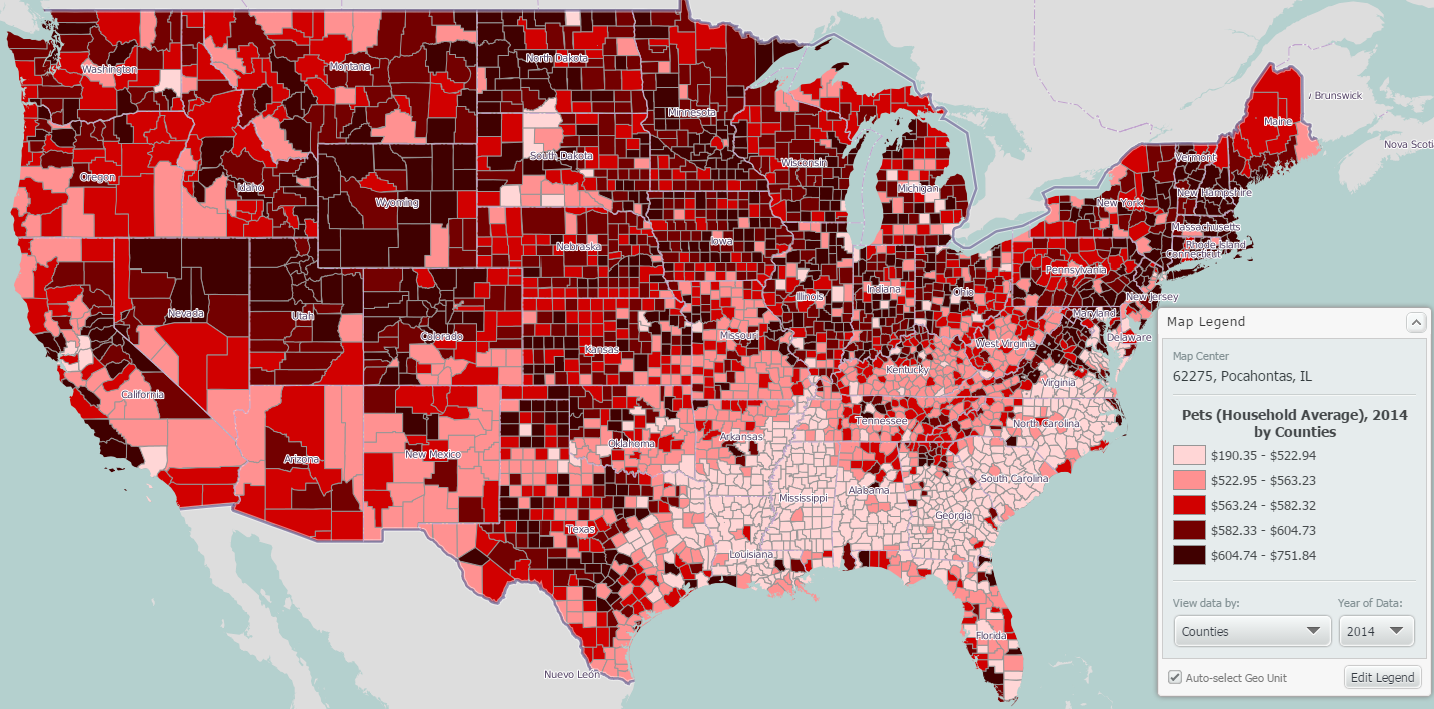
The national quantiles (by counties) in our legend ranged from a low of $190.35 to a high of $751.84. Using the “Create Ranking from Map” feature, we were presented with the following unfiltered results:
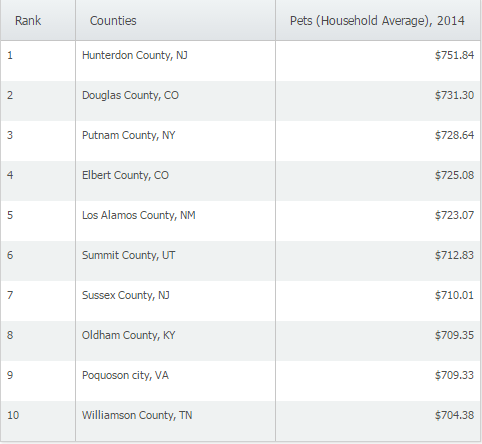
Creating a ranking report from a map using the US as the location will present county level data by default. Because we wanted to find larger US cities, we had to do two things: change the geography that the data was analyzed by, and create a population filter to show cities with a population greater than 100,000.
Changing How the Data is Analyzed
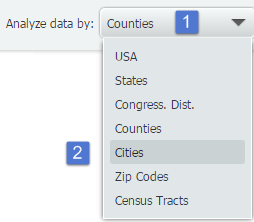
Changing the geographies of your ranking report is a simple two step process. First, select the “analyze data by” drop down menu and then select a new geographic unit. SimpyMap will present your new data immediately.
Creating and Applying a Filter
To create and apply a filter to only show cities with a population > 100,000:
Select “Data filters” then “Create new filter” from the top right of your screen.
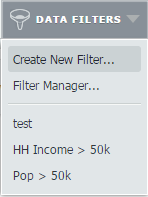
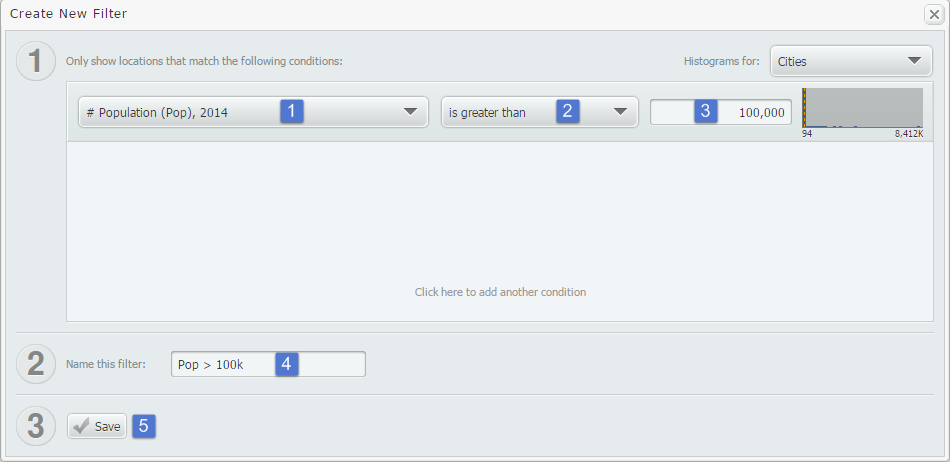
At the filter creation screen, we used a recent variable # Population. We then set the condition to be greater than and typed in the value of 100,000. Lastly, we created a name and saved the filter.
Final Results Presented
Using the Display Options menu located near the top right of SimplyMap, we chose to hide results that did not meet our criteria of a city population greater than 100,000. The final results are below:
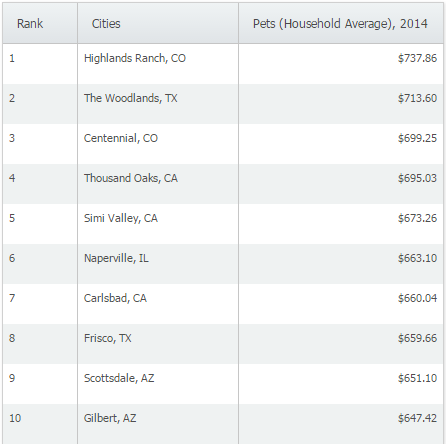
At a yearly average of $737.86, Highlands Ranch, CO ranks #1 in the United States in yearly average household spending on pets.
Stay tuned for more reports and SimplyMap tips & tricks!
More from SimplyAnalytics


Posted on Aug 27, 2018 by Admin
Welcome readers! This week we are excited to feature our newest view in SimplyAnalytics, the Time Series Table.What is it?The Time Series Table allows you to quickly pull all years availa...
Posted on Apr 17, 2009 by Admin
The Special Libraries Association will hold its Annual Conference in Washington, DC at the Washington Walter E. Washington Convention Center from June 14-17 2009. The conference will crea...
Posted on May 19, 2015 by Admin
We will be attending ALA this summer in San Francisco (hint: dress warm!). Visit us at Booth 413 and don't forget to enter our raffle - we will be giving away a $100 gift certificate to A...
Posted on Feb 25, 2020 by Admin
SimplyAnalytics will be exhibiting at the PLA Conference, held this year at the Music City Center in Nashville, TN on February 26 - 28. Visit the team at Booth 1444 with your questions, f...
Posted on May 17, 2016 by Admin
This week’s SimplyMap report is a quick reader challenge. Can you guess what the map of the United States below is depicting? Keep in mind the legend colors - lighter is less, and darker ...
Posted on May 31, 2011 by Admin
Kenneth Johnson of the Science, Industry, and Business Library at the New York Public Library recently provided a "boot camp" on the library's market research resources to budding entrep...
Posted on Jun 07, 2011 by Admin
We will be exhibiting at the Special Library Association Annual Conference in Philadelphia and the American Library Association conference in New Orleans later this month. Come and visit ...
Posted on Dec 02, 2014 by Admin
Today we take a look at one of the more advanced features in SimplyMap - editing the map legend. Editing the map legend is a great way to not only customize how the data is distributed on...
Posted on May 08, 2018 by Admin
We will be exhibiting at the SLA conference in Baltimore, MD this June. Stop by booth #912 and say hello - we look forward to demonstrating SimplyAnalytics, answering your questions, and ...
Posted on Feb 16, 2009 by Admin
Men's Health conducted their first survey of America's recycling habits, and used SimplyMap in their research. Here’s how the editors explain their methodology: To determine how well citi...