 Go up
Go up


Release Announcement
Posted on Nov 28, 2023 by Admin
Hello readers! We are happy to announce that SimplyAnalytics has successfully migrated to the Census 2020 boundaries on Sunday, November 19th. This blog will talk about what that is, what it means for you now, and what it means moving forward. Let’s get into it.
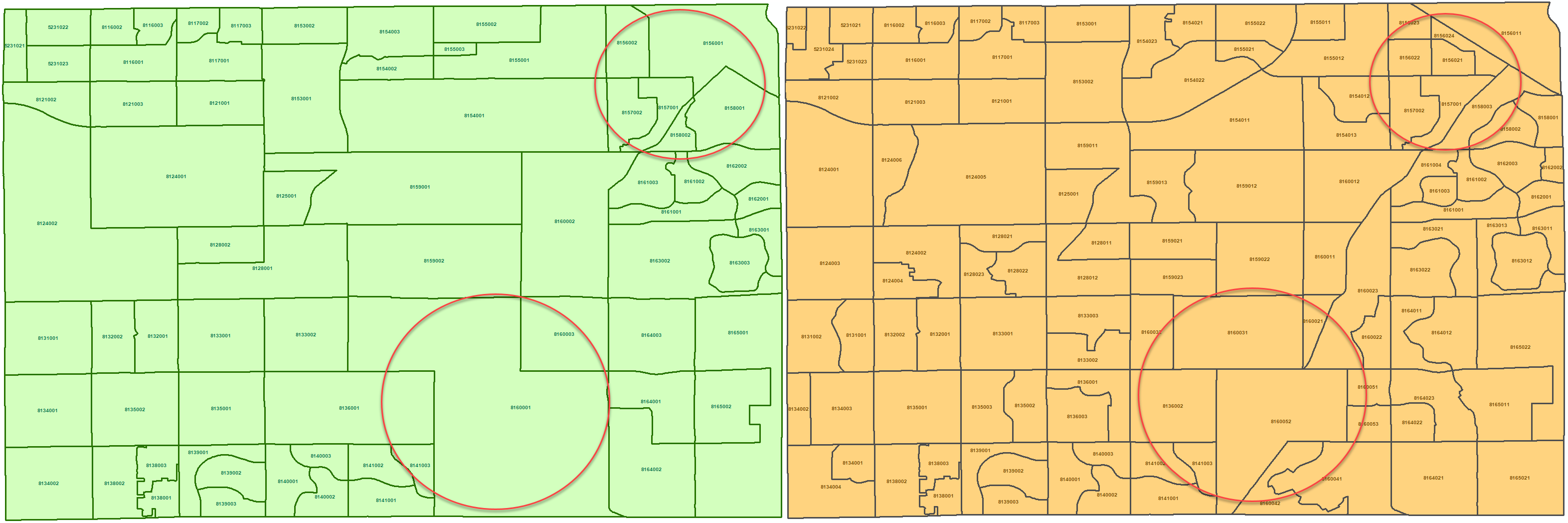
What is this migration all about?The United States Census Bureau provides updates to location boundaries every 10 years. They do this based on population changes and to ensure fair representation for locations that have changed over time. For example, maybe a Census Tract or Census Block Group has grown in population over time, and once it reaches a certain population threshold, that Census Tract or Block Group will get split up, and new Tracts or Block Groups will be created.
Check out the example below that highlights the same area in Arizona in 2019 (green), and then with updated boundaries in 2020 (orange).
If you’re interested in a more detailed overview of this, feel free to check out the video here: https://vimeo.com/user68002385/simplyanalytics-historical-mode?share=copy
What does it mean for SimplyAnalytics?By default, SimplyAnalytics is now in 2020 boundaries, and with that comes a host of newer data, including 2023 Community Demographics, the complete 2021 ACS (with 2022/23 estimates), The 2020 Decennial Census, and a new 2020 Election dataset - more on that in a future blog.
For returning users: If you are a returning user, you might notice that your views have a historical badge on them or that there’s a note at the top, and it’ll look like this:
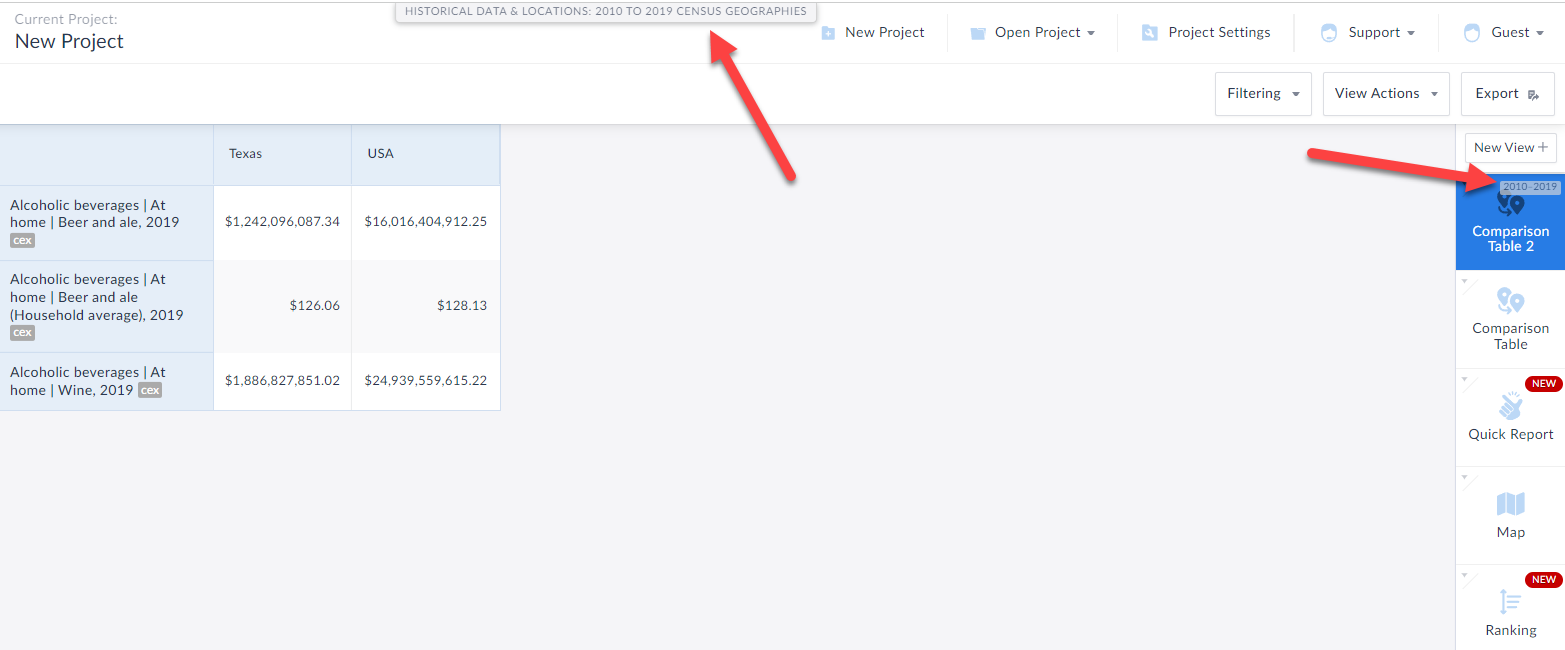
This is because all of your work prior to Nov. 19th, 2023, would have been in the older geographies, but as mentioned above SimplyAnalytics now defaults to 2020 Census boundaries.
What if I want to explore the newest data? If you want to use the newest data, simply click on New View at the top-right of the screen and proceed as you normally would. However, if you want to continue using the now older data, you’ll have to go into historical mode - similarly, some datasets are not yet migrated to the new boundaries, and so if you want to access those, you’ll need to use historical mode.
Final NotesFor existing/returning users, we understand that there might be some confusion with accessing some datasets that are not yet available in the newer geographies. But please note that this is temporary. As all future years of the datasets you’ve come to love come online, the only reason you’ll need to go into Historical Mode will be if you want older years of data which is how it has traditionally been.
As always, we are here to help! Please email support@simplyanalytics.com if you are running into any issues.
More from SimplyAnalytics


Posted on May 24, 2023 by Admin
SimplyAnalytics is excited to attend. Swing by booth 1733 for a brief demo, and discover how our user-friendly demographics, business, health & marketing data analytics and visualizat...
Posted on Aug 02, 2016 by Admin
Did you know that you can use SimplyMap to identify which make and model of vehicle is most prevalent within any location in the United States? In this week’s SimplyMap report, we’ll take...
Posted on Oct 24, 2019 by Admin
Hi everybody! This week we wanted to bring you something unique, so we’re taking you behind the scenes to show you what goes in to setting up the SimplyAnalytics conference booth you’ve c...
Posted on Nov 10, 2017 by Admin
Welcome to this week’s SimplyAnalytics blog post. Today we’re going to take a closer look at the options available to you when editing the map legend. Let’s get started! First, to start e...
Posted on Dec 06, 2009 by Admin
ALA's Choice Magazine, publisher of independent reviews of products and services for academic libraries, released a new review of SimplyMap in the December 2009 edition. The reviewer, Car...
Posted on Nov 29, 2009 by Admin
Legal Information Alert, a monthly newsletter covering what's new in legal publications, databases and research techniques, published a review of SimplyMap in their April 2009 issue title...
Posted on Aug 15, 2013 by Admin
Anyone who has traveled to Seattle hoping for a sunny day could fairly estimate that it is one of the rainiest states with the highest level of precipitation each year. SimmonsLOCAL varia...
Posted on May 26, 2020 by Admin
Hello readers! We hope you are doing well, and thank you for your continued support of SimplyAnalytics. We are excited to announce that scatterplots are officially live! Scatter plots ar...
Posted on May 17, 2016 by Admin
This week’s SimplyMap report is a quick reader challenge. Can you guess what the map of the United States below is depicting? Keep in mind the legend colors - lighter is less, and darker ...
Posted on Jul 30, 2018 by Admin
Hello readers! Welcome to this week’s blog. This week we will feature the Related Data Table view and how you can use it to maximize your productivity in SimplyAnalytics. What is it? The ...