 Go up
Go up


Exploring SimplyMap Data: America’s Historic Homes
Posted on Jan 07, 2015 by Admin
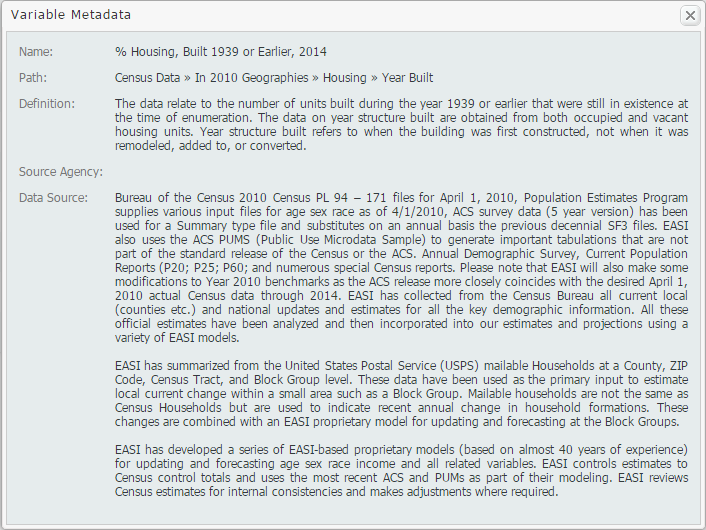
In this week’s exploration of SimplyMap data, we set out to find which cities in the United States have the highest percentage of older houses. To determine this, we used the variable “% Housing, Built 1939 or Earlier”. The metadata for this variable is shown below:
The ranking report allows SimplyMap users to analyze the data by different geographies. For example, if you select the United States as your location, you may rank the data by: USA, States, Congressional Districts, Counties, Cities, ZIP Codes, and Census Tracts.

First, we’ll take a look at the top 10 states. For reference, 12.71% of all of the housing stock in the USA was built before 1939.
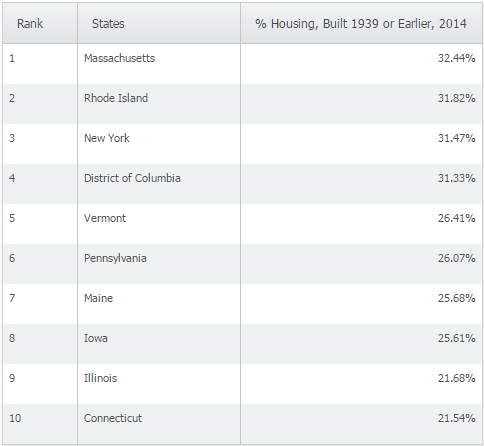
Not surprisingly, the majority of the states with the highest percentage of older homes are located in the northeast. When we switched to cities and applied a population filter > 50,000 we were left with the following cities:
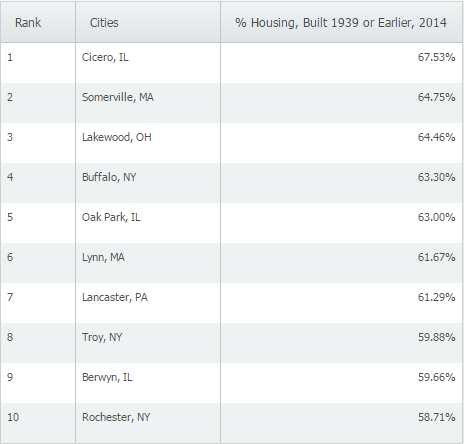
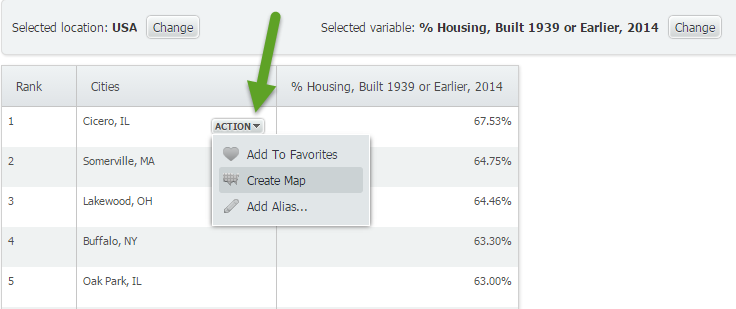
At 67.53% of homes built in 1939 or earlier, Cicero, IL ranks first among cities with populations greater than 50,000 in the United States. We then used the feature to make a map directly from the results page by hovering over Cicero, IL and selecting “Create Map” from the action drop down.
It looks like Cicero, IL is located about 10 miles west from the heart of Chicago.

Want more tips and examples of SimplyMap reports? Follow us on Twitter and like us on Facebook to stay informed!
More from SimplyAnalytics


Posted on Apr 28, 2016 by Admin
In this week’s SimplyMap report we’ll take a look at one of our newer data packages offered, P$YCLE® by Nielsen. P$YCLE® is a segmentation system that evaluates consumers using key demogr...
Posted on Mar 13, 2023 by Admin
Hello readers! Today, we’re excited to officially introduce the Location Query Report in SimplyAnalytics. The Location Query Report is a powerful feature in SimplyAnalytics that allows us...
Posted on Oct 26, 2018 by Admin
Welcome readers! This week we’ll take a look at how to browse for data by category in SimplyAnalytics. Browsing by Category is the default way of browsing for data in SimplyAnalytics. It ...
Posted on Jul 30, 2018 by Admin
Hello readers! Welcome to this week’s blog. This week we will feature the Related Data Table view and how you can use it to maximize your productivity in SimplyAnalytics. What is it? The ...
Posted on Nov 20, 2015 by Admin
In a previous blog we demonstrated the power of utilizing multiple years for the same variable. We found that the usage of Amazon.com had grown substationally from 2008-2014. In this week...
Posted on Apr 14, 2016 by Admin
This week’s SimplyMap report will provide an overview of one of the more advanced functionalities in SimplyMap - applying multiple filter conditions. Filters can be applied to any map or ...
Posted on Feb 05, 2015 by Admin
In this week’s edition of exploring SimplyMap data, we take a look at America’s coffee drinkers. SimplyMap contains more than 100 coffee related variables, including consumer spending on ...
Posted on May 26, 2016 by Admin
In this week’s report exploring SimplyMap data, we take a look at the variables available relative to internet search engines used. The source of this data will come from the SimmonsLOCAL...
Posted on Dec 02, 2014 by Admin
Today we take a look at one of the more advanced features in SimplyMap - editing the map legend. Editing the map legend is a great way to not only customize how the data is distributed on...
Posted on Sep 28, 2018 by Admin
Welcome readers! Today we have a quick feature highlight that will assist you in browsing and searching for data variables. All data variables have a path where they reside within their d...