 Go up
Go up


SimplyMap 3.0 Tip - Using the Data Filter
Posted on Oct 24, 2014 by Admin
At times it can be useful to apply filters to the data in SimplyMap as a means of focusing on specific characteristics, or preforming a query. For example, a map showing household income levels by ZIP Code could be filtered to only show ZIP Codes with income over a specific threshold.
Filters can be applied to any map or report. When a filter is applied to a report, the locations that do not meet the filter criteria can be stricken out in the report, or hidden entirely. Let’s look at an example.
If you run a ranking report for counties in the US with the most residents possessing a Bachelor’s degree, you will see the following:
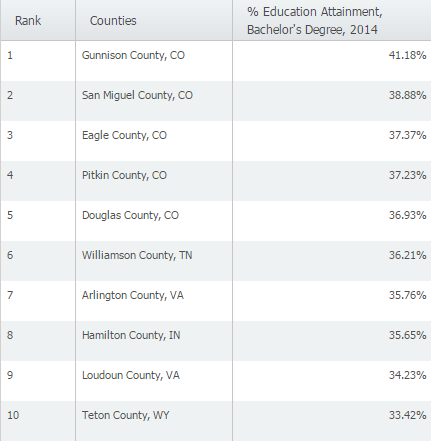
It turns out that the counties with the highest percentages of college graduates are found in lower population counties- Gunnison County, CO for example only has a population of 15,507. In order to analyze this data for larger population counties, we can apply a Data Filter. Here’s how:
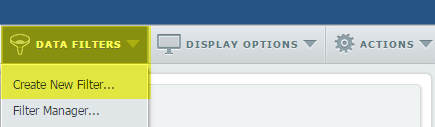
1. From the Data Filters menu near the upper right corner of the window, select Create New Filter.
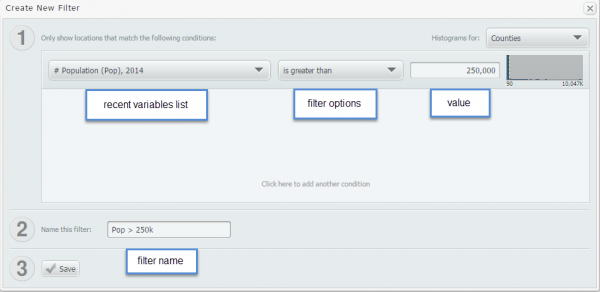
2. The Create New Filter window will pop up. Select a recent variable, filter option, set a value for the filter, and provide a descriptive name.
3. After you select save, you’ll see a list of counties that meet your new criteria.
Below is the new list of counties (> 250,000 population) with the highest % of bachelor’s degrees.
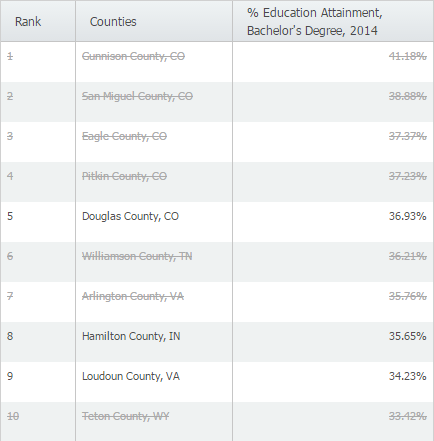
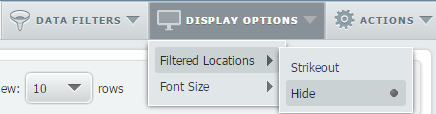
You may see a list of areas listed with a line through the middle to indicate the county has not reached your criteria (shown above). If you’d prefer to not see them at all, the display options menu has an option to hide them altogether.
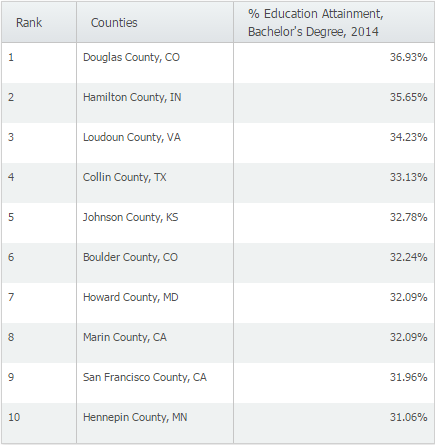
Here is what the results would look like if we hid those counties.
More from SimplyAnalytics


Posted on May 23, 2019 by Admin
Come visit the SimplyAnalytics team at the Special Library Association's Annual Conference in Cleveland. Special librarians and other information professionals come together at SLA’s annu...
Posted on May 31, 2011 by Admin
Kenneth Johnson of the Science, Industry, and Business Library at the New York Public Library recently provided a "boot camp" on the library's market research resources to budding entrep...
Posted on Sep 21, 2009 by Admin
The North Carolina Library Association will hold its annual conference in Greenville, NC at the Greenville Convention Center from October 6-8, 2009. Geographic Research, Inc. will be exhi...
Posted on Nov 11, 2013 by Admin
Chad Boeninger, Business & Economics Subject Specialist at Ohio University Libraries has produced some excellent tutorial videos to help students learn how to analyze data and create ...
Posted on Aug 22, 2009 by Admin
Lynda Kellam, the Data Services & Government Information Librarian at the University of North Carolina, Greensboro has produced some new tutorial videos to help students learn how to ...
Posted on Mar 21, 2018 by Admin
The Quick Report is one of the newest features added to SimplyAnalytics - let’s take a look at how it can support your research. This report instantly provides you with a curated list of ...
Posted on Jul 09, 2009 by Admin
The American Library Association 2009 Annual Conference will take place in Chicago, IL from July 9- July 15, 2009 at McCormick Place West located at 2301 S. Lake Shore Drive Chicago, IL. ...
Posted on Feb 13, 2015 by Admin
In this week’s report exploring SimplyMap data, we want to find out where America’s remote workers reside. To find this, we can tap into the Census data in SimplyMap. The specific variabl...
Posted on Jun 21, 2019 by Admin
Come visit the SimplyAnalytics booth (#3010) at the upcoming ALA 2019 show in Washington, D.C.! Our team will be on hand offering quick demos of SimplyAnalytics, answering questions and s...
Posted on Mar 02, 2018 by Admin
In this week’s blog we’ll take a look at how to enter an address in SimplyAnalytics to find the Census Block Group or Census Tract. Let’s get started! Use Case: You want to analyze the ar...