 Go up
Go up


Introducing Scatter Plots
Posted on May 26, 2020 by Admin
Hello readers! We hope you are doing well, and thank you for your continued support of SimplyAnalytics. We are excited to announce that scatterplots are officially live! Scatter plots are a great way to visualize the relationship between two different data variables, and we know you will enjoy them as much as we do.
Let’s take an in-depth look at this new feature.
What is a scatter plot?
A scatter plot is a graphical representation where the values of two data variables are plotted along the x and y axis. Each dot represents both the x and y values for a single location, such as a ZIP Code or county.
Why use a scatter plot?
Scatter plots enable users to identify correlations between two different variables. Let’s take a look at an example below using SimplyAnalytics where we’ll use the % of Adults (25+) with a college degree and Median Household Income to see if there’s a correlation between the variables for Counties in the USA.
Getting Started
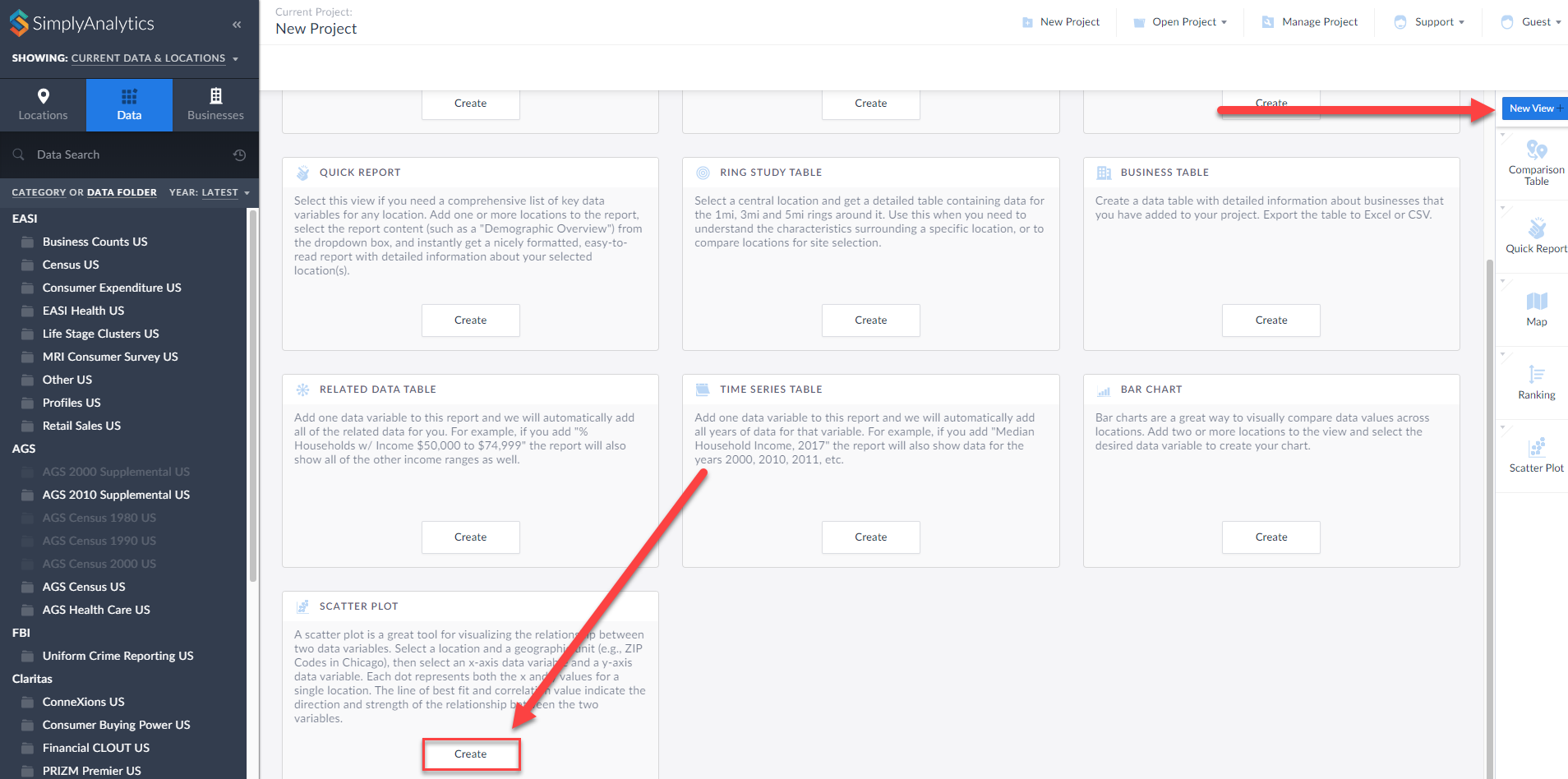
First, click on New View > Create under the Scatter plot option:
The Edit View page displays your data variables and locations in the project.
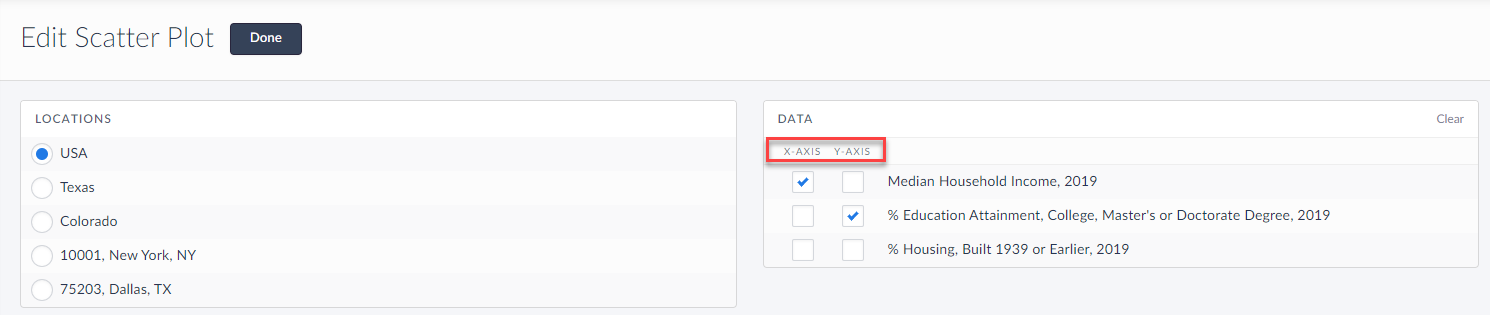
Here you can choose which data variables to display along which axis. Of course, this can be edited directly on the scatter plot as well, but for now, select Done to generate the scatter plot.
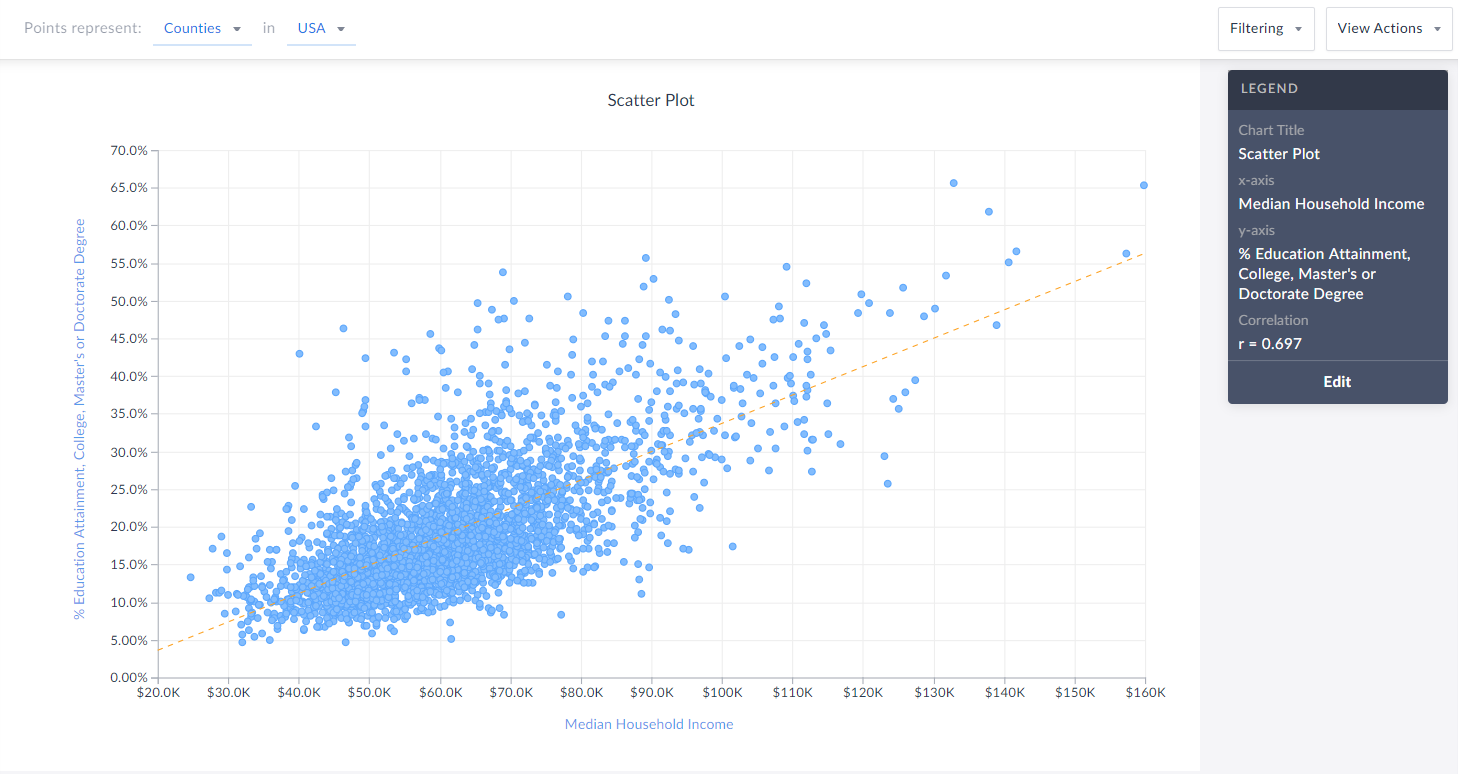
Voila! Your first scatter plot is created. Now, what exactly is this showing?
The top of the view explains what each point represents - in this example, Counties in the USA. The legend towards the right also displays helpful information.
TIP: You can click on any point to display the name and underlying data.
Interpreting Your Scatter Plot
Looking at this scatter plot, there is a strong positive correlation between median household income and the % of adults who have a college degree within CDs in the USA.
The legend has a section heading titled Correlation that contains an “r” value. What does the r-value mean? In short, that’s displaying Pearson’s R - this is a correlation coefficient that’s used in linear regression. The “r” value will always be on a scale from -1 to +1, and you can use these values to understand the relationship between the variables.
A generalization of the scales and how to think of them is:
Positive Direction - The points looks like they are going uphill
1 - perfect correlation
0.75 to 1 - very strong correlation
0.5 to 0.75 - moderate correlation
0.25 - 0.5 - weak correlation
Less than 0.25 - none/no correlation
Negative Direction - The points looks like they are going downhill
-1 - perfect correlation
-0.75 to -1 - very strong correlation
-0.5 to -0.75 - moderate correlation
-0.25 to -0.5 - weak correlation
Less than -0.25 - none/no correlation
The scatter plot above has an r value of 0.697. This means there is a moderate, positive correlation. Does a negative direction/value mean anything bad or wrong? Nope! It just means as the x axis increases, the y axis decreases - nothing negative or incorrect.
Editing Your Scatter Plot
Renaming
You can rename your scatter plot by either clicking on the heading at the top of the graphic, or by selecting Edit on the legend and renaming there.
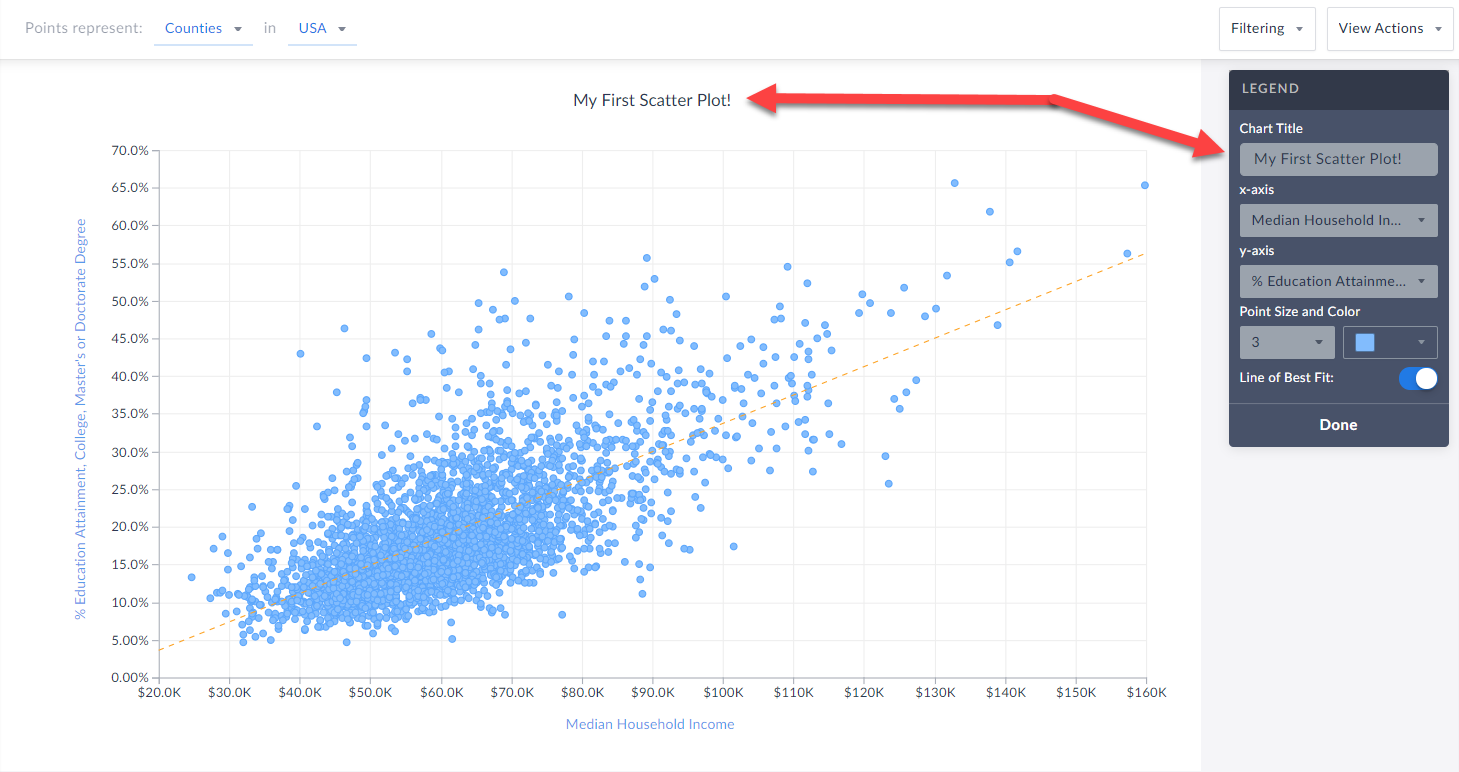 Changing Variables
You are welcome to select either axis in the legend, and change the variable(s) you want to analyze.
Changing Point Size and Color
Feel free to edit these options within the Edit Legend page to change the appearance of your graphic.
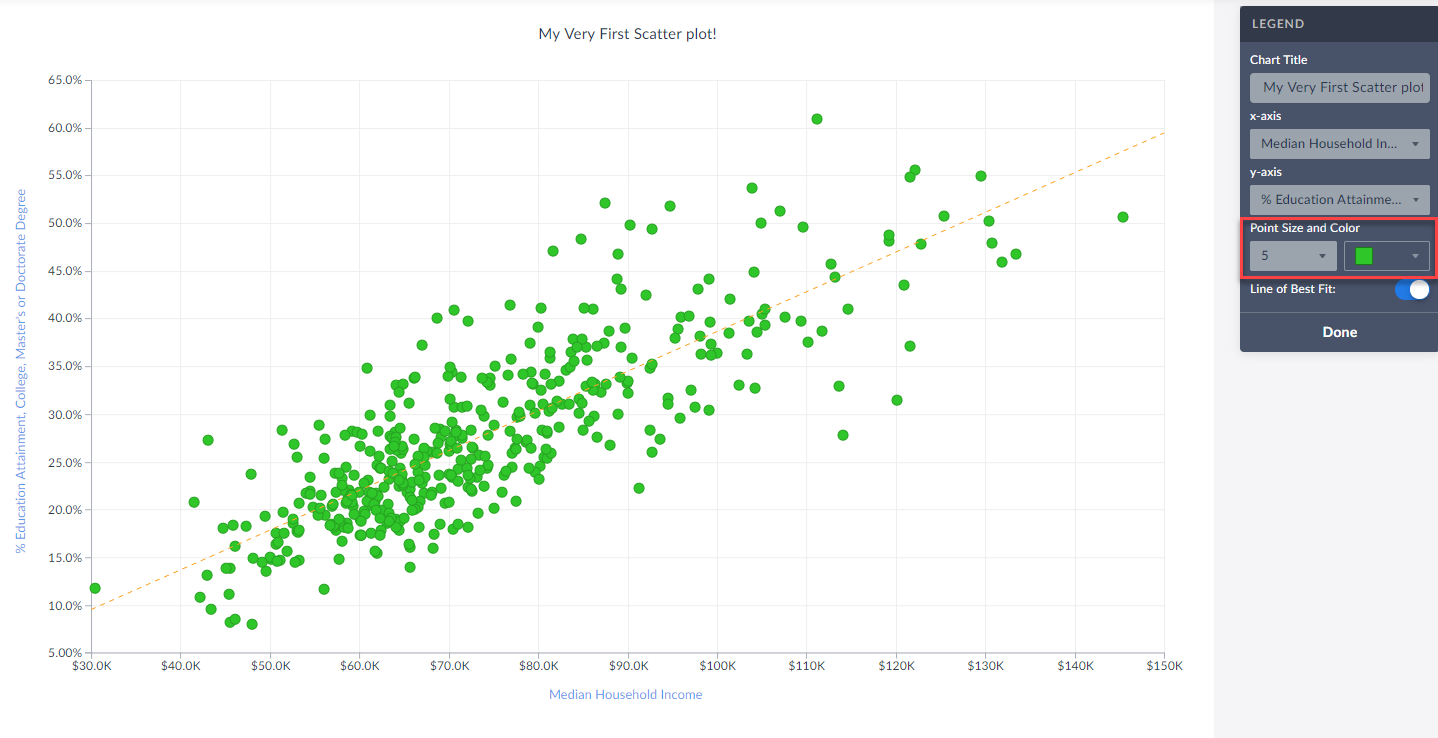
Toggle Off/On the Line of Best Fit
Use this button to toggle between whether or not the line of best fit is present. What is the line of best fit? In short, it is a straight line that best represents the data on a scatter plot.
Advanced
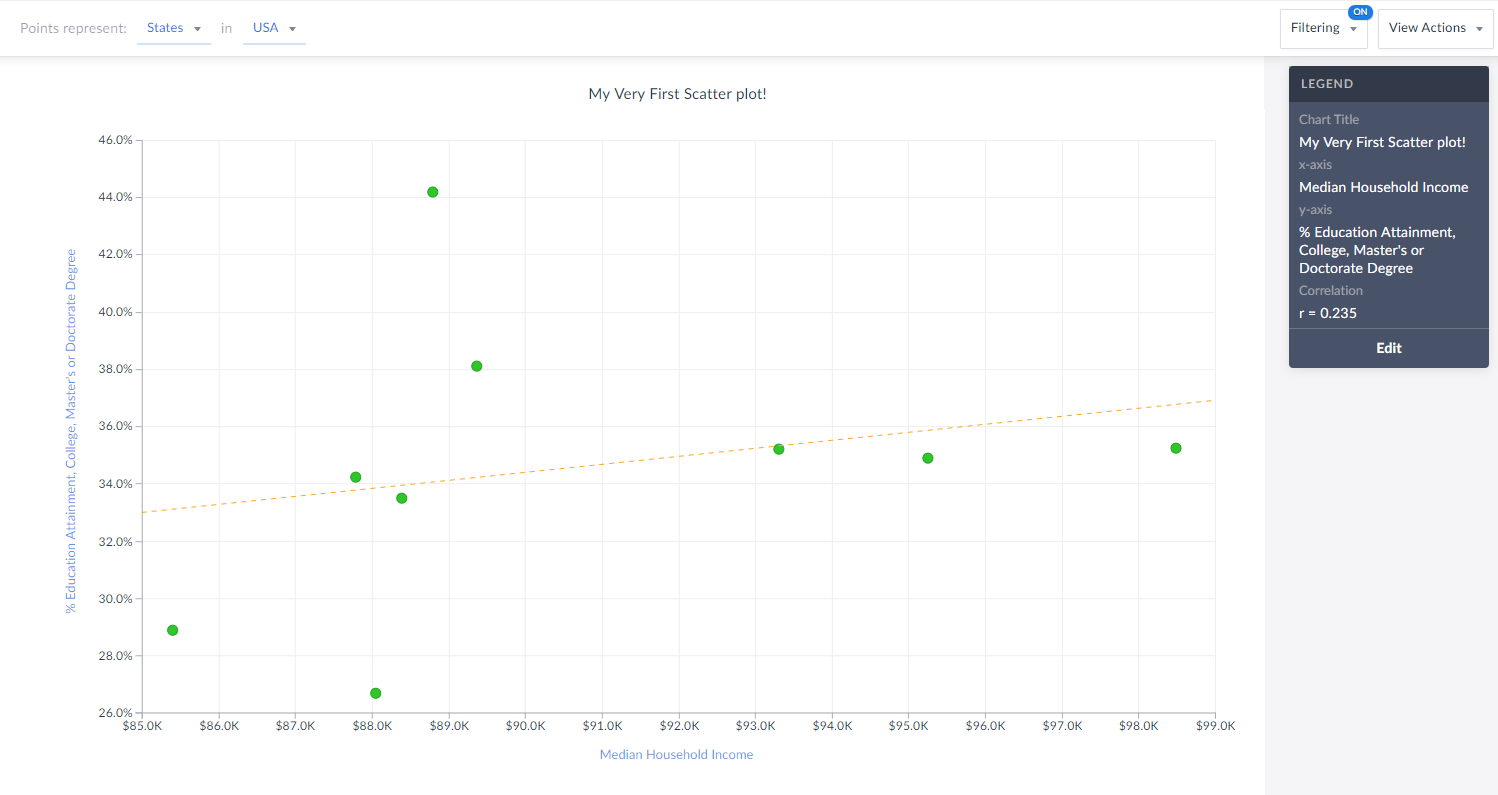
Lastly, you are welcome to create and apply a data filter onto your scatter plot. This will remove any points that do not meet your filter conditions. The image below would normally display all States in the USA, however, there is a median hh income filter applied (inc > $85,000) so you are left with only 9 states (dots) in the chart that meet this criteria.
Also notice how the x-axis has moved to reflect our criteria.
That’s all for today! We’re excited to see some of the interesting scatter plots you can come up with!
Stay safe everyone, and as always, you can access SimplyAnalytics remotely, so please let us know if you are running into any issues with remote access - we are here to help and always available for webinar training sessions.
More from SimplyAnalytics


Posted on Mar 03, 2016 by Admin
In this week’s SimplyMap report we take a look into the SimmonsLOCAL dataset to determine which cities in America have the highest percentage of residents who consume organic food product...
Posted on Oct 22, 2008 by Admin
Excerpt from University of Iowa Library blog: In your marketing class, you may be developing a marketing plan for a pre-made meals restaurant specializing in vegetarian menus in Chicagola...
Posted on Sep 28, 2018 by Admin
Welcome readers! Today we have a quick feature highlight that will assist you in browsing and searching for data variables. All data variables have a path where they reside within their d...
Posted on May 23, 2012 by Admin
We will be exhibiting at the Special Libraries Association (SLA) annual conference and Info-Expo at McCormick Place in Chicago Sunday June 15th - Tuesday July 17th. Visit us at Booth 124 ...
Posted on May 10, 2016 by Admin
One benefit of data and applications like SimplyMap is the ability to visualize information. In this week’s report, we’ll take a quick look at some branding preferences in contiguous Amer...
Posted on Feb 26, 2014 by Admin
The Statewide California Electronic Library Consortium is holding another packed week of workshops and networking during the SCELCapalooza event in March 2014. Geographic Research will b...
Posted on Apr 10, 2015 by Admin
In this week’s SimplyMap report, we explore one of the newer datasets available: Retail Market Power®. What is it? In short, the Retail Market Power® dataset helps users identify opportun...
Posted on Dec 12, 2011 by Admin
Men's Health magazine has published a ranked list to help readers find the cities where Americans are the saddest and where they are living with big smiles on their faces. As they note, "...
Posted on Aug 15, 2013 by Admin
Anyone who has traveled to Seattle hoping for a sunny day could fairly estimate that it is one of the rainiest states with the highest level of precipitation each year. SimmonsLOCAL varia...
Posted on Dec 19, 2016 by Admin
Stop by the Geographic Research booth [#T8] at the Ontario Library Association Super Conference to get a hands-on look at our latest and greatest SimplyMap offering. The conference will t...