 Go up
Go up


Introducing Histograms to SimplyAnalytics
Posted on Sep 14, 2021 by Admin
Welcome readers! Today we are excited to welcome histograms to SimplyAnalytics. We hope you enjoy this wonderful new visualization as much as we do. Let’s take a look.
What is a histogram?
In short, a histogram is similar to a bar chart, but instead groups values into ranges (referred to as “bins”). The height of each bar displays how many values fall within that bin.
Example
Let’s take a look at an easy to read example. The histogram view can be found under New View > Histogram in the program. The example below is showing the % of adults (pop 25+) with a bachelor’s degree or higher in States in the USA.
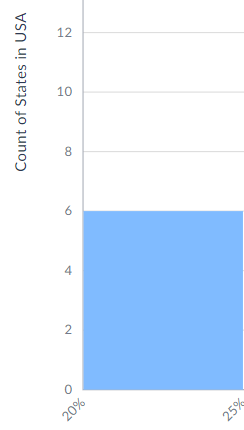
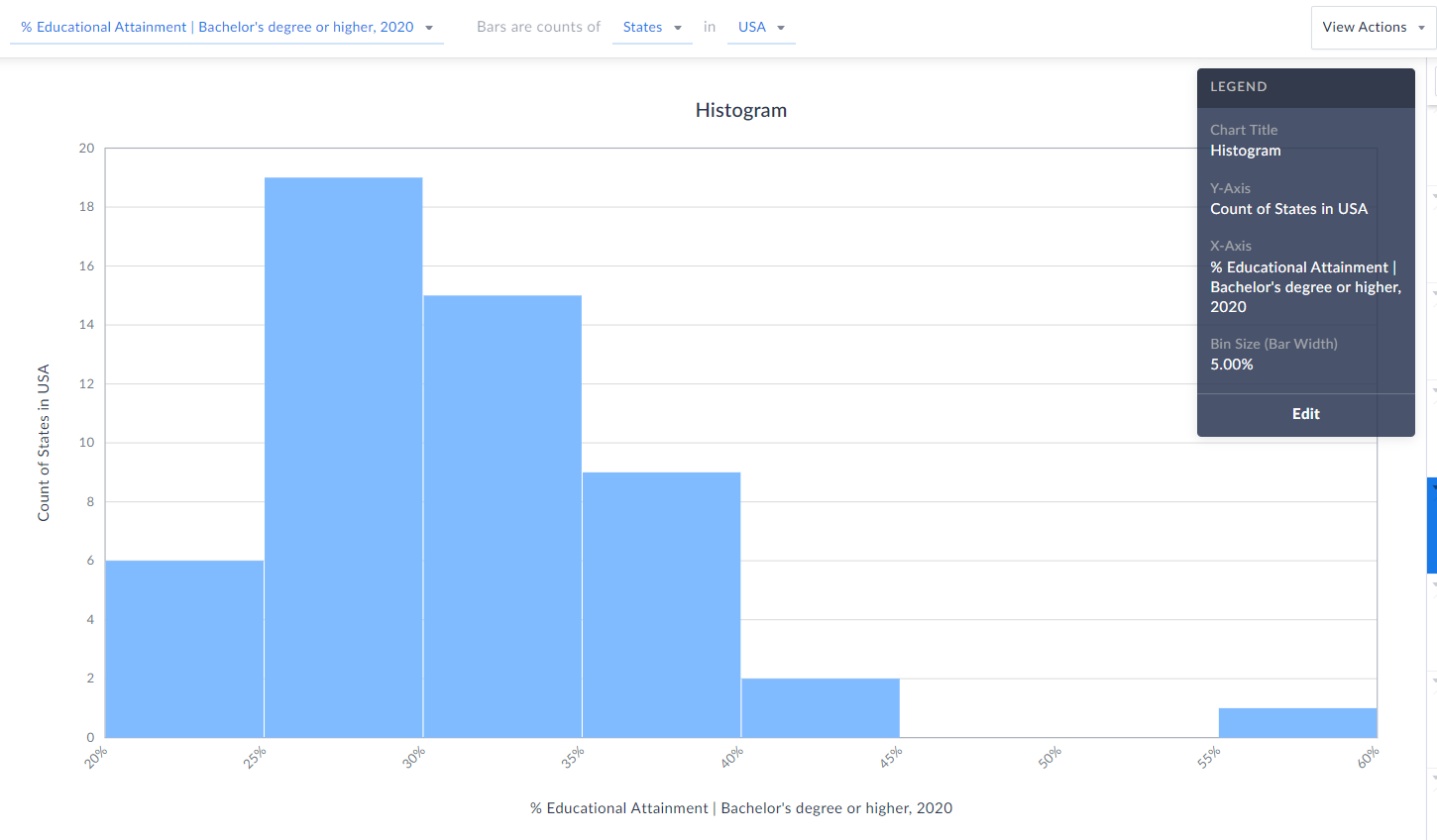 Each bin size, or bar width along the X axis represents a 5% range - so, 20-25%, 25-30%, etc. (zoomed in below)
 The height of each bin represents how many states fall within that bin/range. The example here means that 6 states in the USA have between 20-25% of the adult population who have a bachelor’s degree or higher.
 TIP: Reference the legend on your screen to help interpret the visualization.
Notice towards the far-right of our histogram there does seem to be a potential outlier in the data - there is 1 state where 55-60% of the population 25 and above have at least a bachelor’s degree! Can you guess what state that is?
Answer/Bonus Tip: Towards the top-right of your histogram, click on View Actions > Create Data Table.
TIP: Reference the legend on your screen to help interpret the visualization.
Notice towards the far-right of our histogram there does seem to be a potential outlier in the data - there is 1 state where 55-60% of the population 25 and above have at least a bachelor’s degree! Can you guess what state that is?
Answer/Bonus Tip: Towards the top-right of your histogram, click on View Actions > Create Data Table.
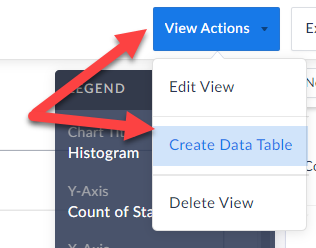 This will generate a Ranking Report for you, and you can quickly sort to find out the answer here…...drum roll…...it’s the District of Columbia, with a value of 57.15% - the lone state within that bin mentioned above.
Last Note: You can edit the color of the bars, title and bin sizes of your histogram by clicking Edit on the Legend.
This will generate a Ranking Report for you, and you can quickly sort to find out the answer here…...drum roll…...it’s the District of Columbia, with a value of 57.15% - the lone state within that bin mentioned above.
Last Note: You can edit the color of the bars, title and bin sizes of your histogram by clicking Edit on the Legend. 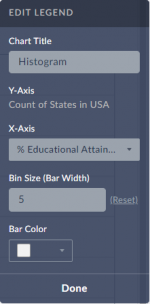 Feel free to make any changes here, and your histogram will automatically be updated.
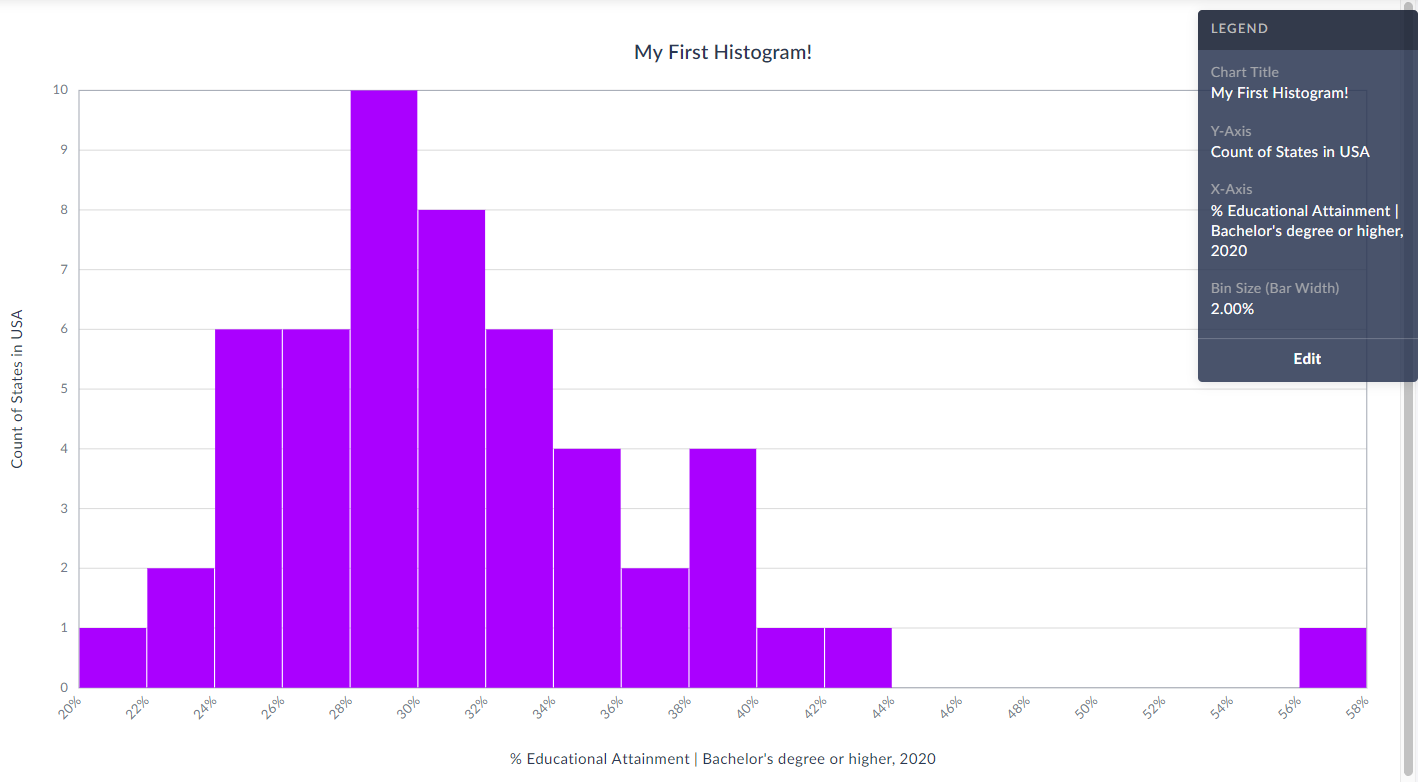
Check out our final histogram below with new colored bins, bin sizes set to 2% instead of 5%, and title.
As always, you are welcome to export your work by clicking on the Export button towards the top-right of the screen.
Feel free to make any changes here, and your histogram will automatically be updated.
Check out our final histogram below with new colored bins, bin sizes set to 2% instead of 5%, and title.
As always, you are welcome to export your work by clicking on the Export button towards the top-right of the screen.
 We hope you enjoy this new visualization! Feel free to contact us at anytime by emailing support@simplyanalytics.com
Each bin size, or bar width along the X axis represents a 5% range - so, 20-25%, 25-30%, etc. (zoomed in below)
 The height of each bin represents how many states fall within that bin/range. The example here means that 6 states in the USA have between 20-25% of the adult population who have a bachelor’s degree or higher.
TIP: Reference the legend on your screen to help interpret the visualization.
Notice towards the far-right of our histogram there does seem to be a potential outlier in the data - there is 1 state where 55-60% of the population 25 and above have at least a bachelor’s degree! Can you guess what state that is?
Answer/Bonus Tip: Towards the top-right of your histogram, click on View Actions > Create Data Table.
This will generate a Ranking Report for you, and you can quickly sort to find out the answer here…...drum roll…...it’s the District of Columbia, with a value of 57.15% - the lone state within that bin mentioned above.
Last Note: You can edit the color of the bars, title and bin sizes of your histogram by clicking Edit on the Legend. Feel free to make any changes here, and your histogram will automatically be updated.
Check out our final histogram below with new colored bins, bin sizes set to 2% instead of 5%, and title.
As always, you are welcome to export your work by clicking on the Export button towards the top-right of the screen.
We hope you enjoy this new visualization! Feel free to contact us at anytime by emailing support@simplyanalytics.com
The height of each bin represents how many states fall within that bin/range. The example here means that 6 states in the USA have between 20-25% of the adult population who have a bachelor’s degree or higher.
TIP: Reference the legend on your screen to help interpret the visualization.
Notice towards the far-right of our histogram there does seem to be a potential outlier in the data - there is 1 state where 55-60% of the population 25 and above have at least a bachelor’s degree! Can you guess what state that is?
Answer/Bonus Tip: Towards the top-right of your histogram, click on View Actions > Create Data Table.
This will generate a Ranking Report for you, and you can quickly sort to find out the answer here…...drum roll…...it’s the District of Columbia, with a value of 57.15% - the lone state within that bin mentioned above.
Last Note: You can edit the color of the bars, title and bin sizes of your histogram by clicking Edit on the Legend. Feel free to make any changes here, and your histogram will automatically be updated.
Check out our final histogram below with new colored bins, bin sizes set to 2% instead of 5%, and title.
As always, you are welcome to export your work by clicking on the Export button towards the top-right of the screen.
We hope you enjoy this new visualization! Feel free to contact us at anytime by emailing support@simplyanalytics.com
More from SimplyAnalytics


Posted on Feb 27, 2009 by Admin
Geographic Research, Inc. is pleased to participate in the Statewide California Electronic Library Consortium's (SCELC) 12th Annual Vendor Day. SCELC members and librarians from other aca...
Posted on Mar 30, 2016 by Admin
In previous blog entries we highlighted the usefulness of viewing multiple years of data for the same variable. In short, analyzing the same variable across multiple years allows users to...
Posted on Aug 13, 2015 by Admin
In this quick SimplyMap report, we use Census data to help us identify which city in the United States has the highest percentage of residents who reported walking to work as their mode o...
Posted on Jun 25, 2015 by Admin
In this week’s SimplyMap report, we review the different options available when searching for a business. The easiest and fastest method of mapping businesses or creating a business repor...
Posted on Feb 20, 2018 by Admin
We are looking forward to attending the annual SCELC (Statewide California Electronic Library Consortium) Vendor day, at Loyola Marymount University in Los Angeles on March 8th. In additi...
Posted on Apr 23, 2018 by Admin
Hello everyone and welcome to this week’s blog. This week we will discuss how to create and utilize filters for your research. Why Use a Filter? Filters are a great way to identify target...
Posted on Jan 17, 2011 by Admin
Come visit the Geographic Research booth at the Ontario Library Association Super Conference this season. The conference will take place on February 2-5, 2011 at the Metro Toronto Convent...
Posted on May 25, 2010 by Admin
The American Library Association 2010 Annual Conference is coming and the GRI team is gearing up for another great event this summer. We will be in Washington, D.C. again this year, June ...
Posted on Aug 22, 2009 by Admin
Lynda Kellam, the Data Services & Government Information Librarian at the University of North Carolina, Greensboro has produced some new tutorial videos to help students learn how to ...
Posted on Apr 14, 2016 by Admin
This week’s SimplyMap report will provide an overview of one of the more advanced functionalities in SimplyMap - applying multiple filter conditions. Filters can be applied to any map or ...