 Go up
Go up


Identifying Top PRIZM Segments
Posted on Feb 27, 2015 by Admin
SimplyMap is an excellent tool for market research, and it’s made even more powerful by Nielsen PRIZM data. Nielsen PRIZM is the highest quality market segment data available. Every household in the United States is assigned to one of 66 segments, and Nielsen provides detailed information about each segment, such as demographic characteristics, shopping habits, financial and technology preferences, media habits, and much more.
PRIZM segments define every U.S. household in terms of 66 demographically and behaviorally distinct types, or "segments," to help marketers discern those consumers’ likes, dislikes, lifestyles and purchase behaviors. Used by thousands of marketers within Fortune 500 companies, PRIZM provides the "common language" for marketing in an increasingly diverse and complex American marketplace.
Let’s start by identifying the largest PRIZM segments in some target locations.
First, create a Standard Report using your target locations. We’ll compare some different ZIP codes within and including the city of Boston, MA. Next, navigate to the PRIZM segments. You will want to select each # segment within that folder. Lastly, close the window to generate your report.
To locate the highest segment within each location, hover over a location and select Sort Descending. SimplyMap will reprocess the report, showing the highest figure at the top for the selected location.
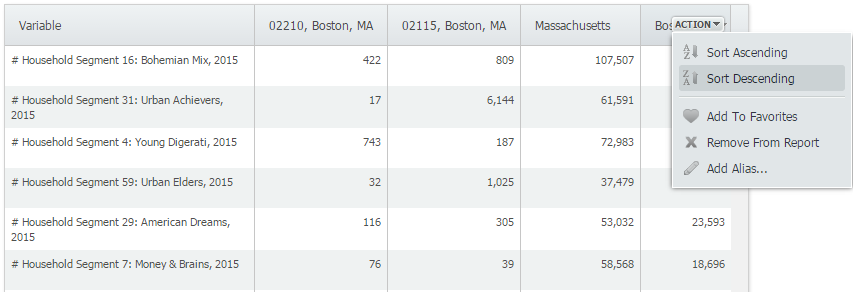 Here are the results for each ZIP code and the city of Boston.
02210: Young Digerati
02115: Urban Achievers
Boston: Bohemian Mix
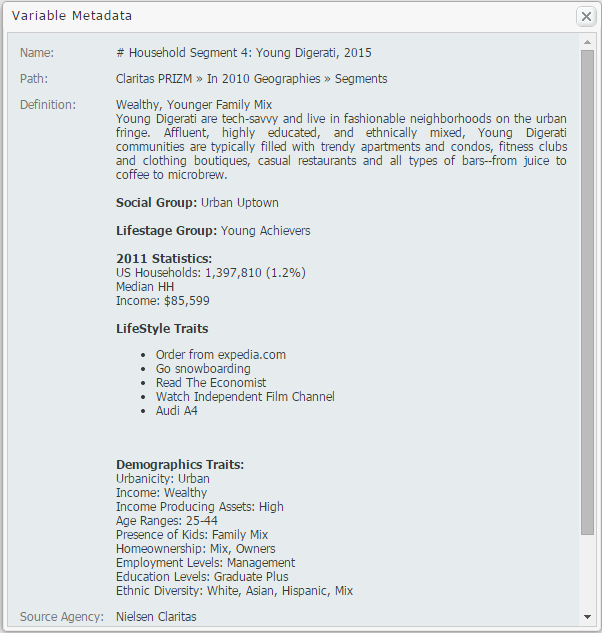
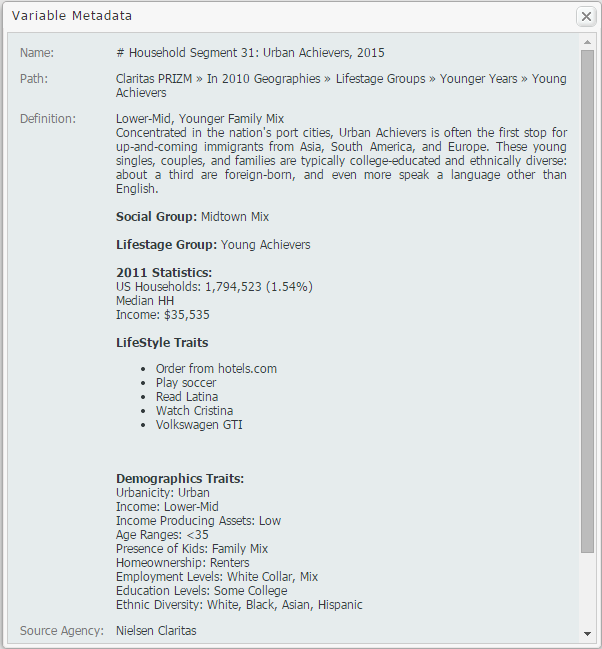
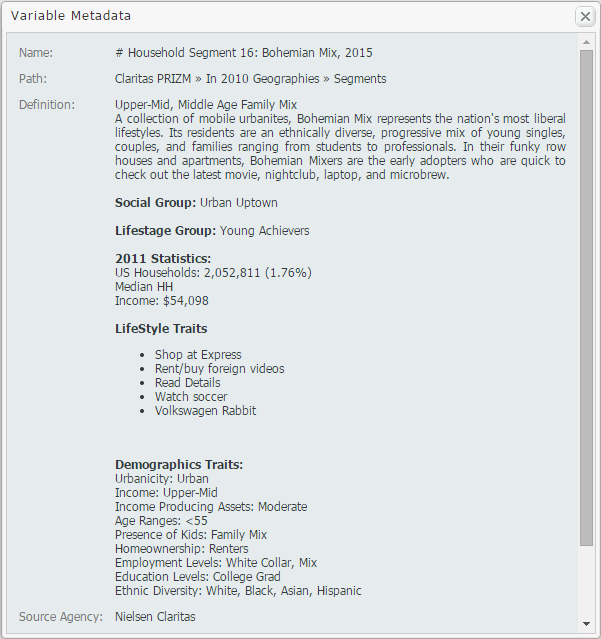
To find out more information about each segment, hover over the segment and select View Metadata. The metadata for each segment above is presented below:
ZIP Code 02210: Young Digerati
ZIP Code 02115: Urban Achievers
Boston, MA: Bohemian Mix Metadata
We hope you enjoyed this week’s blog. Stay tuned for more reports and SimplyMap tips! If you haven’t already, don’t forget to follow us on Twitter and Like Us on Facebook to get yourself entered into our Winter Sweepstakes!
More from SimplyAnalytics


Posted on Apr 30, 2008 by Admin
Doreen Harwood, Business Librarian from the University of Washington has developed a series of detailed tutorials on using SimplyMap. The tutorials, which are Flash-based and interactive,...
Posted on Nov 11, 2014 by Admin
With Veteran’s Day in the US this week, we thought it would be an ideal time to explore some of the variables in SimplyMap that pertain to veterans. Specifically, we wanted to know which ...
Posted on Jun 01, 2014 by Admin
Visit the SimplyMap team at the ALA Annual Conference and Exposition in Las Vegas later this month. We will be at booth 1271, offering product demonstrations, tips & tricks, and of co...
Posted on Apr 17, 2009 by Admin
The Special Libraries Association will hold its Annual Conference in Washington, DC at the Washington Walter E. Washington Convention Center from June 14-17 2009. The conference will crea...
Posted on Dec 15, 2014 by Admin
Custom Locations allow SimplyMap users to combine several locations into one larger region. For example, you can use this feature to combine three adjacent ZIP Codes to create your study ...
Posted on Feb 16, 2009 by Admin
Men's Health conducted their first survey of America's recycling habits, and used SimplyMap in their research. Here’s how the editors explain their methodology: To determine how well citi...
Posted on Aug 22, 2009 by Admin
Lynda Kellam, the Data Services & Government Information Librarian at the University of North Carolina, Greensboro has produced some new tutorial videos to help students learn how to ...
Posted on Jan 15, 2013 by Admin
The GRI team is looking forward to exhibiting at ACRL 2013 at the Indiana Convention Center in Indianapolis April 10 - 12, 2013. Every other year, ACRL offers its premier professional dev...
Posted on Nov 11, 2013 by Admin
Chad Boeninger, Business & Economics Subject Specialist at Ohio University Libraries has produced some excellent tutorial videos to help students learn how to analyze data and create ...
Posted on Dec 02, 2014 by Admin
Today we take a look at one of the more advanced features in SimplyMap - editing the map legend. Editing the map legend is a great way to not only customize how the data is distributed on...