 Go up
Go up


SimplyMap Tip: Exporting Maps
Posted on May 15, 2015 by Admin
In this week’s SimplyMap report, we want to share with you the many options available when exporting maps in SimplyMap. In SimplyMap, when a user selects Export Map Image from the Actions bar, you will be presented with a 3 step export process. This report will cover all options available from each step. Let’s get started!
Step 1 - CROPPING
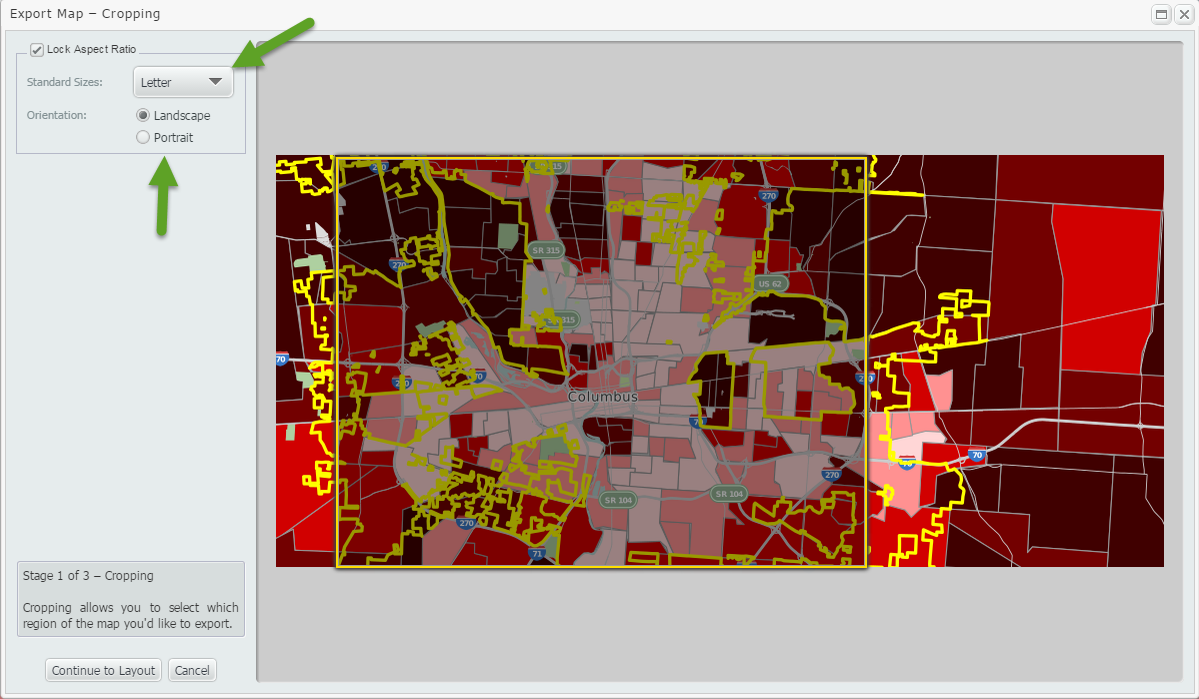
The arrows in the image below refer to the Standard Size and Orientation of your cropping square. Changing either of these options will alter the cropping square to your selection.
Options available for Standard Size: Letter, Legal, Tabloid
Orientation: Portrait or Landscape
If you prefer instead to customize the size and shape of your cropping area, you may do so by clicking and dragging along an edge or corner of the box until the area meets your desired specifications. Example shown below:
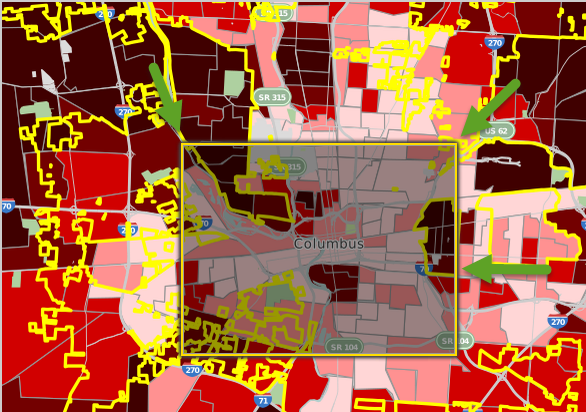
With the cropping area to your choosing, advance to the next step of the export process by selecting “Continue to Layout” from the bottom left side of the cropping menu.
Step 2 - LAYOUT
This step allows users a myriad of customization options. Let’s take a look at these.
Adding a Label - Located towards the top of the menu is a button to “Add Text Label”. Once selected, you may enter a title and change the color or font size of your labels. Feel free to add additional labels as needed.
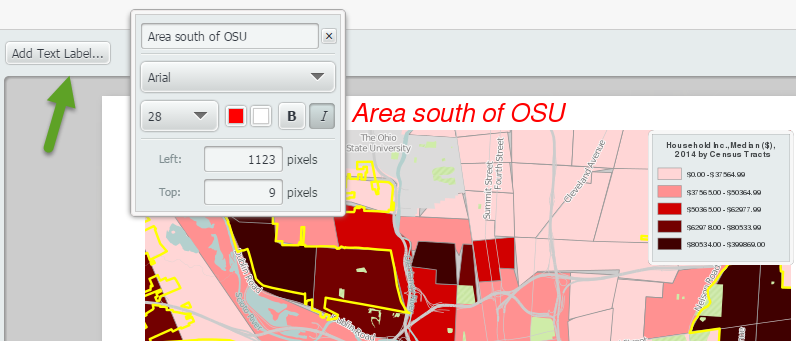
Tip: You can also move the location of the label itself to anywhere in or around your map.
Adding an Inset Map and North Arrow - The bottom left side of the menu will present checkboxes to add an inset map or north arrow. Selecting one or both will add them to your map.
Picture of Inset Map:
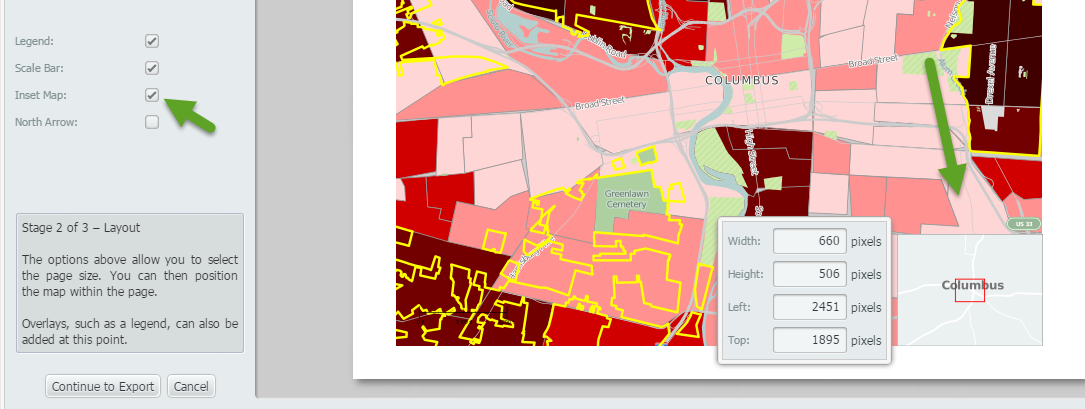
Tip: You may resize or relocate your inset map as needed by selecting the map and moving it to a new location and editing the width, height, left, and top values.
Picture of North Arrow:
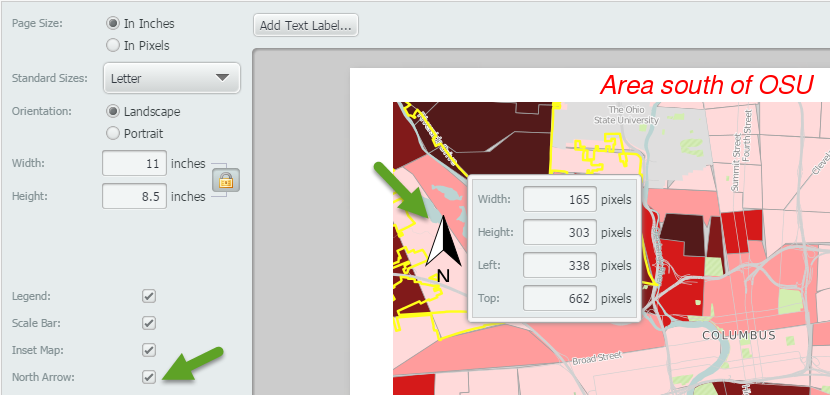
Tip: Similar to the inset map and labels, you may relocate and resize your arrow.
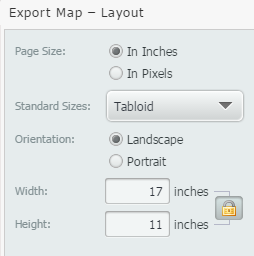
Adjusting Page Size, and Orientation: The page size, and orientation options will allow you to tailor the final layout presentation of your image. For custom sizes, there is an option to edit the width and height values as shown below:
Step 3 - Export your Map
The final step in the exporting process is to choose your file format and method of delivery.
Available file formats: PNG, JPEG, SVG and PDF
Delivery options: Email or direct download
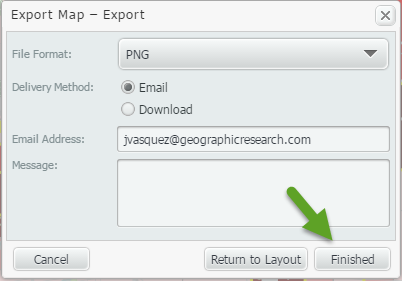
Click “Finished” to export your map!
We hope you enjoyed this SimplyMap feature showcase - let us know if there’s anything in particular you would like to see explained!
More from SimplyAnalytics


Posted on Jun 09, 2016 by Admin
In this week’s blog, we’ll be featuring our newest data offering, PRIZM® Premier. If your institution currently subscribes to PRIZM data, this new module is available at no additional cos...
Posted on May 23, 2019 by Admin
Come visit the SimplyAnalytics team at the Special Library Association's Annual Conference in Cleveland. Special librarians and other information professionals come together at SLA’s annu...
Posted on Dec 03, 2012 by Admin
Come visit the Geographic Research booth at the Ontario Library Association Super Conference this season. The conference will take place on January 30 - February 2, 2013 at the Metro Toro...
Posted on Aug 15, 2013 by Admin
Anyone who has traveled to Seattle hoping for a sunny day could fairly estimate that it is one of the rainiest states with the highest level of precipitation each year. SimmonsLOCAL varia...
Posted on Sep 27, 2019 by Admin
Hello readers! This week we provide an in-depth response to a question asking about the legend classification methods in SimplyAnalytics. This response is now part of our Help Center: htt...
Posted on May 23, 2012 by Admin
We will be exhibiting at the Special Libraries Association (SLA) annual conference and Info-Expo at McCormick Place in Chicago Sunday June 15th - Tuesday July 17th. Visit us at Booth 124 ...
Posted on May 06, 2013 by Admin
The GRI team is looking forward to exhibiting at SLA 2013 at the San Diego Convention Center, June 9th through the 11th. The Special Libraries Association (SLA) is a nonprofit global orga...
Posted on Oct 08, 2008 by Admin
Geographic Research, Inc. (GRI) is pleased to sponsor the fourth annual American Collegiate Retailing Association’s Undergraduate Student Retail Analysis Competition. This is the second ...
Posted on Nov 11, 2015 by Admin
Inspired by a recent help desk ticket, we wanted to discuss how users may utilize SimplyMap to identify relationships between unique variables. For example, does having a college degree s...
Posted on Apr 14, 2016 by Admin
This week’s SimplyMap report will provide an overview of one of the more advanced functionalities in SimplyMap - applying multiple filter conditions. Filters can be applied to any map or ...