 Go up
Go up


From the Help Desk - Legend Classification Methods
Posted on Sep 27, 2019 by Admin
Hello readers! This week we provide an in-depth response to a question asking about the legend classification methods in SimplyAnalytics. This response is now part of our Help Center: https://simplyanalytics.zendesk.com/hc/en-us
Question: Can you explain the legend classification methods?
The classification method controls how the data in your map is grouped. Areas on the map are assigned to groups using different classification methods. The colors you see on the map depend on which class is assigned to each area.
There are multiple methods for calculating break points for the data. You can select any of the following from the Classification Method menu:
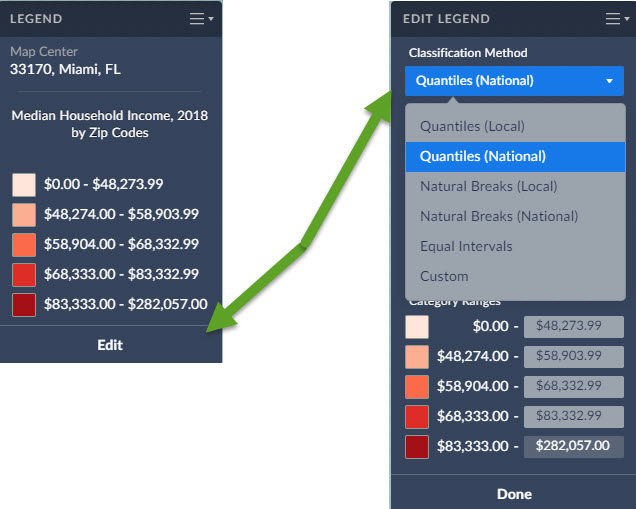
- Quantiles (Local)
- Quantiles (National)
- Natural Breaks (Local)
- Natural Breaks (National)
- Equal Intervals
- Custom
Quantiles (National): This is the default method used to classify each area on the map, and works for most situations. Breakpoints are calculated so that each category contains about the same number of features. "National" uses a sample of locations from throughout the USA to calculate the breakpoints.
Example: If there are 35,000 ZIP Codes nationally and you have 5 categories the legend is calculated so there are theoretically 7,000 ZIPs in each category.
Quantile classes are easiest to understand, but they can be misleading if the data being mapped is not distributed normally. For example, population counts are usually not suitable for quantile classification because only a few places are highly populated. Use population density or percentages for more meaningful maps.
Quantiles (Local): Breakpoints are calculated so that each category contains about the same number of features. "Local" uses a sample of locations from your current view to calculate the breakpoints. This method usually ensures the map will show more colors. For example, if there are 50 ZIP codes visible on your map, and you choose to display them in five classes, the map will show 10 ZIP codes per color.
Natural Breaks (National): Breakpoints are calculated using a statistical formula that finds groupings and patterns in the data. "National" uses a sample of locations from throughout the USA to calculate the breakpoints.
Natural Breaks (Local): Breakpoints are calculated using a statistical formula that finds groupings and patterns in the data. "Local" uses a sample of locations from your current view to calculate the breakpoints.
Equal Intervals: This method uses equal-size intervals for each class and color on the map. Breakpoints are calculated so that each category has the same range. This method doesn't care if all areas on the map end up sharing the same color.
Example: if the lowest value nationwide is 1 and the highest value is 100 for that specific geography the legend will have 5 equal categories 1 to 20, 21 - 40, 41 - 60, 61 to 80 and 81 to 100
Custom: The user selects their own breakpoints by typing in their own values.To set your own custom breakpoints, you can click in each value’s cell and enter a value of your choice. You can also click the colors to customize how the map looks.
More information on data classification/reference:
https://gisgeography.com/choropleth-maps-data-classification/
More from SimplyAnalytics


Posted on Dec 09, 2014 by Admin
In this week’s SimplyMap blog post, we set out to discover which large US cities spend the most money per year on their pets. To find this out we used the variable, “Pets, Household Avera...
Posted on Jan 10, 2024 by Admin
We are delighted to announce our sponsorship of the Midwest Entrepreneurship Case Competition! At SimplyAnalytics, we understand the power of data-driven decision-making in entrepreneursh...
Posted on Feb 02, 2024 by Admin
We are excited to be back exhibiting at PLA this April in Columbus, OH. Join us at Booth #2631 to discover how SimplyAnalytics can help libraries understand their service area, assist sma...
Posted on Jun 01, 2014 by Admin
Visit the SimplyMap team at the ALA Annual Conference and Exposition in Las Vegas later this month. We will be at booth 1271, offering product demonstrations, tips & tricks, and of co...
Posted on Nov 06, 2014 by Admin
With over 75,000 variables in SimplyMap, you can find virtually any information you want. This week, we take a look at which U.S. locations spend the most money eating at restaurants or c...
Posted on Aug 20, 2015 by Admin
Is there a specific age group and income bracket you are specifically interested in researching for a target location? Our Life Stages module has the information you need. Life Stages, by...
Posted on Sep 03, 2015 by Admin
This week we explore the SimmonsLOCAL data package to find which cities in America have the highest percentage of residents enrolled in a frequent flyer program. SimmonsLOCAL is available...
Posted on Nov 23, 2012 by Admin
Men's Health magazine is charting vanity in US cities, with help from SimplyMap. What did they find? The Sunshine State, with a long history of going to great lengths to look good, tops t...
Posted on Jan 05, 2018 by Admin
The SimplyAnalytics team is looking forward to exhibiting at the Ontario Library Association Super Conference 2018! Stop by the SimplyAnalytcs booth (115T) and take a look at our newest o...
Posted on Oct 07, 2013 by Admin
Do you know the quickest way to find the name of a Block Group, Census Tract or ZIP code in our upcoming release for 3.0? The i-Tool gives you the ability to click anywhere on a map to g...