 Go up
Go up


SimplyMap Tip: Creating a Custom Location
Posted on Dec 15, 2014 by Admin
Custom Locations allow SimplyMap users to combine several locations into one larger region. For example, you can use this feature to combine three adjacent ZIP Codes to create your study area.
In this example, we will take a look at neighborhoods (at the block group level) surrounding a university in Chicago.
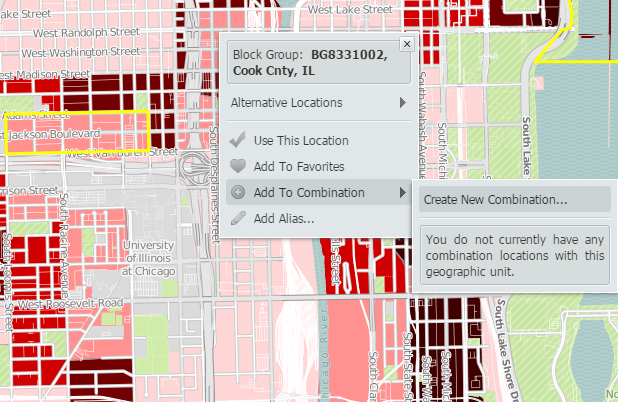
To get started creating your custom location from the map, use the i-tool and select a location. There will be a drop down to “Add to Combination” with an option to “Create New Combination”.
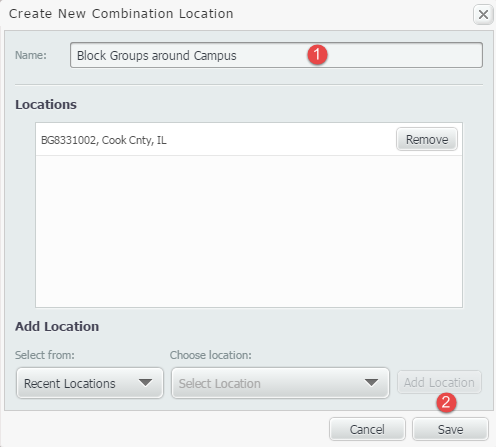
This will open up a box to create your combination. Enter a name, and Save.
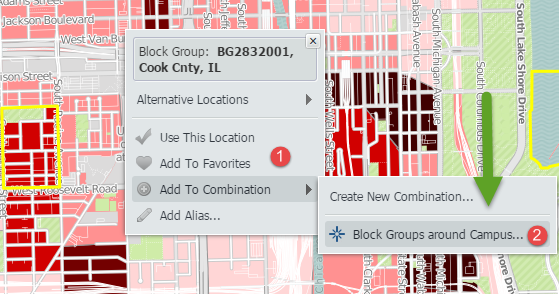
Once saved, your combination location will be available to have additional locations added to it. To add more locations, use the i-tool over a location once more, and select “Add to Combination” while choosing the combination that was just created.
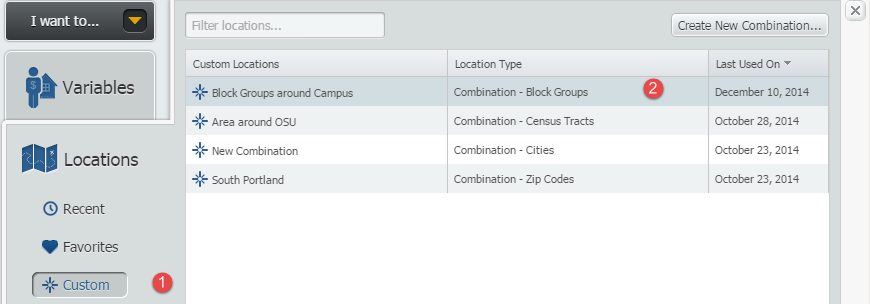
Repeat this process with all locations you would like to include. Selecting the locations panel, and going to “Custom” will allow you to access your new location.
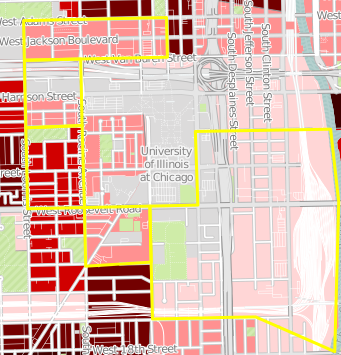
Below is a map representing the new custom location.
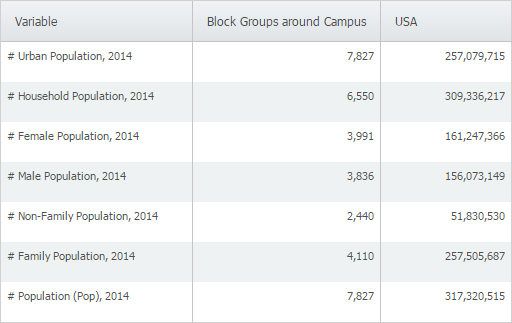
One of the additional features of creating a custom location, is that this location can be utilized throughout your reports. SimplyMap will combine the data from each individual location, and present the total for the combined custom location.
Method #2
The second method of creating a custom combination does not require the user to have the location in a recent or favorites, as described above.
1. Go to locations, and select your geography.
2. Check the box for Custom Location, as shown below:
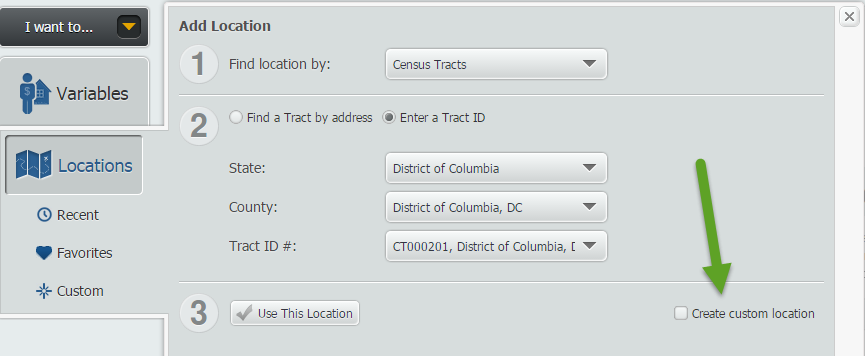
3. Select "Combination Location" (by default the Radius Location will be checked)
4. If you don't already have a custom area, select "Create Combination" and give the target area a name, as shown below:
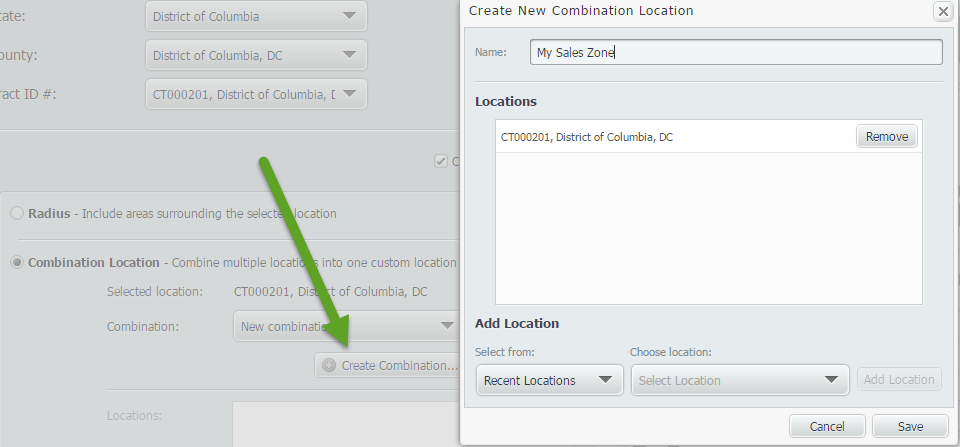
5. Save
6. Now you can select the drop down of locations and add them into your new custom combination that you created.
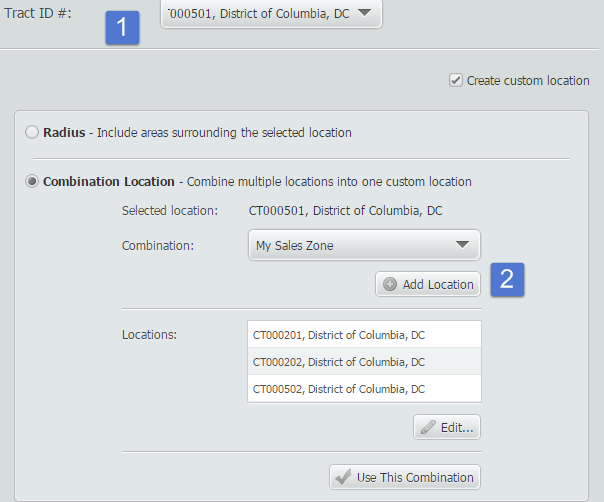
When you're ready to use your new location, select "Use This Combination"
Stay tuned for more SimplyMap tips and tricks! And don’t forget to follow us on Twitter @SimplyMap.
More from SimplyAnalytics


Posted on Sep 18, 2015 by Admin
With tens of thousands of variables available in SimplyMap, it’s common for users to wonder whether or not a particular variable they have in mind is available in SimplyMap. This is where...
Posted on Aug 15, 2013 by Admin
Anyone who has traveled to Seattle hoping for a sunny day could fairly estimate that it is one of the rainiest states with the highest level of precipitation each year. SimmonsLOCAL varia...
Posted on Aug 13, 2015 by Admin
In this quick SimplyMap report, we use Census data to help us identify which city in the United States has the highest percentage of residents who reported walking to work as their mode o...
Posted on Jun 11, 2026 by Admin
SimplyAnalytics is excited to exhibit at ALA Annual 2026 in Chicago! Visit us at Booth #4336 to meet our team, ask questions, and learn more about the latest SimplyAnalytics features and ...
Posted on Apr 05, 2019 by Admin
Come visit the SimplyAnalytics booth (325) at the upcoming ACRL 2019 show in Cleveland! Say hello, grab a chocolate, and stay for a quick demo of SimplyAnalytics. The team will be showcas...
Posted on Apr 01, 2014 by Admin
Another fantastic series of workshops and events are planned at the SLA Conference on June 8-10th, 2014. Register now for networking and workshops throughout the week. Over 200 events are...
Posted on Sep 08, 2016 by Admin
One of our favorite uses of SimplyMap is to find data that validates our general assumptions and observations. For example, in a previous blog we wrote about the growth of tablet ownershi...
Posted on Jul 30, 2018 by Admin
Hello readers! Welcome to this week’s blog. This week we will feature the Related Data Table view and how you can use it to maximize your productivity in SimplyAnalytics. What is it? The ...
Posted on May 31, 2011 by Admin
Kenneth Johnson of the Science, Industry, and Business Library at the New York Public Library recently provided a "boot camp" on the library's market research resources to budding entrep...
Posted on Sep 03, 2015 by Admin
This week we explore the SimmonsLOCAL data package to find which cities in America have the highest percentage of residents enrolled in a frequent flyer program. SimmonsLOCAL is available...