 Go up
Go up


The Location Query Report
Posted on Mar 13, 2023 by Admin
Hello readers! Today, we’re excited to officially introduce the Location Query Report in SimplyAnalytics. The Location Query Report is a powerful feature in SimplyAnalytics that allows users to quickly and easily identify target locations. This report is especially useful for businesses, researchers, and marketers who are looking to find some locations based on their desired conditions. Think of this report as a reimagining of the data filters, where we’ve put that functionality into a report and made it easier to understand what you are viewing. Let’s take a look at an example.
How to Create this Report:In your project, click on New View > “Create” Under the Location Query report
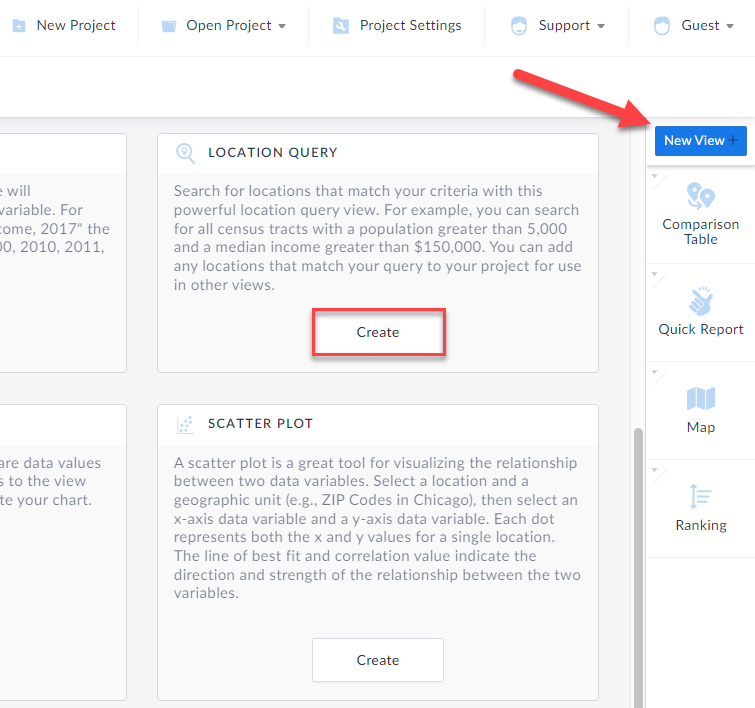
The Location Query report appears. Some tips in the image below of the layout:
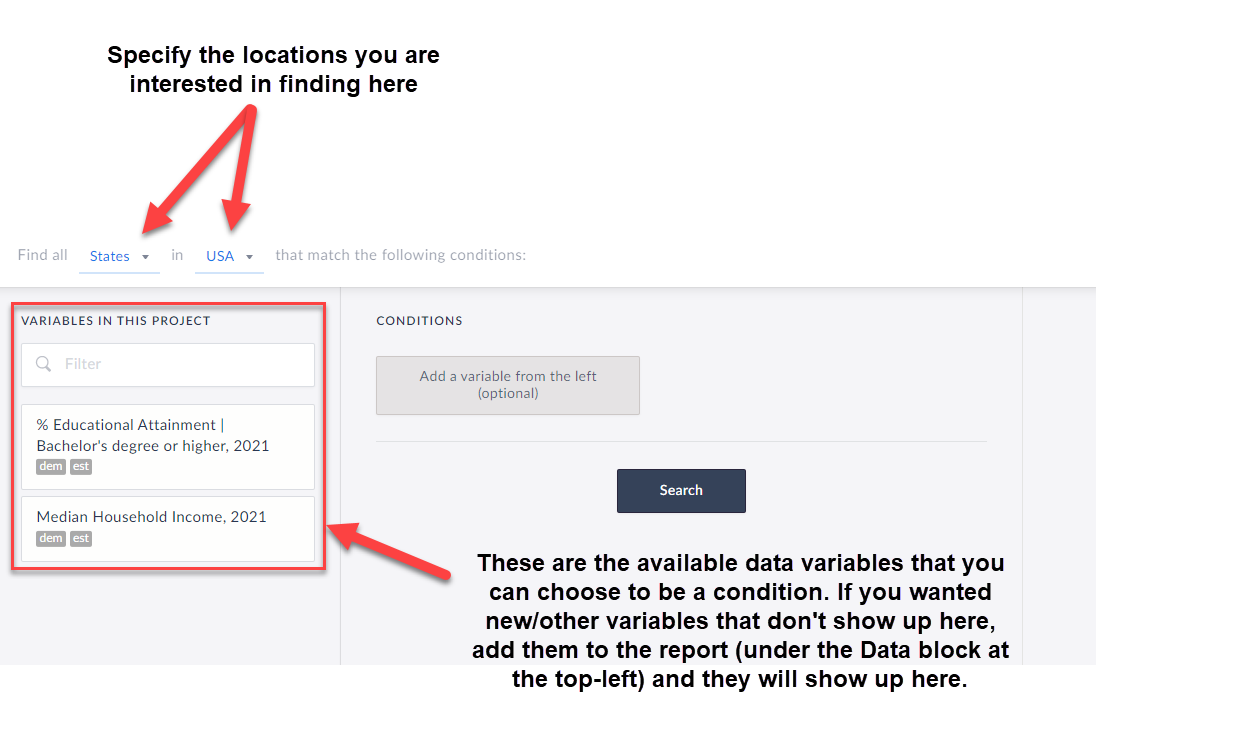
To begin the query, first choose from the dropdown at the top that reads: Find all X in Y that match the following conditions. This is where to choose which locations you are looking for. For example, find all ZIP Codes in Colorado, or all Census Tracts in Miami-Dade County, etc.
Next, add in variables by clicking on them and specify the conditions you are looking for. TIP: Any data variable in SimplyAnalytics can be a condition, and you are welcome to have dozens of conditions, so feel free to be as creative or as specific as you want!
Click Search, and voila! The far-right side of the workspace will display which locations meet your criteria. Check out the report we created below:
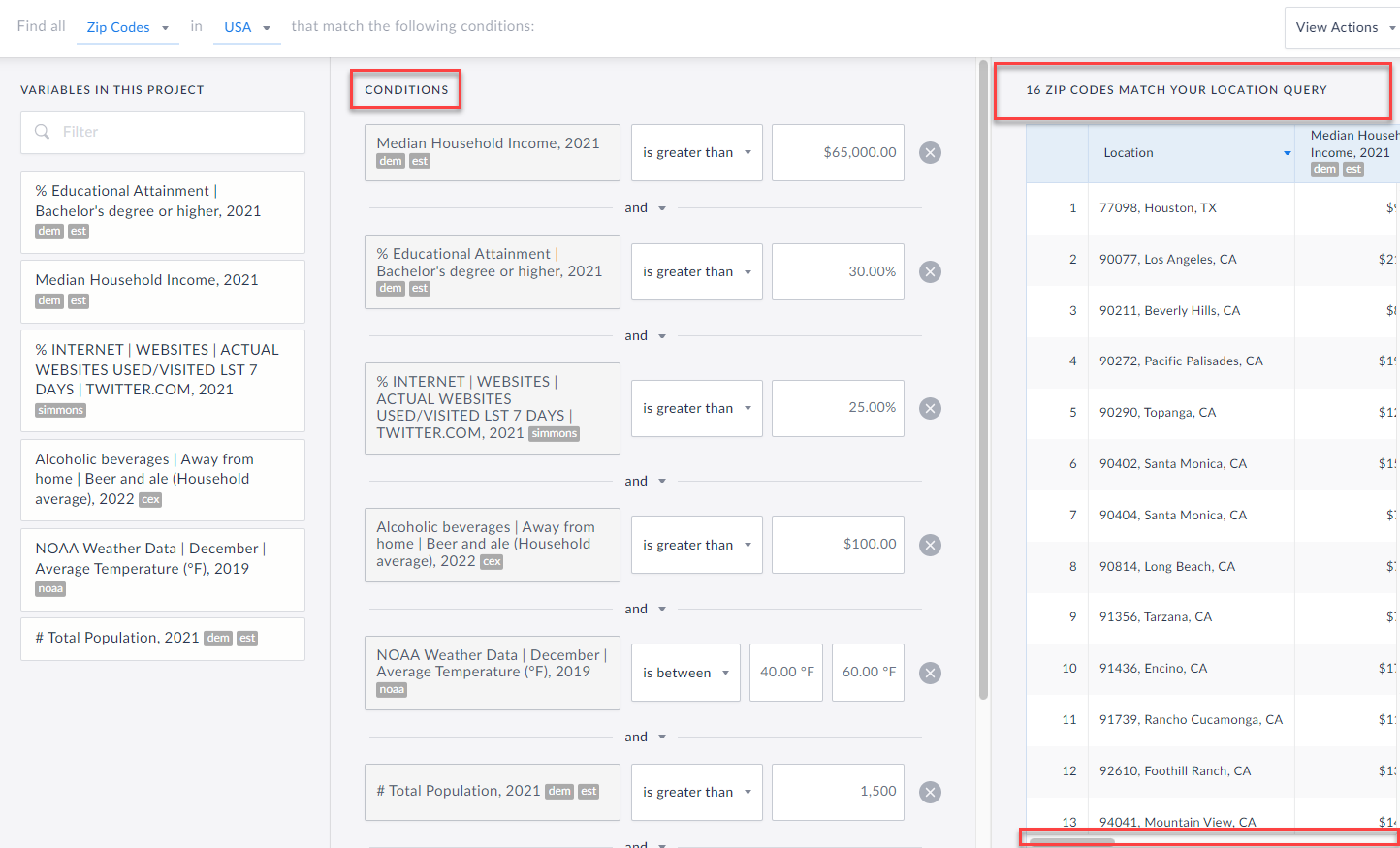 So, in case you were wondering - there are 16 ZIP Codes in the USA that:
Have a Median HH Income greater than $65,000
AND
The % of Adults 25+ with a Bachelor’s degree or higher is greater than 30%
AND
The % of adults who have been on Twitter in the past week is greater than 25%
AND
The Average HH spends more than $100 on Beer and Ale away from Home
AND
The Average Temperature in December is between 40 and 60 degrees
AND
The Zip Codes have a population of more than 1,500
This is sort of a silly example, but it does highlight what you are capable of doing with this report in SimplyAnalytics. Let us know any interesting queries you come up with!
More from SimplyAnalytics


Posted on Feb 01, 2009 by Admin
Want to know the top 10 wealthiest ZIP codes in your state? How about the top 25 counties with the most elderly residents? Duke University students can now easily answer these questions a...
Posted on Jan 28, 2010 by Admin
Come visit the Geographic Research booth at the Ontario Library Association Super Conference, February 24-27, 2010 at the Metro Toronto Convention Centre. The Ontario Library Association ...
Posted on Nov 03, 2017 by Admin
This week we’ll talk about one of our favorite features in SimplyAnalytics - the custom combination location. This feature is a simple and effective means to create custom geographies whe...
Posted on Nov 11, 2015 by Admin
Inspired by a recent help desk ticket, we wanted to discuss how users may utilize SimplyMap to identify relationships between unique variables. For example, does having a college degree s...
Posted on Oct 07, 2013 by Admin
Do you know the quickest way to find the name of a Block Group, Census Tract or ZIP code in our upcoming release for 3.0? The i-Tool gives you the ability to click anywhere on a map to g...
Posted on Oct 02, 2015 by Admin
In this week’s SimplyMap tip, we wanted to do a quick write up reminding users about the Saved Tabs feature within SimplyMap. Did you know that SimplyMap will automatically save all of yo...
Posted on Mar 04, 2020 by Admin
Come meet the SimplyAnalytics team at the 15th annual Electronic Resources and Libraries conference, held at the AT&T Hotel & Conference Center in Austin, TX. We will be exhibitin...
Posted on May 23, 2012 by Admin
We will be exhibiting at the Special Libraries Association (SLA) annual conference and Info-Expo at McCormick Place in Chicago Sunday June 15th - Tuesday July 17th. Visit us at Booth 124 ...
Posted on Jan 15, 2013 by Admin
The GRI team is looking forward to exhibiting at ACRL 2013 at the Indiana Convention Center in Indianapolis April 10 - 12, 2013. Every other year, ACRL offers its premier professional dev...
Posted on Jun 08, 2015 by Admin
In this week’s report we take a look at one folder found within SimplyMap’s SimmonsLOCAL data package. SimmonsLOCAL is a powerful targeting and profiling system that provides insights int...