 Go up
Go up


SimplyMap Tip: Using Multiple Years
Posted on Jul 30, 2015 by Admin
One great feature within SimplyMap is the ability to track the same variable across multiple years. In this report, we will track the percentage of households in the US ordering items from Amazon.com, as we suspect it might show a marked increase over the span of the available years. The value in viewing the same variable over multiple years is that it helps users identify trends in the data over time.
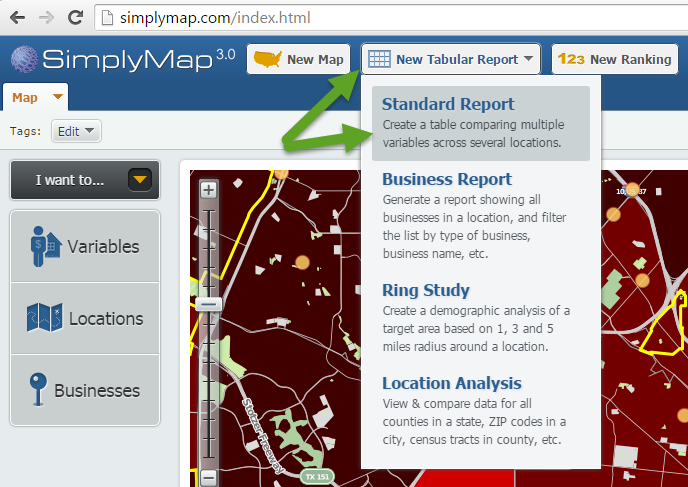
Let’s get started. First, create a Standard Report by selecting New Tabular Report > Standard Report at the top of your screen.
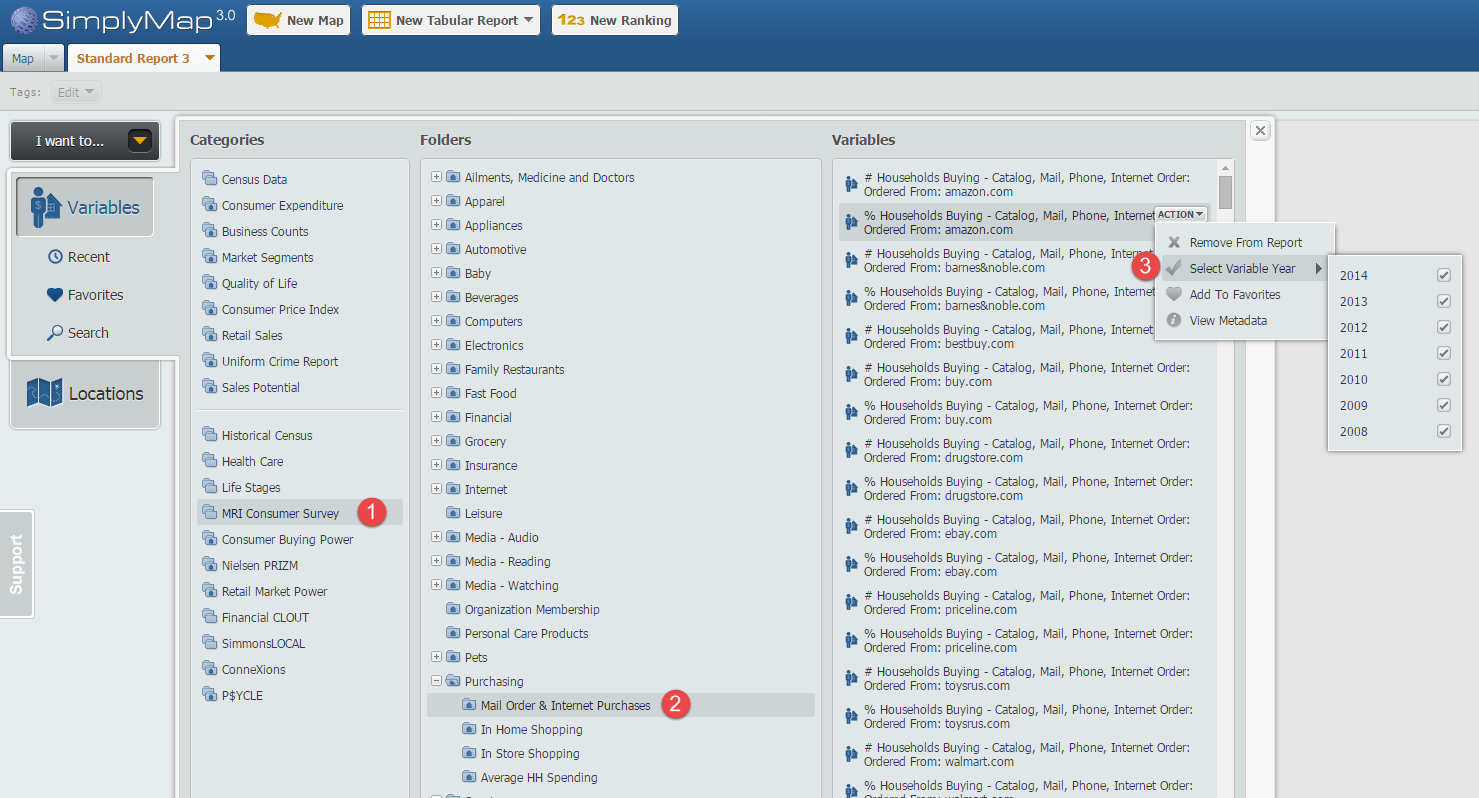
Next, navigate through this path: MRI Consumer Survey » Purchasing » Mail Order & Internet Purchases and hover over the variable, % Households Buying - Catalog, Mail, Phone, Internet Order: Ordered From: amazon.com, 2014 so the actions menu appears. From the “Select Variable Year” option check off the list of years you would like to see. In this example we will use 2008-2014. See the image below for reference:
Close out the variables panel, and your Standard Report will be created using the United States by default. Results below!
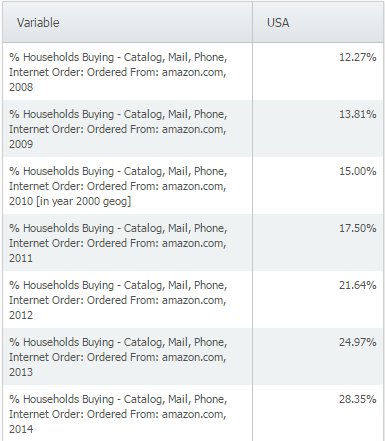
The data clearly shows a trend in Amazon.com ordering throughout years, more than doubling from 2008 to 2014 nationally. We suspected this at the onset, and the data appears to back up our initial thoughts. Feel free to add any additional geographies you’d like to see - the data is available down to the block group level.
There are over 200 variables available within the Mail Order & Internet Purchases folder in the MRI Consumer Survey data, including other websites such as:
ebay.com
buy.com
priceline.com
bestbuy.com
walmart.com
And purchases by catalog/mail order from:
QVC
L.L. Bean
Macy’s
Nordstrom
We encourage you to explore the many variables found within the MRI data package. If your school or library does not currently subscribe to the MRI data set, please write in to support@geographicresearch.com. We are always happy to provide demonstrations and trials of data packages at no cost.
What other trends have you utilized SimplyMap to identify? Let us know in the comments below!
More from SimplyAnalytics


Posted on Jun 25, 2015 by Admin
In this week’s SimplyMap report, we review the different options available when searching for a business. The easiest and fastest method of mapping businesses or creating a business repor...
Posted on Sep 20, 2011 by Admin
Men's Health magazine has once again published rankings that include research from SimplyMap. They ranked the most (and least) educated cities in America. In addition to several other sou...
Posted on Jul 20, 2020 by Admin
Hello readers! We hope you are doing well and staying safe. Today we are excited to introduce the Simmons NCS crosstabs functionality! This is a feature we’ve been working on for a while,...
Posted on May 26, 2020 by Admin
Hello readers! We hope you are doing well, and thank you for your continued support of SimplyAnalytics. We are excited to announce that scatterplots are officially live! Scatter plots ar...
Posted on Jun 09, 2021 by Admin
Hello readers! SimplyAnalytics will be exhibiting at the Virtual ALA Annual Conference this year on June 23-26. Be sure to drop by our booth, and click the banner image to video chat with...
Posted on Dec 16, 2015 by Admin
Visit the SimplyMap team at the ALA Midwinter Meeting 2016 in Boston. We will be at booth #1913 offering product demonstrations, tips & tricks, and of course Ghirardelli Chocolate! Ex...
Posted on Oct 12, 2010 by Admin
NC LIVE, a member-driven library service organization dedicated to providing online information services that support education, enhance statewide economic development, and increase qu...
Posted on Dec 02, 2014 by Admin
Today we take a look at one of the more advanced features in SimplyMap - editing the map legend. Editing the map legend is a great way to not only customize how the data is distributed on...
Posted on Jul 30, 2008 by Admin
Cornell’s Albert R. Mann Library has subscribed to SimplyMap. They provide some tips and access to the SimplyMap Quick Reference Guide, variable list, and some information on the EASI dat...
Posted on Oct 23, 2009 by Admin
SimplyMap was highlighted in the Wake County, NC Public Library Business Blog today as a valuable tool for business planning. Wake County has access to SimplyMap through NC LIVE, a statew...