 Go up
Go up


From the Help Desk: How do I analyze data for downtown?
Posted on Nov 06, 2019 by Admin
Hello readers! We hope you’re having a wonderful week. Today we feature another entry from our From the Help Desk series. Let’s get started!
Question: How do I analyze data for downtown?
Answer: Use the combination location feature. The combination location feature enables users to combine locations of similar geographies to form one larger area. SimplyAnalytics will calculate all number, percent, and average data variables for the custom area. Here’s how to do that.
- Click on the Locations button (1), and select the Custom Locations heading (2). From there, select Create New Combination Location (3). Enter the name for your location in box 1 (4).
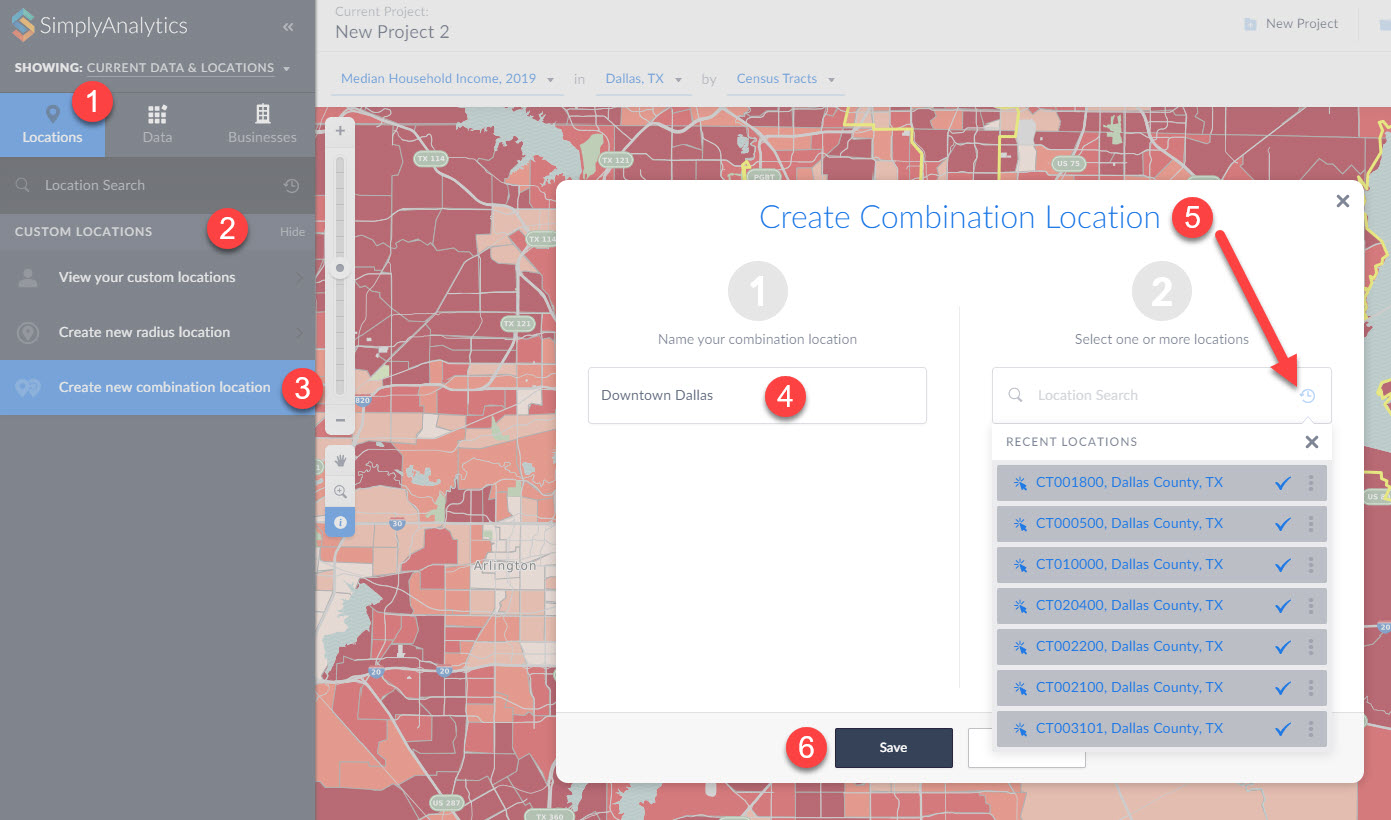
(5) If you have a list of locations that make up your custom location, you can enter them into box number 2. Alternatively, if you have previously used or favorited locations, you can easily access them by clicking on the respective icons within the Locations option as shown in step 5 above. (6) Click Save.
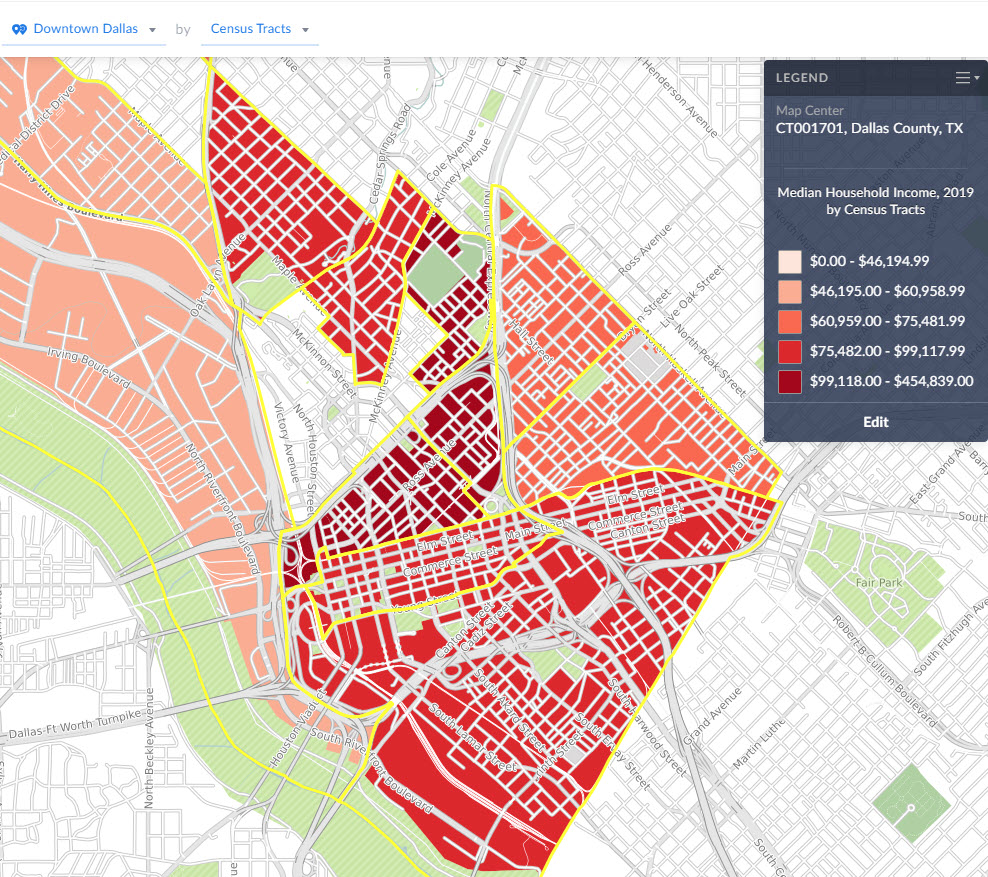
Your new location gets created and can now be mapped or used with any of the available reports in SimplyAnalytics:
That’s all we have for today - stay tuned for more!
More from SimplyAnalytics


Posted on Sep 03, 2015 by Admin
This week we explore the SimmonsLOCAL data package to find which cities in America have the highest percentage of residents enrolled in a frequent flyer program. SimmonsLOCAL is available...
Posted on Aug 22, 2009 by Admin
Lynda Kellam, the Data Services & Government Information Librarian at the University of North Carolina, Greensboro has produced some new tutorial videos to help students learn how to ...
Posted on Dec 15, 2014 by Admin
Stop by the Geographic Research booth at the Ontario Library Association Super Conference to check out SimplyMap Canada. The conference will take place January 28-31 at the Metro Toronto ...
Posted on Aug 26, 2015 by Admin
Most people in the United States could probably guess which cities are popular amongst tourists - Los Angeles and New York. But can you guess how much money is spent in novelty and souven...
Posted on Oct 08, 2008 by Admin
Geographic Research, Inc. (GRI) is pleased to sponsor the fourth annual American Collegiate Retailing Association’s Undergraduate Student Retail Analysis Competition. This is the second ...
Posted on Jul 14, 2009 by Admin
Men's Health continues to utilize SimplyMap to identify and rank U.S. cities. This time they are studying "sports-obsessed citizenry," and here is how they did it: Our stat showdown began...
Posted on Aug 20, 2015 by Admin
Is there a specific age group and income bracket you are specifically interested in researching for a target location? Our Life Stages module has the information you need. Life Stages, by...
Posted on Feb 25, 2020 by Admin
SimplyAnalytics will be exhibiting at the PLA Conference, held this year at the Music City Center in Nashville, TN on February 26 - 28. Visit the team at Booth 1444 with your questions, f...
Posted on Jul 09, 2009 by Admin
The American Library Association 2009 Annual Conference will take place in Chicago, IL from July 9- July 15, 2009 at McCormick Place West located at 2301 S. Lake Shore Drive Chicago, IL. ...
Posted on Jun 16, 2016 by Admin
This week’s SimplyMap report is a quick tip that we hope you find useful and time saving. Did you know that SimplyMap will save all recently searched business queries for future usage? Le...