 Go up
Go up


Exploring SimplyMap Data: Make of Vehicles
Posted on Aug 02, 2016 by Admin
Did you know that you can use SimplyMap to identify which make and model of vehicle is most prevalent within any location in the United States? In this week’s SimplyMap report, we’ll take a look at the SimmonsLOCAL data set to identify the top vehicle brands in select cities around the US. Let’s get started!
First, open up a Standard Report. For this example, we’ll focus on which domestic and foreign vehicles have been most recently acquired within our target areas. Accordingly, we will utilize the Use All Variables feature to add all variables within the two folders:
- DOMESTIC-MOST RECENTLY ACQUIRED
- FOREIGN-MOST RECENTLY ACQUIRED
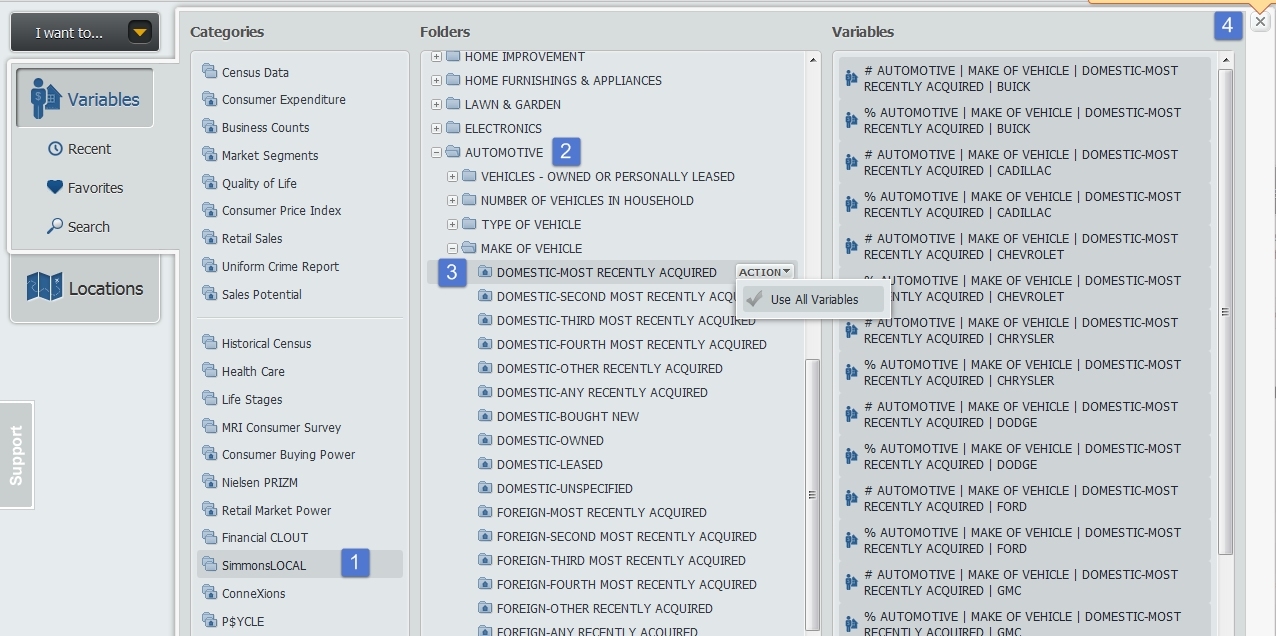
When you close out the variables panel, a report for the United States is generated. Utilizing the Sort Descending feature, you can determine the top represented domestic and foreign cars that have been most recently purchased.
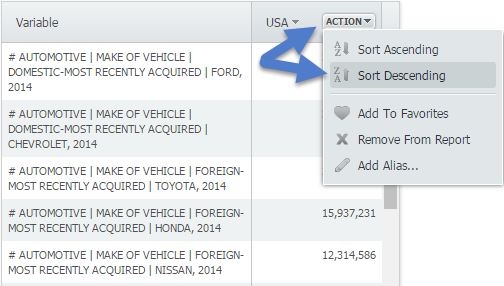
Results for the US:
- Ford - 34,042,678
- Chevrolet - 31,309,261
- Toyota - 24,672,205
- Honda - 15,937,231
- Nissan - 12,314,586
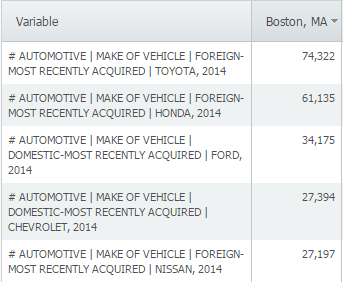
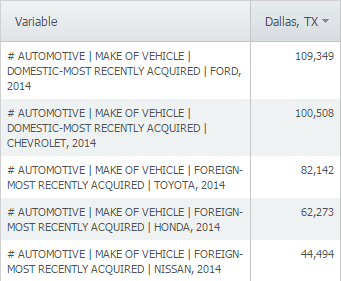
Now let’s take a look at the results for a few other cities:
Boston:
Dallas:
San Francisco:
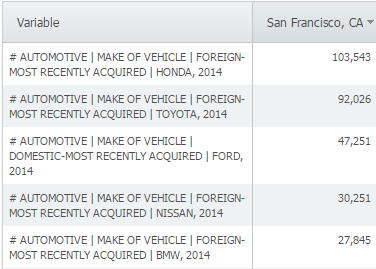
If you want to see more detail on a particular model from a brand, utilize this path and add/sort all models from the brand: SimmonsLOCAL » AUTOMOTIVE » DOMESTIC VEHICLES - MAKE/MODEL » MOST RECENTLY ACQUIRED - DOMESTIC or FOREIGN
For example, looking at Boston, MA and adding all Toyota models reveals the following:
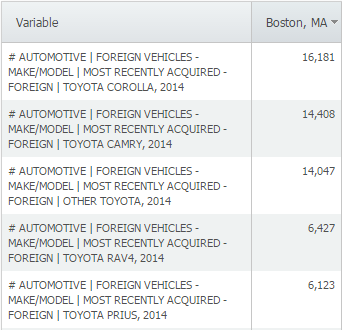
It looks like Boston is a big fan of Toyota Corollas. This data is available down to the block group level, so feel free to find out which make and model of vehicle is popular within your own neighborhood - stay tuned for more!
More from SimplyAnalytics


Posted on Oct 26, 2018 by Admin
Welcome readers! This week we’ll take a look at how to browse for data by category in SimplyAnalytics. Browsing by Category is the default way of browsing for data in SimplyAnalytics. It ...
Posted on Feb 24, 2023 by Admin
We are excited to attend SCELCapalooza 2023, a three-day conference for academic and research librarians in Southern California. The Vendor Day showcase will take place on March 1st, 2023...
Posted on Mar 18, 2015 by Admin
Can you guess which US city has the most residents per square mile? Today we’re going to use SimplyMap to answer this question for all cities, as well as cities with a population greater ...
Posted on Feb 27, 2009 by Admin
Geographic Research, Inc. is pleased to participate in the Statewide California Electronic Library Consortium's (SCELC) 12th Annual Vendor Day. SCELC members and librarians from other aca...
Posted on Sep 14, 2021 by Admin
Welcome readers! Today we are excited to welcome histograms to SimplyAnalytics. We hope you enjoy this wonderful new visualization as much as we do. Let’s take a look. What is a histogram...
Posted on Nov 28, 2012 by Admin
Come visit the SimplyMap team at the ALA Midwinter Meeting, January 25 - 28, 2013 in Seattle, WA. We will be in Booth 1307, and as always we look forward to meeting with customers new and...
Posted on Sep 08, 2016 by Admin
One of our favorite uses of SimplyMap is to find data that validates our general assumptions and observations. For example, in a previous blog we wrote about the growth of tablet ownershi...
Posted on Dec 15, 2014 by Admin
Stop by the Geographic Research booth at the Ontario Library Association Super Conference to check out SimplyMap Canada. The conference will take place January 28-31 at the Metro Toronto ...
Posted on Feb 05, 2015 by Admin
In this week’s edition of exploring SimplyMap data, we take a look at America’s coffee drinkers. SimplyMap contains more than 100 coffee related variables, including consumer spending on ...
Posted on Apr 01, 2014 by Admin
Another fantastic series of workshops and events are planned at the SLA Conference on June 8-10th, 2014. Register now for networking and workshops throughout the week. Over 200 events are...