 Go up
Go up


From the Help Desk: How to Analyze all PRIZM Segments at Once
Posted on Dec 02, 2019 by Admin
Hi everybody! We’re back this week with another question from our Help Desk. This time featuring SimplyAnalytics Canada. Let’s get started!
Question: How can I analyze all of the PRIZM5 segments for my target area so I can identify the most common segment?
Note: For those unfamiliar with the PRIZM data, this dataset is a marketing segmentation system where households are grouped into one of 68 unique segments based on: demographics, lifestyles, consumer behaviour and settlement patterns in Canada. These segments help you understand what customers are buying, doing and thinking. This is ideal for target marketing, trade area analysis, merchandising and media planning.
Please give us an email if you would like a free trial to the PRIZM data - it is available for both SimplyAnalytics USA and SimplyAnalytics Canada.
Answer: The quickest and easiest way to analyze many similar variables at once is to utilize the Related Data Table. The Related Data Table automatically adds in any similar variables to your chosen one. In this example, we’ll add one PRIZM segment, and the report will add all of them in. This can be used with any variable or dataset - give it a try!
Here’s how:
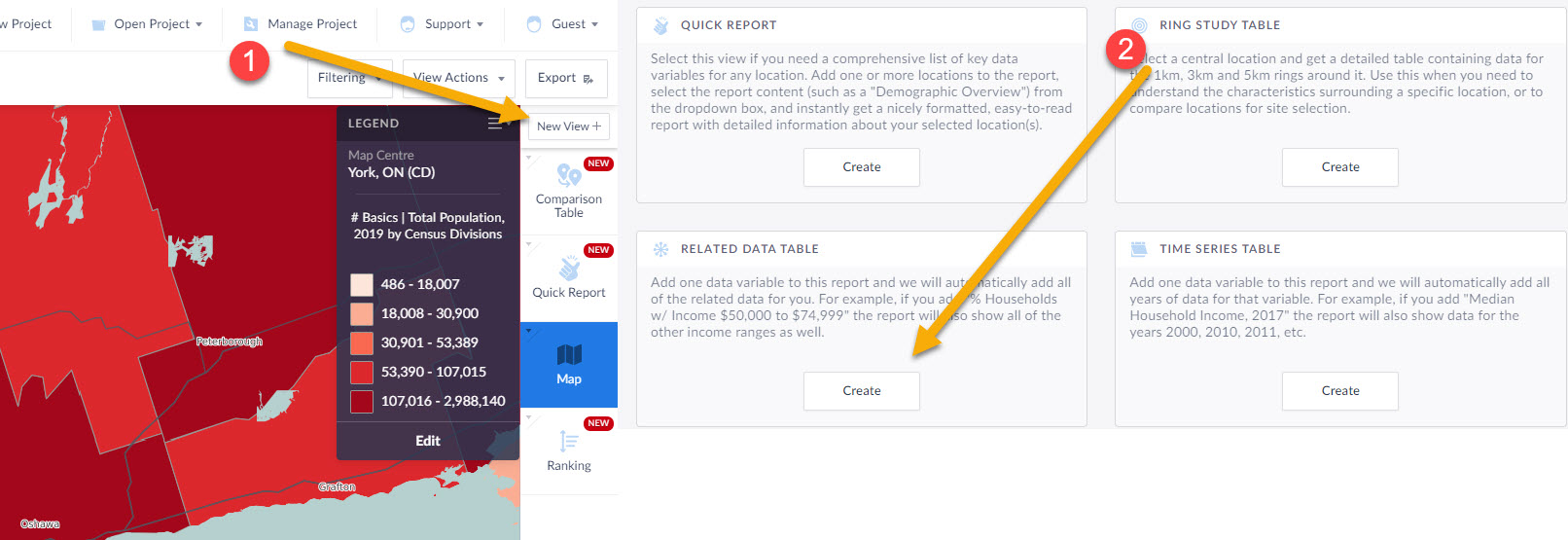
1.) Click on New View towards the top right, then create under Related Data Table
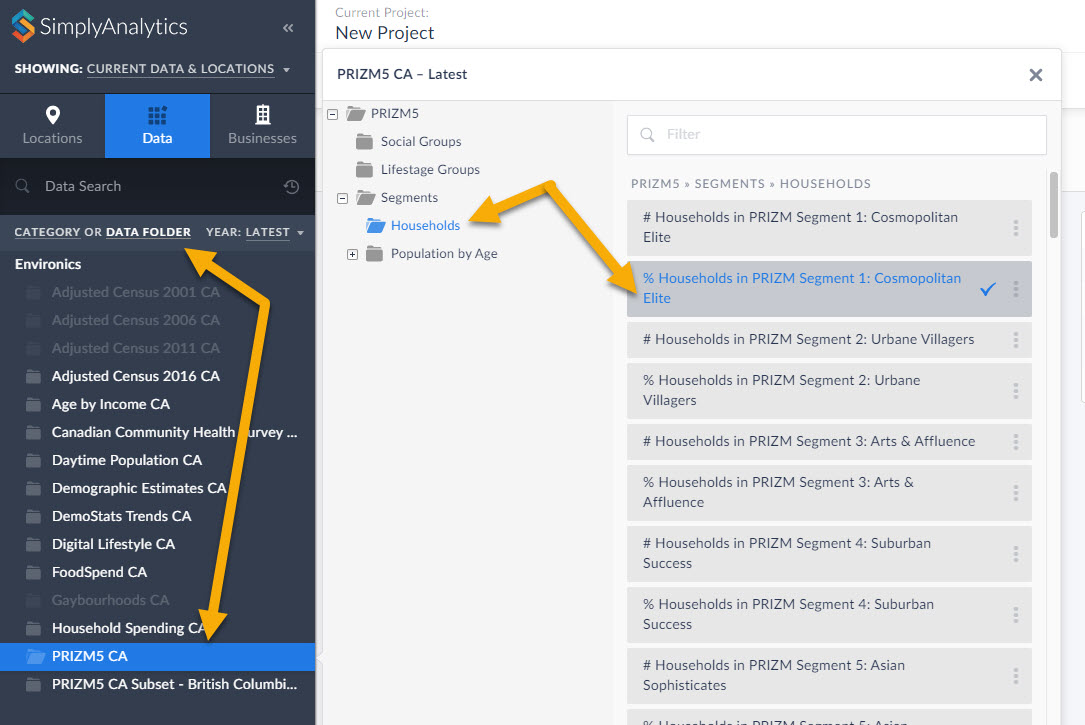
2.) Within the Data block, select any of the PRIZM segments, close the panel, and click on Done.
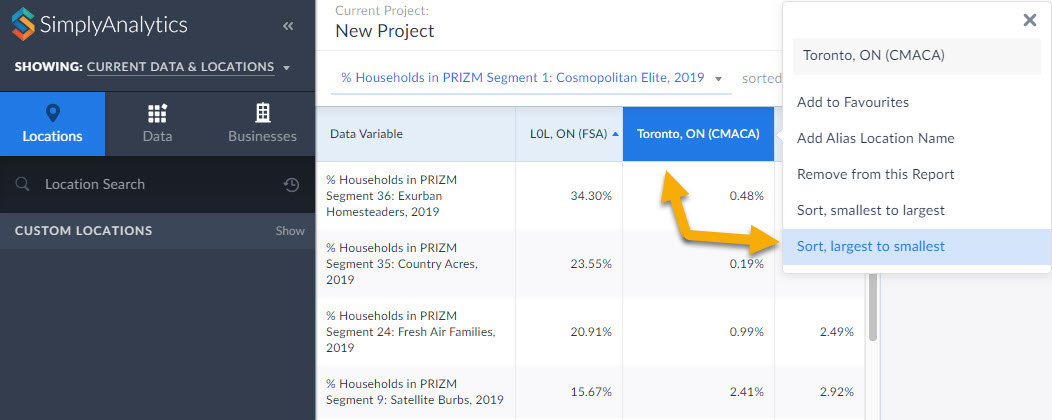
3.) The report will automatically add all PRIZM segments in the category you selected (households, in this case). Click on your location and Sort Descending to view the top segments in the given area. This is a powerful tool for users who want to market a product to a specific segment.
BONUS TIP: Within the Data Documentation page in the Support dropdown (top-right) users have access to the 2019 PRIZM Marketer's Handbook. Check out the super helpful Quick Reference PRIZM Guides on page 212 and 234. This is a great starting point for marketers to determine which PRIZM segments they want to focus on depending on age, children, urbancity, income, etc. For example, if you want high income suburban young families, you'd want Pets & PCs. You can favorite that PRIZM Segment, and use it in a Ranking Report to find out where all the Pets and PCs folks live in your requested geography.
That’s it for this week’s blog! Stay tuned for more.
More from SimplyAnalytics


Posted on Apr 27, 2015 by Admin
In this week’s write up we want to share some quick tips and tricks that you might not yet know about in SimplyMap. TIP #1 Did you know that you can share your work? SimplyMap allows you ...
Posted on May 18, 2015 by Admin
The SimplyMap team is looking forward to visiting with customers and others at the SLA Annual Conference, coming to Boston on June 14-16. Come visit us at Booth #916, we are happy to answ...
Posted on Dec 11, 2015 by Admin
With the final week of the college football season in the books, and bowl game selections having just taken place, we wanted to search within SimplyMap to see if any data pertaining to co...
Posted on Mar 02, 2018 by Admin
In this week’s blog we’ll take a look at how to enter an address in SimplyAnalytics to find the Census Block Group or Census Tract. Let’s get started! Use Case: You want to analyze the ar...
Posted on Jul 30, 2008 by Admin
Cornell’s Albert R. Mann Library has subscribed to SimplyMap. They provide some tips and access to the SimplyMap Quick Reference Guide, variable list, and some information on the EASI dat...
Posted on Apr 17, 2009 by Admin
The Special Libraries Association will hold its Annual Conference in Washington, DC at the Washington Walter E. Washington Convention Center from June 14-17 2009. The conference will crea...
Posted on Jun 21, 2022 by Admin
Hello readers! We hope you’re having a great day. Today we are featuring 5 commonly asked questions about the American Community Survey dataset that’s available to all customers in Simply...
Posted on Feb 26, 2014 by Admin
The Statewide California Electronic Library Consortium is holding another packed week of workshops and networking during the SCELCapalooza event in March 2014. Geographic Research will b...
Posted on Jun 11, 2026 by Admin
SimplyAnalytics is excited to exhibit at ALA Annual 2026 in Chicago! Visit us at Booth #4336 to meet our team, ask questions, and learn more about the latest SimplyAnalytics features and ...
Posted on Jan 08, 2018 by Admin
The SimplyAnalytics team will be exhibiting at ALA Midwinter in Denver February 9-12. Stop by booth 2152 for a visit and a tour of SimplyAnalytics, the best-in-class analytics and data vi...