 Go up
Go up


American Household Spending on Pets
Posted on Dec 09, 2014 by Admin
In this week’s SimplyMap blog post, we set out to discover which large US cities spend the most money per year on their pets. To find this out we used the variable, “Pets, Household Average” found in the consumer expenditure category in SimplyMap.
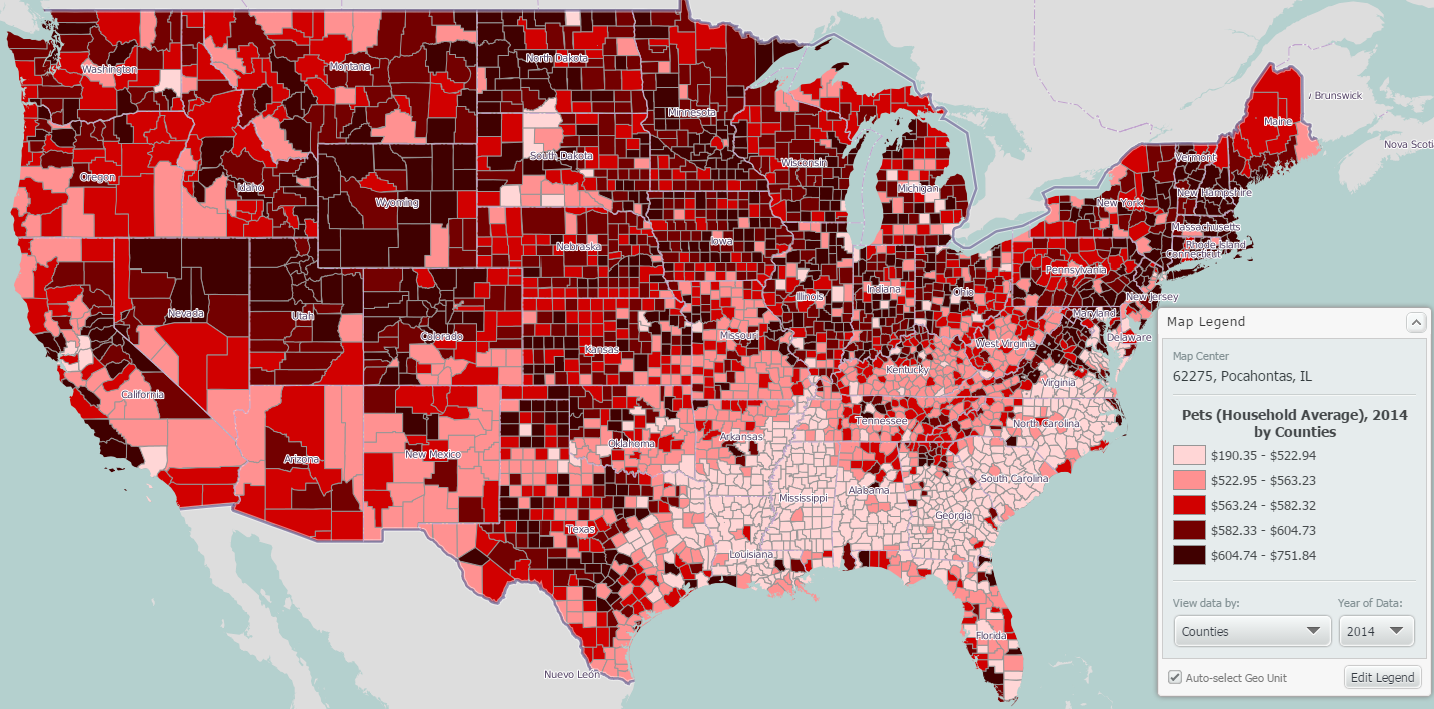
The national quantiles (by counties) in our legend ranged from a low of $190.35 to a high of $751.84. Using the “Create Ranking from Map” feature, we were presented with the following unfiltered results:
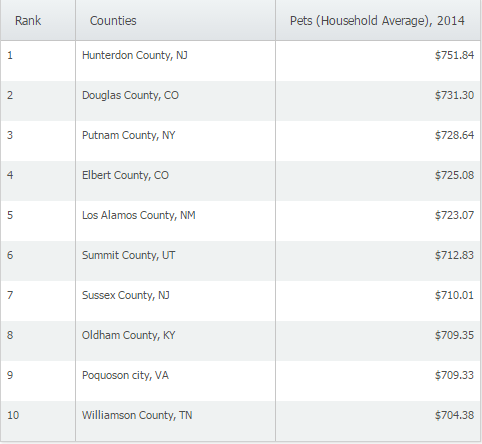
Creating a ranking report from a map using the US as the location will present county level data by default. Because we wanted to find larger US cities, we had to do two things: change the geography that the data was analyzed by, and create a population filter to show cities with a population greater than 100,000.
Changing How the Data is Analyzed
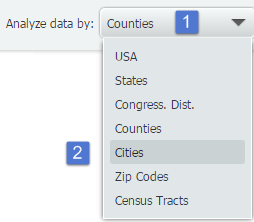
Changing the geographies of your ranking report is a simple two step process. First, select the “analyze data by” drop down menu and then select a new geographic unit. SimpyMap will present your new data immediately.
Creating and Applying a Filter
To create and apply a filter to only show cities with a population > 100,000:
Select “Data filters” then “Create new filter” from the top right of your screen.
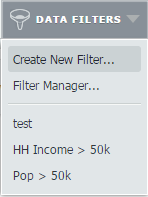
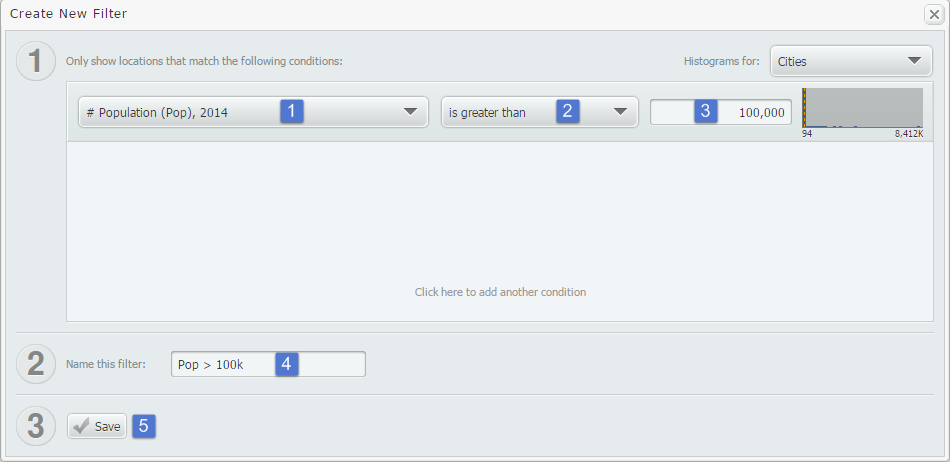
At the filter creation screen, we used a recent variable # Population. We then set the condition to be greater than and typed in the value of 100,000. Lastly, we created a name and saved the filter.
Final Results Presented
Using the Display Options menu located near the top right of SimplyMap, we chose to hide results that did not meet our criteria of a city population greater than 100,000. The final results are below:
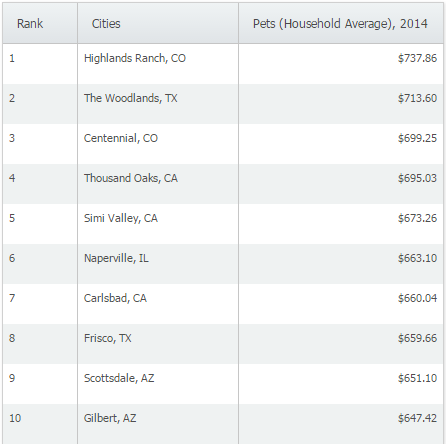
At a yearly average of $737.86, Highlands Ranch, CO ranks #1 in the United States in yearly average household spending on pets.
Stay tuned for more reports and SimplyMap tips & tricks!
More from SimplyAnalytics


Posted on Jul 19, 2016 by Admin
Are you a tech wizard? Maybe you’re an apprentice? Learn more about technology consumption behaviors using the Simmons MOSAIC Technology Adoption segments located within the SimmonsLOCAL ...
Posted on Aug 22, 2009 by Admin
Lynda Kellam, the Data Services & Government Information Librarian at the University of North Carolina, Greensboro has produced some new tutorial videos to help students learn how to ...
Posted on Jan 16, 2026 by Admin
We are excited to be exhibiting at the Public Library Association (PLA) 2026 Conference in Minneapolis this April 1-3!
Posted on Jan 08, 2018 by Admin
The SimplyAnalytics team will be exhibiting at ALA Midwinter in Denver February 9-12. Stop by booth 2152 for a visit and a tour of SimplyAnalytics, the best-in-class analytics and data vi...
Posted on Dec 15, 2014 by Admin
Custom Locations allow SimplyMap users to combine several locations into one larger region. For example, you can use this feature to combine three adjacent ZIP Codes to create your study ...
Posted on Jan 19, 2009 by Admin
The 2009 Midwinter Meeting will be held in Denver, CO, from Jan 23–28, 2009. http://www.ala.org/midwinter The exhibits will be held Jan 23–26, 2009 at the Colorado Convention Center,...
Posted on Dec 30, 2009 by Admin
Skokie Public Library, in Skokie, IL has published a useful overview of SimplyMap on the Mike's Space blog on SkokieNet. The article is filled with examples of research questions that can...
Posted on Dec 06, 2009 by Admin
ALA's Choice Magazine, publisher of independent reviews of products and services for academic libraries, released a new review of SimplyMap in the December 2009 edition. The reviewer, Car...
Posted on Jan 28, 2010 by Admin
Come visit the Geographic Research booth at the Ontario Library Association Super Conference, February 24-27, 2010 at the Metro Toronto Convention Centre. The Ontario Library Association ...
Posted on Jan 05, 2018 by Admin
The SimplyAnalytics team is looking forward to exhibiting at the Ontario Library Association Super Conference 2018! Stop by the SimplyAnalytcs booth (115T) and take a look at our newest o...