 Go up
Go up


Introducing Scatter Plots
Posted on May 26, 2020 by Admin
Hello readers! We hope you are doing well, and thank you for your continued support of SimplyAnalytics. We are excited to announce that scatterplots are officially live! Scatter plots are a great way to visualize the relationship between two different data variables, and we know you will enjoy them as much as we do.
Let’s take an in-depth look at this new feature.
What is a scatter plot?
A scatter plot is a graphical representation where the values of two data variables are plotted along the x and y axis. Each dot represents both the x and y values for a single location, such as a ZIP Code or county.
Why use a scatter plot?
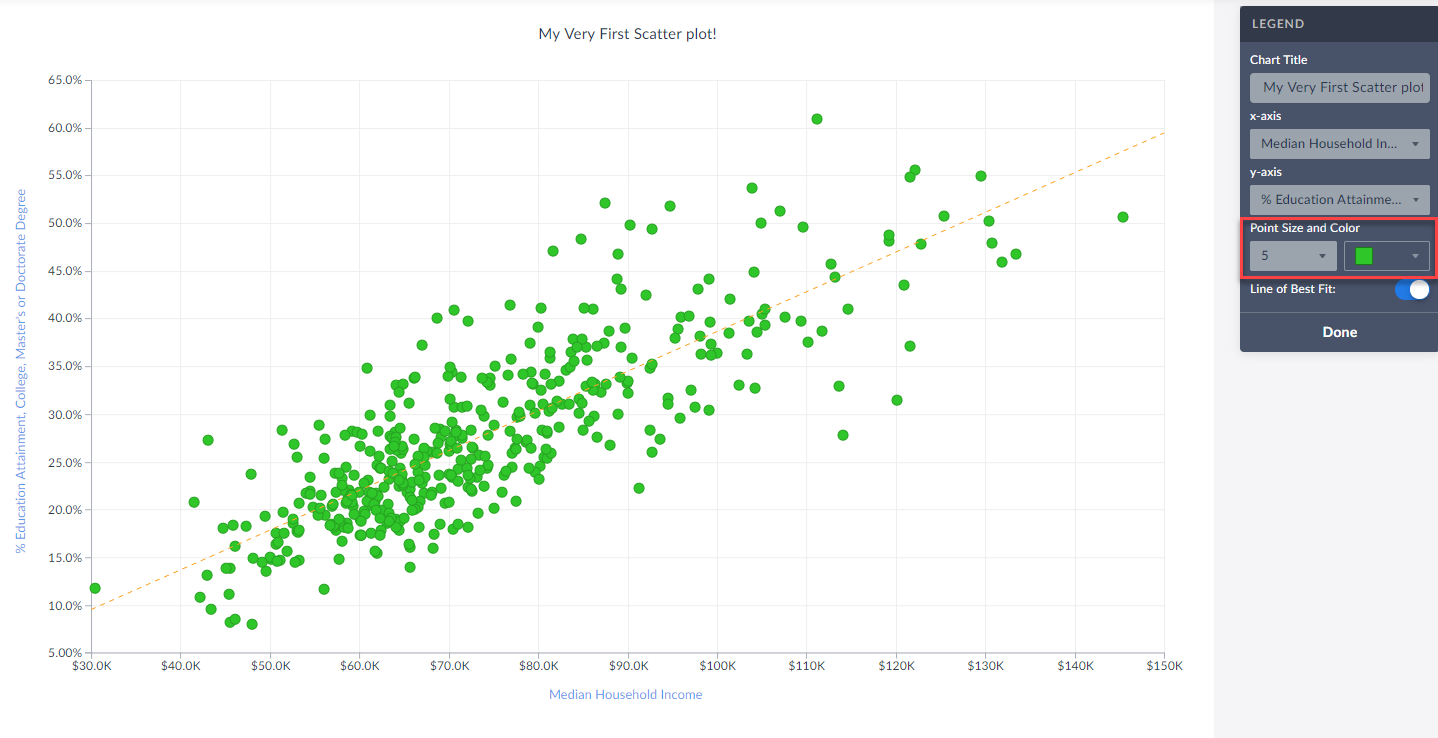
Scatter plots enable users to identify correlations between two different variables. Let’s take a look at an example below using SimplyAnalytics where we’ll use the % of Adults (25+) with a college degree and Median Household Income to see if there’s a correlation between the variables for Counties in the USA.
Getting Started
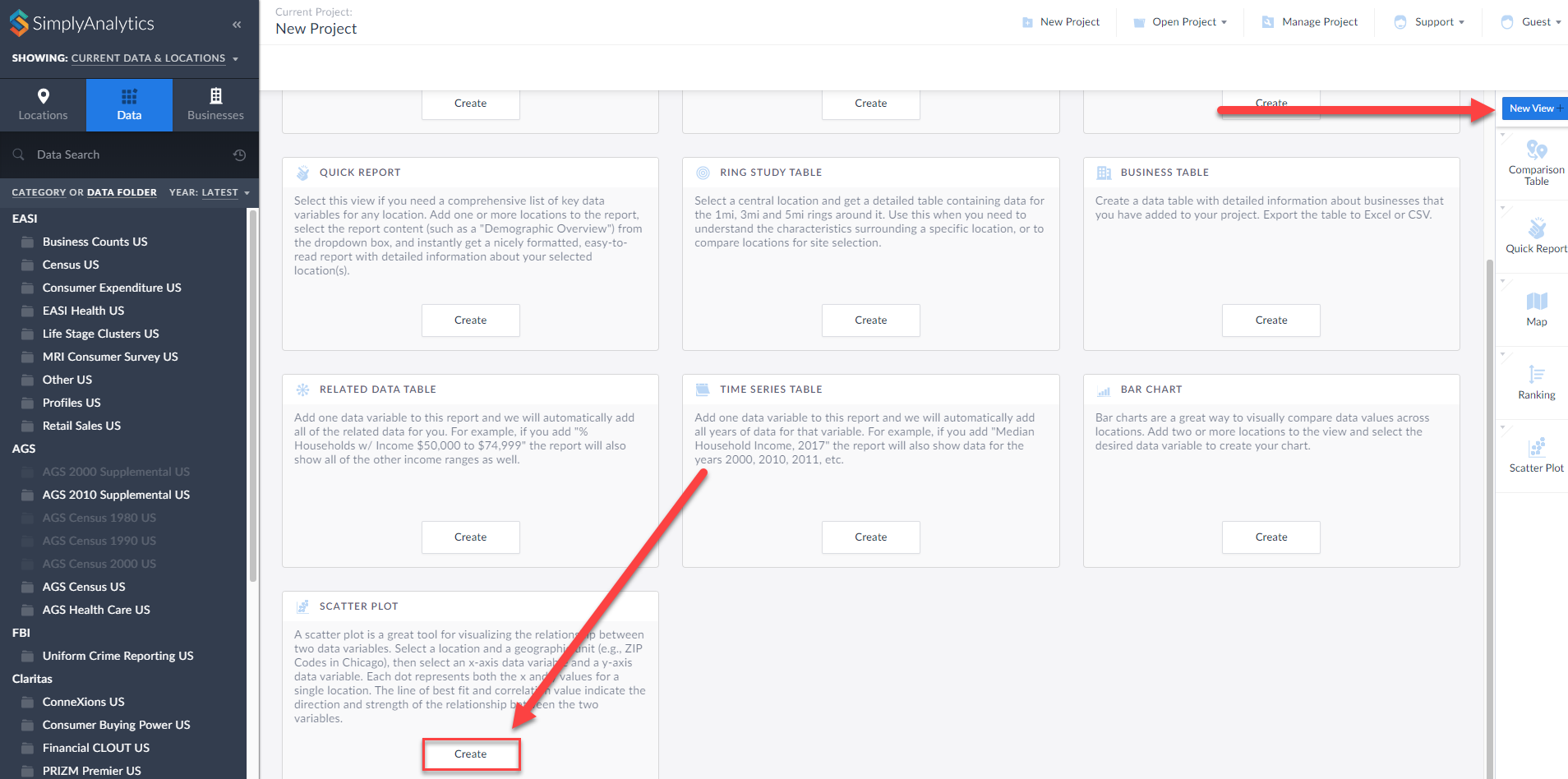
First, click on New View > Create under the Scatter plot option:
The Edit View page displays your data variables and locations in the project.
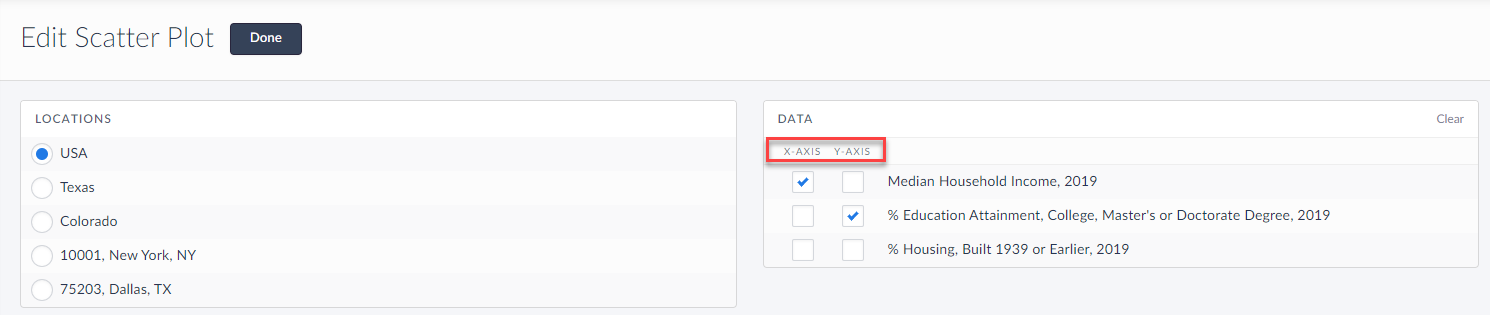
Here you can choose which data variables to display along which axis. Of course, this can be edited directly on the scatter plot as well, but for now, select Done to generate the scatter plot.
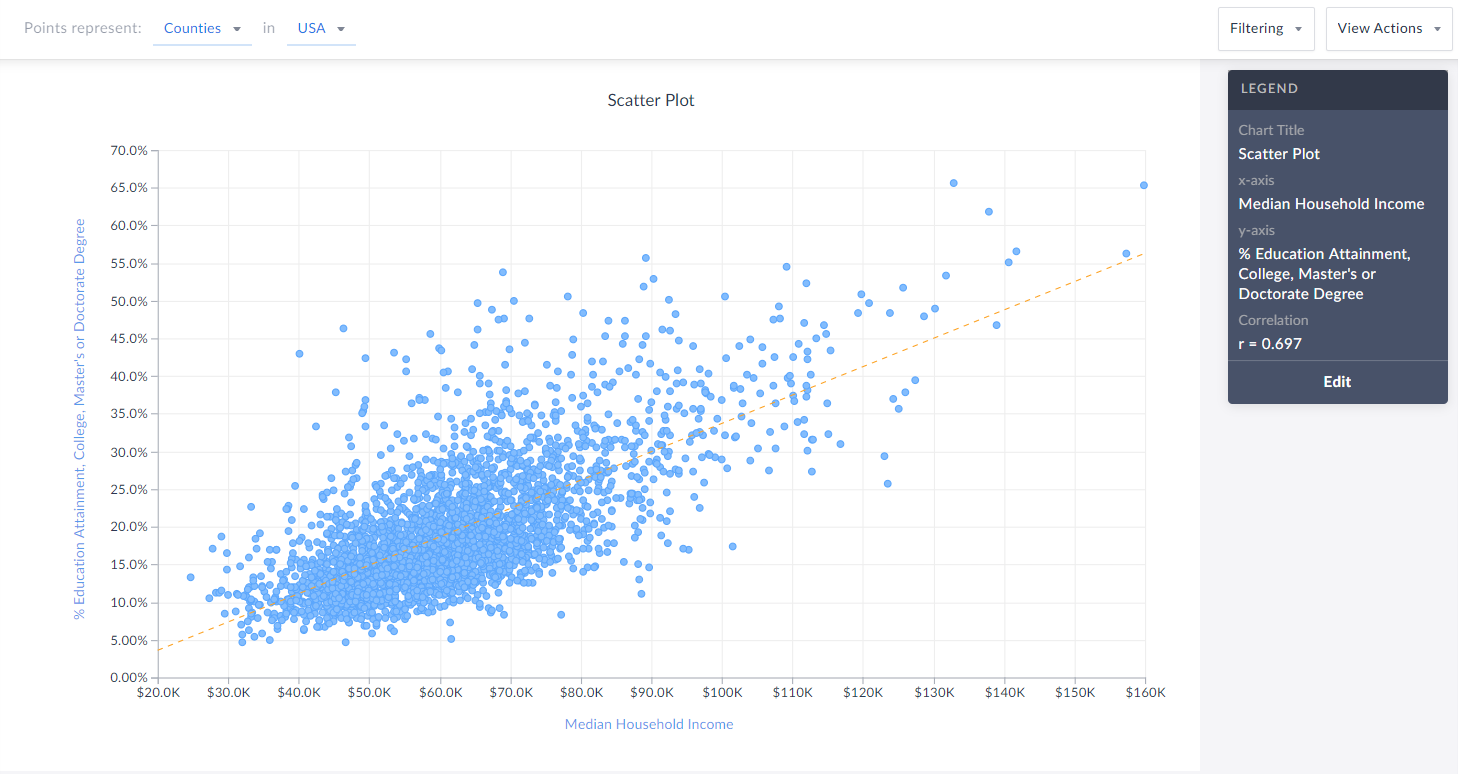
Voila! Your first scatter plot is created. Now, what exactly is this showing?
The top of the view explains what each point represents - in this example, Counties in the USA. The legend towards the right also displays helpful information.
TIP: You can click on any point to display the name and underlying data.
Interpreting Your Scatter Plot
Looking at this scatter plot, there is a strong positive correlation between median household income and the % of adults who have a college degree within CDs in the USA.
The legend has a section heading titled Correlation that contains an “r” value. What does the r-value mean? In short, that’s displaying Pearson’s R - this is a correlation coefficient that’s used in linear regression. The “r” value will always be on a scale from -1 to +1, and you can use these values to understand the relationship between the variables.
A generalization of the scales and how to think of them is:
Positive Direction - The points looks like they are going uphill
1 - perfect correlation
0.75 to 1 - very strong correlation
0.5 to 0.75 - moderate correlation
0.25 - 0.5 - weak correlation
Less than 0.25 - none/no correlation
Negative Direction - The points looks like they are going downhill
-1 - perfect correlation
-0.75 to -1 - very strong correlation
-0.5 to -0.75 - moderate correlation
-0.25 to -0.5 - weak correlation
Less than -0.25 - none/no correlation
The scatter plot above has an r value of 0.697. This means there is a moderate, positive correlation. Does a negative direction/value mean anything bad or wrong? Nope! It just means as the x axis increases, the y axis decreases - nothing negative or incorrect.
Editing Your Scatter Plot
Renaming
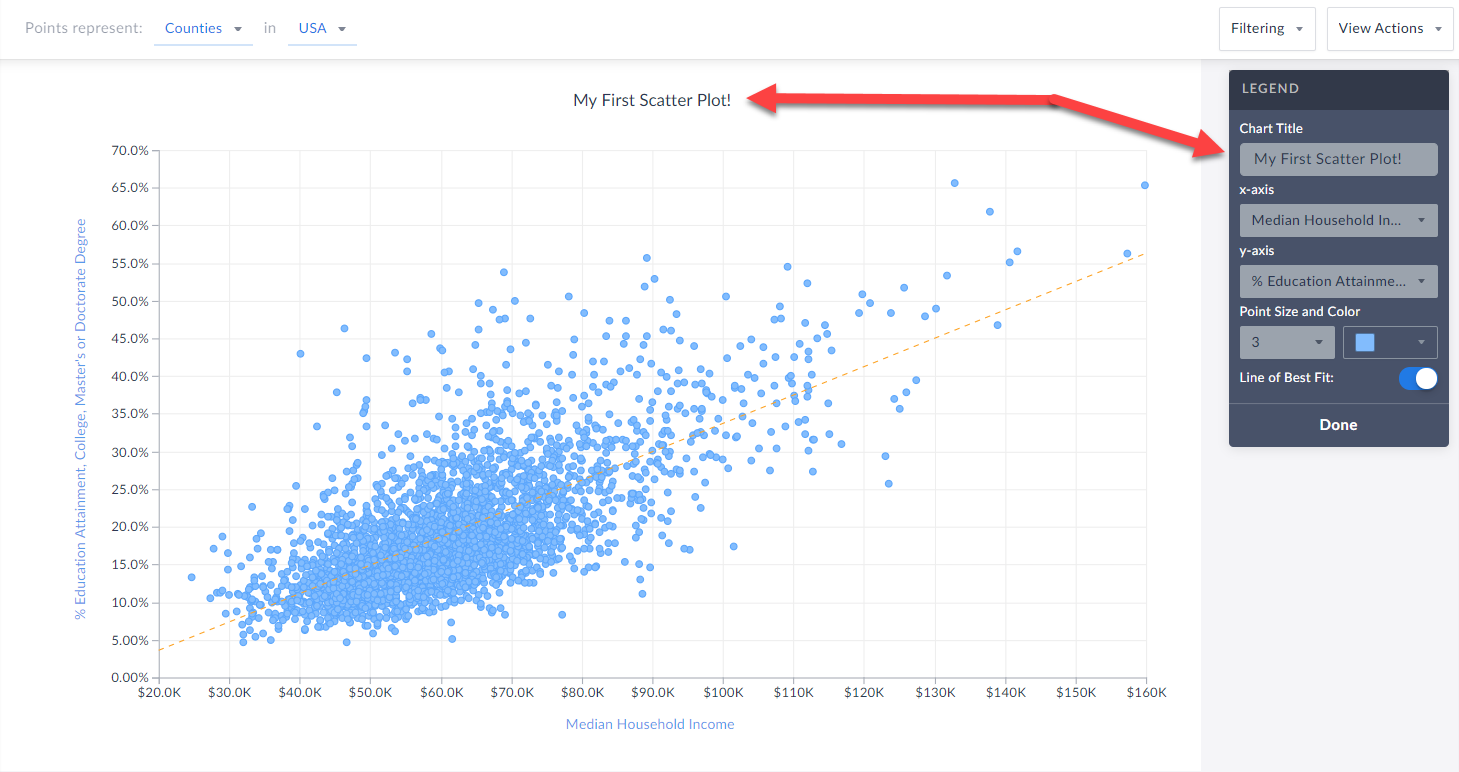
You can rename your scatter plot by either clicking on the heading at the top of the graphic, or by selecting Edit on the legend and renaming there.
 Changing Variables
You are welcome to select either axis in the legend, and change the variable(s) you want to analyze.
Changing Point Size and Color
Feel free to edit these options within the Edit Legend page to change the appearance of your graphic.
Toggle Off/On the Line of Best Fit
Use this button to toggle between whether or not the line of best fit is present. What is the line of best fit? In short, it is a straight line that best represents the data on a scatter plot.
Advanced
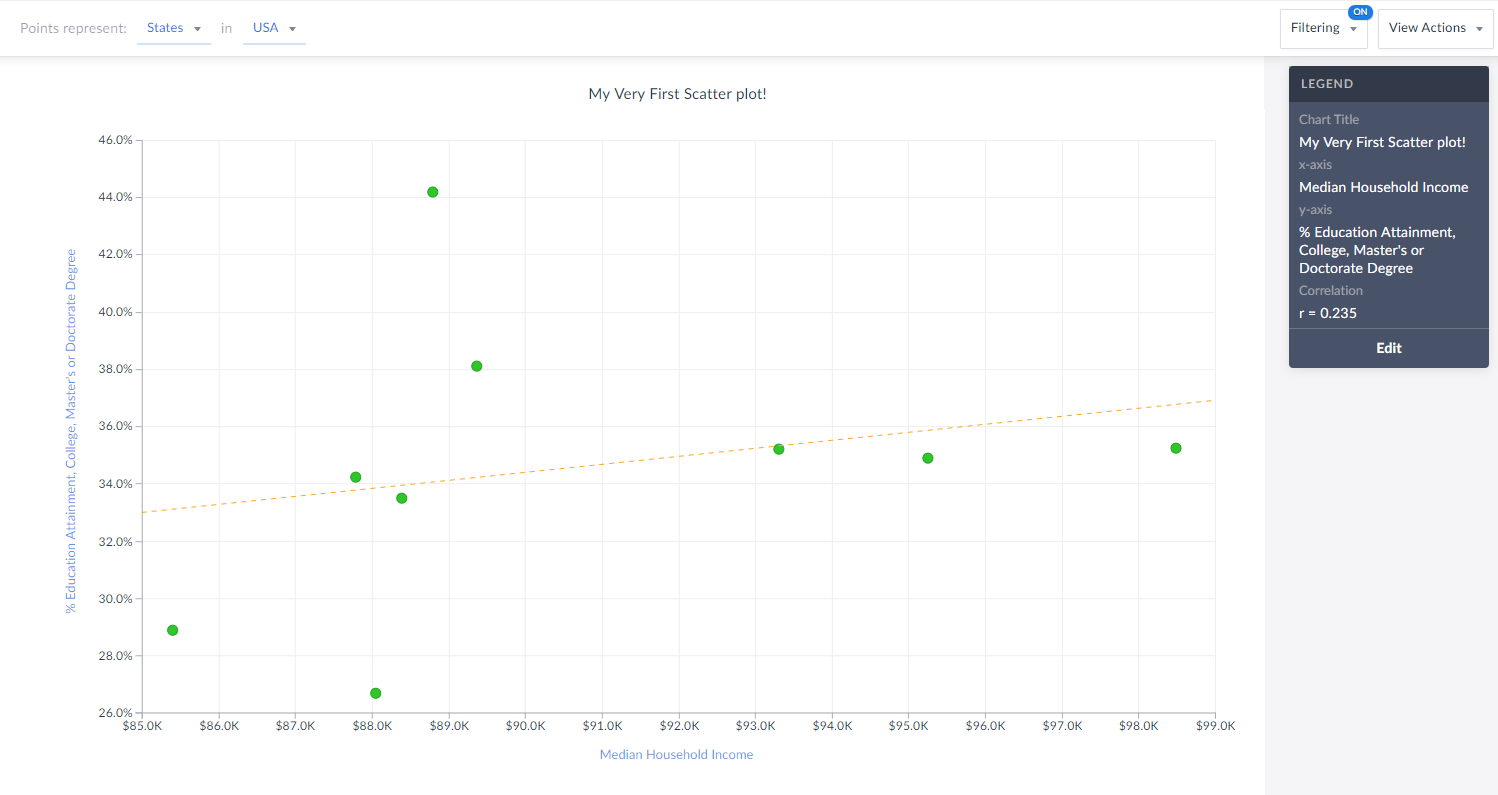
Lastly, you are welcome to create and apply a data filter onto your scatter plot. This will remove any points that do not meet your filter conditions. The image below would normally display all States in the USA, however, there is a median hh income filter applied (inc > $85,000) so you are left with only 9 states (dots) in the chart that meet this criteria.
Also notice how the x-axis has moved to reflect our criteria.
That’s all for today! We’re excited to see some of the interesting scatter plots you can come up with!
Stay safe everyone, and as always, you can access SimplyAnalytics remotely, so please let us know if you are running into any issues with remote access - we are here to help and always available for webinar training sessions.
More from SimplyAnalytics


Posted on Sep 18, 2015 by Admin
With tens of thousands of variables available in SimplyMap, it’s common for users to wonder whether or not a particular variable they have in mind is available in SimplyMap. This is where...
Posted on Mar 02, 2018 by Admin
In this week’s blog we’ll take a look at how to enter an address in SimplyAnalytics to find the Census Block Group or Census Tract. Let’s get started! Use Case: You want to analyze the ar...
Posted on Jun 08, 2023 by Admin
We are excited to announce Mansi Nishit Trivedi as the winner of the 2023 BRASS Student Travel Award sponsored by SimplyAnalytics! Mansi, a Master of Information student at Dalhousie, has...
Posted on Feb 21, 2018 by Admin
We are looking forward to sharing SimplyAnalytics with the public library community at the upcoming PLA 2018 Conference in Philadelphia, PA. Our team will be exhibiting in Booth #855. Vis...
Posted on Apr 17, 2018 by Admin
The SimplyAnalytics team would like to congratulate Rachel Holder, MLS candidate at Indiana University for being selected as this year's recipient of the BRASS Student Travel Award! ...
Posted on May 06, 2013 by Admin
We will be exhibiting at ALA 2013 at McCormick Place in Chicago, IL, June 28-July 1. The ALA Annual Conference programs, updates, conversations, and other events cover all of the key issu...
Posted on Nov 11, 2015 by Admin
Inspired by a recent help desk ticket, we wanted to discuss how users may utilize SimplyMap to identify relationships between unique variables. For example, does having a college degree s...
Posted on May 31, 2011 by Admin
Kenneth Johnson of the Science, Industry, and Business Library at the New York Public Library recently provided a "boot camp" on the library's market research resources to budding entrep...
Posted on Jan 16, 2026 by Admin
We are excited to be exhibiting at the Public Library Association (PLA) 2026 Conference in Minneapolis this April 1-3!
Posted on Mar 03, 2016 by Admin
In this week’s SimplyMap report we take a look into the SimmonsLOCAL dataset to determine which cities in America have the highest percentage of residents who consume organic food product...