 Go up
Go up


Exploring SimplyMap Data: America’s Work from Home Employees
Posted on Feb 13, 2015 by Admin
In this week’s report exploring SimplyMap data, we want to find out where America’s remote workers reside. To find this, we can tap into the Census data in SimplyMap. The specific variable is titled: % Employment, Work at Home, 2014.
To get started ranking geographies, first select New Ranking at the top of the SimplyMap screen. Next, locate the variable by following this path: Census Data » In 2010 Geographies » People and Households » Employment » Travel to Work » Mode.
Lastly, to view this data by state select Locations, and set it to USA.
From the Analyze Data By dropdown, select “States” to rank the USA by all states. The results are shown below:
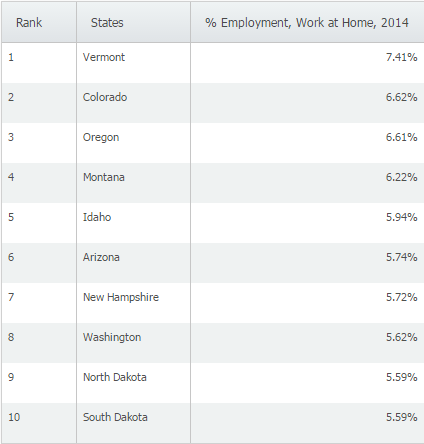
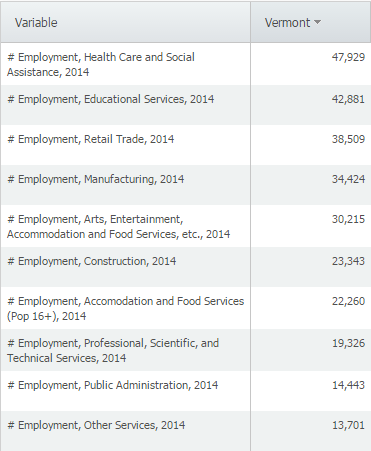
At 7.41%, Vermont ranks first in the US for remote workers. For reference, the national percentage is 4.38. Does anyone have insight as to why Vermont ranks first? A list of the most common employment industries in Vermont is below:
Lastly, we can look at the data by a different geography - change the Analyze Data By dropdown to display Cities. We can also apply a population filter to only show cities with a population greater than 100,000. Here are the results:
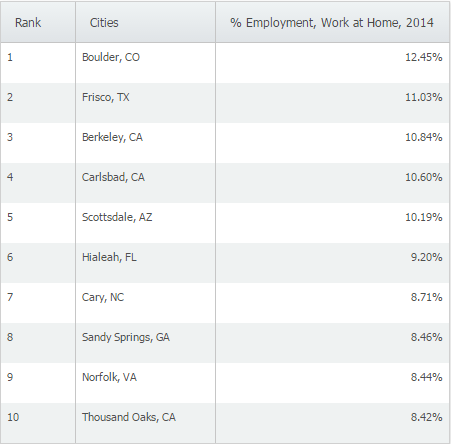
Boulder, CO ranks first in the United States for Work at Home employees. We think this could be attributed to the number of software and tech firms that have opened up or moved to that city in recent years.
We hope you found this SimplyMap report interesting. Stay tuned for more SimplyMap tips and interesting data reports.
Have you already entered for your chance to win an iPad or Kindle Fire? We will be holding the drawing on April 17, 2015. To enter, simply follow us on Twitter and Like Us on Facebook to get your name in consideration.
More from SimplyAnalytics


Posted on Sep 09, 2015 by Admin
This week’s SimplyMap report will set out to discover what America’s favorite type of music is. We will use data within the premium data package, SimmonsLOCAL to answer the question. The ...
Posted on Jan 24, 2009 by Admin
Men's Health magazine took a look this month at where our wireless habits are most out of control. Their methodology includes the use of SimplyMap: First, we crunched data from SimplyMap...
Posted on Nov 06, 2019 by Admin
Hello readers! We hope you’re having a wonderful week. Today we feature another entry from our From the Help Desk series. Let’s get started! Question: How do I analyze data for downtown? ...
Posted on Dec 03, 2015 by Admin
With the Thanksgiving holiday last week, we decided to take a quick look into SimplyMap to see what pertinent variables are available for analysis. First, open the Variables panel and cli...
Posted on May 15, 2015 by Admin
In this week’s SimplyMap report, we want to share with you the many options available when exporting maps in SimplyMap. In SimplyMap, when a user selects Export Map Image from the Actions...
Posted on Feb 05, 2015 by Admin
Our Winter Sweepstakes has begun! Enter to win an iPad Mini 3 or Kindle Fire. How to Enter: Follow @SimplyMap on Twitter Like our SimplyMap Facebook Page for a 2nd Chance to Win If you ...
Posted on Feb 21, 2018 by Admin
We are looking forward to attending our first Electronic Resources & Libraries (ER&L) conference in Austin, TX! Visit us at Table #510 for a closer look at SimplyAnalytics – the b...
Posted on Jun 01, 2014 by Admin
Visit the SimplyMap team at the ALA Annual Conference and Exposition in Las Vegas later this month. We will be at booth 1271, offering product demonstrations, tips & tricks, and of co...
Posted on Sep 10, 2010 by Admin
SimplyMap Canada is now available at several Canadian institutions, including York University and Ryerson University, in Toronto. SimplyMap Canada has all of the great features included i...
Posted on Jul 30, 2018 by Admin
Hello readers! Welcome to this week’s blog. This week we will feature the Related Data Table view and how you can use it to maximize your productivity in SimplyAnalytics. What is it? The ...