 Go up
Go up


From the Help Desk: How to Analyze all PRIZM Segments at Once
Posted on Dec 02, 2019 by Admin
Hi everybody! We’re back this week with another question from our Help Desk. This time featuring SimplyAnalytics Canada. Let’s get started!
Question: How can I analyze all of the PRIZM5 segments for my target area so I can identify the most common segment?
Note: For those unfamiliar with the PRIZM data, this dataset is a marketing segmentation system where households are grouped into one of 68 unique segments based on: demographics, lifestyles, consumer behaviour and settlement patterns in Canada. These segments help you understand what customers are buying, doing and thinking. This is ideal for target marketing, trade area analysis, merchandising and media planning.
Please give us an email if you would like a free trial to the PRIZM data - it is available for both SimplyAnalytics USA and SimplyAnalytics Canada.
Answer: The quickest and easiest way to analyze many similar variables at once is to utilize the Related Data Table. The Related Data Table automatically adds in any similar variables to your chosen one. In this example, we’ll add one PRIZM segment, and the report will add all of them in. This can be used with any variable or dataset - give it a try!
Here’s how:
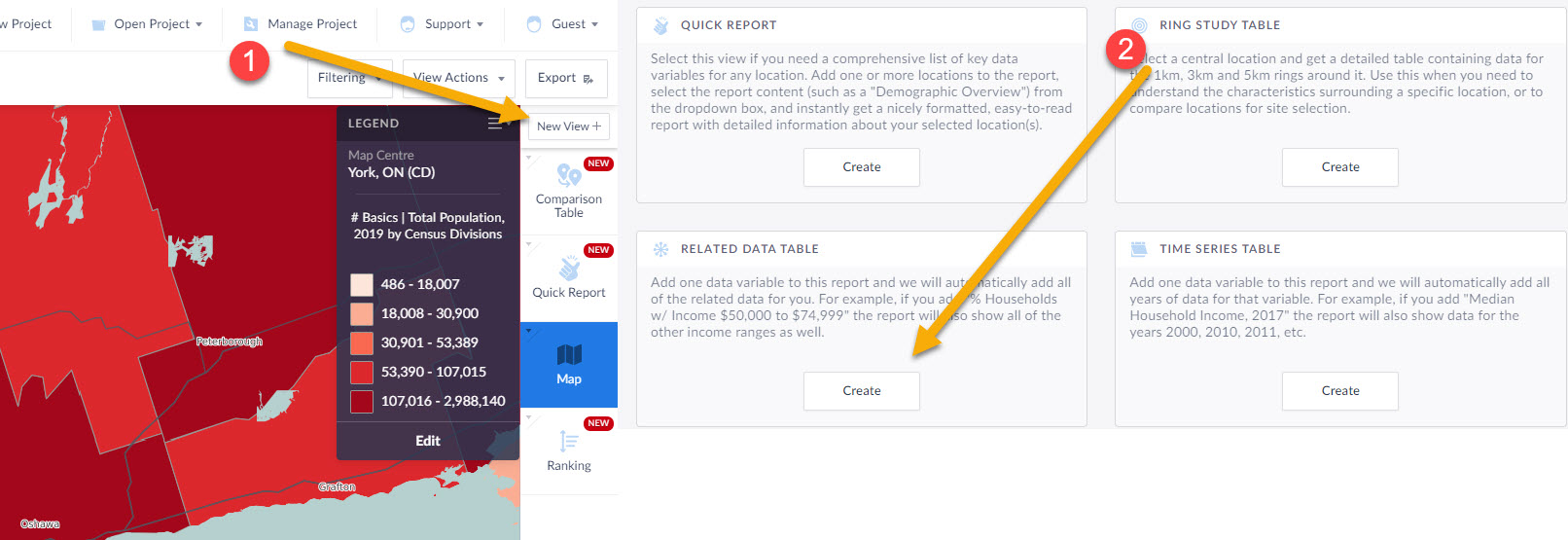
1.) Click on New View towards the top right, then create under Related Data Table
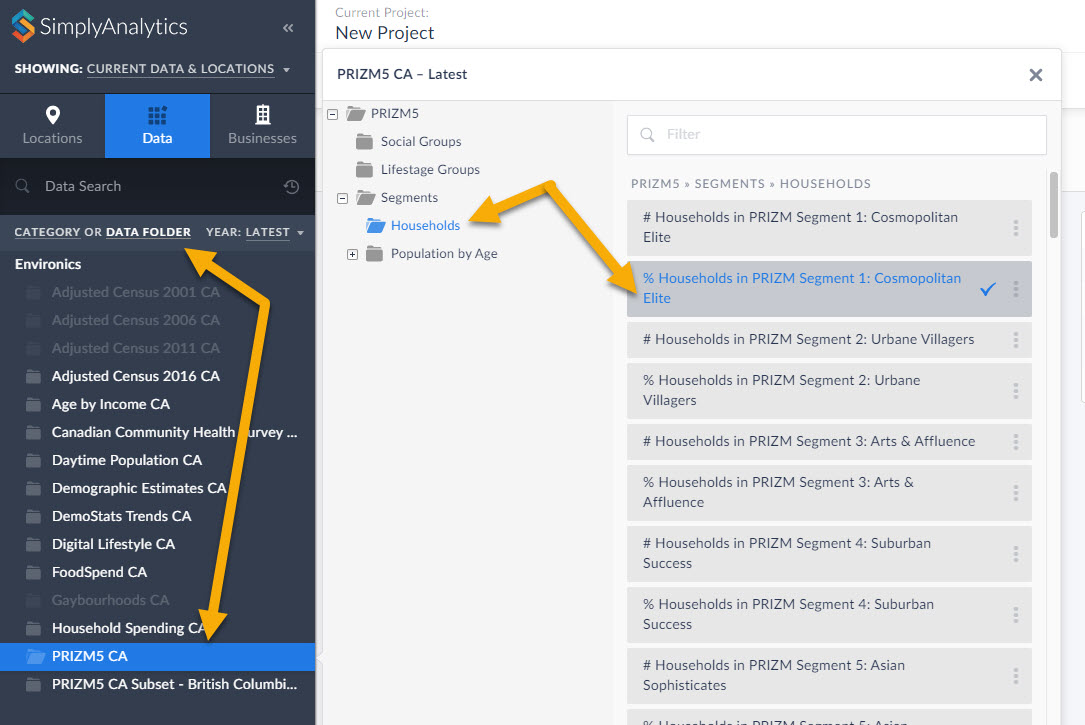
2.) Within the Data block, select any of the PRIZM segments, close the panel, and click on Done.
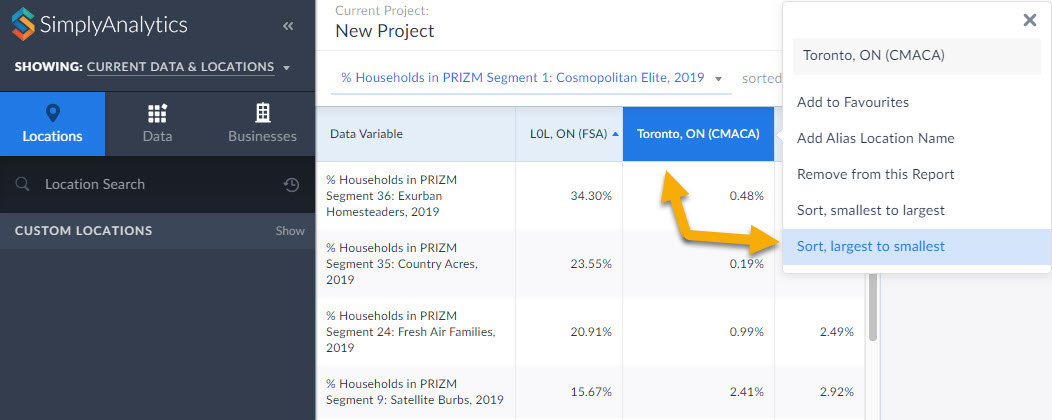
3.) The report will automatically add all PRIZM segments in the category you selected (households, in this case). Click on your location and Sort Descending to view the top segments in the given area. This is a powerful tool for users who want to market a product to a specific segment.
BONUS TIP: Within the Data Documentation page in the Support dropdown (top-right) users have access to the 2019 PRIZM Marketer's Handbook. Check out the super helpful Quick Reference PRIZM Guides on page 212 and 234. This is a great starting point for marketers to determine which PRIZM segments they want to focus on depending on age, children, urbancity, income, etc. For example, if you want high income suburban young families, you'd want Pets & PCs. You can favorite that PRIZM Segment, and use it in a Ranking Report to find out where all the Pets and PCs folks live in your requested geography.
That’s it for this week’s blog! Stay tuned for more.
More from SimplyAnalytics


Posted on Jun 05, 2025 by Admin
We’re excited to announce that SimplyAnalytics will be exhibiting at the American Library Association (ALA) Annual Conference in Philadelphia! We’re thrilled to showcase how SimplyAnalyti...
Posted on Mar 10, 2011 by Admin
The GRI team is looking forward to exhibiting at ACRL 2011 at the PA Convention Center in Philadelphia, March 30 - April 1, 2011. Every other year, ACRL offers its premier professional d...
Posted on Sep 03, 2015 by Admin
This week we explore the SimmonsLOCAL data package to find which cities in America have the highest percentage of residents enrolled in a frequent flyer program. SimmonsLOCAL is available...
Posted on Aug 13, 2015 by Admin
In this quick SimplyMap report, we use Census data to help us identify which city in the United States has the highest percentage of residents who reported walking to work as their mode o...
Posted on Oct 20, 2026 by Admin
We’re heading to Charleston! Join SimplyAnalytics at booth 41 during the Charleston Conference Vendor Showcase on Tuesday, November 3, at the Charleston Gaillard Center.Stop by for a live...
Posted on Jun 21, 2022 by Admin
Hello readers! We hope you’re having a great day. Today we are featuring 5 commonly asked questions about the American Community Survey dataset that’s available to all customers in Simply...
Posted on Dec 07, 2021 by Admin
Hello readers! We hope you are enjoying the holiday season as much as we are. Today, we are happy to announce a couple of improvements to SimplyAnalytics designed to help you get your res...
Posted on Feb 17, 2015 by Admin
Our recent trip to Chicago exhibiting at the ALA Midwinter Meeting inspired this week’s SimplyMap blog post. Today, we’re going to demonstrate how to use business points in SimplyMap to a...
Posted on Sep 10, 2010 by Admin
SimplyMap Canada is now available at several Canadian institutions, including York University and Ryerson University, in Toronto. SimplyMap Canada has all of the great features included i...
Posted on Mar 14, 2010 by Admin
The GRI team was honored to learn that SimplyMap was included in this year's Choice Outstanding Academic Title List, published in the January 2010 issue of Choice Magazine. This is a grea...