 Go up
Go up


Using SimplyMap to Identify Relationships Between Variables
Posted on Nov 11, 2015 by Admin
Inspired by a recent help desk ticket, we wanted to discuss how users may utilize SimplyMap to identify relationships between unique variables. For example, does having a college degree significantly impact the median income of areas? And how does median income effect spending on eating out? Let’s take a look at ZIP Codes within the state of North Carolina.
To quickly analyze a larger area by its smaller geographies, a Location Analysis Report is ideal.
Click on New Tabular Report > Location Analysis:

Choose the state of North Carolina, and navigate to the variables you would like to see compared and analyzed. In this example, we’ll use:
Household Inc, Median
% Education, College, Master's or Doctorate Degree, 2015
% Education, High School
Food away from home (Household Average)
# Households (HHs)
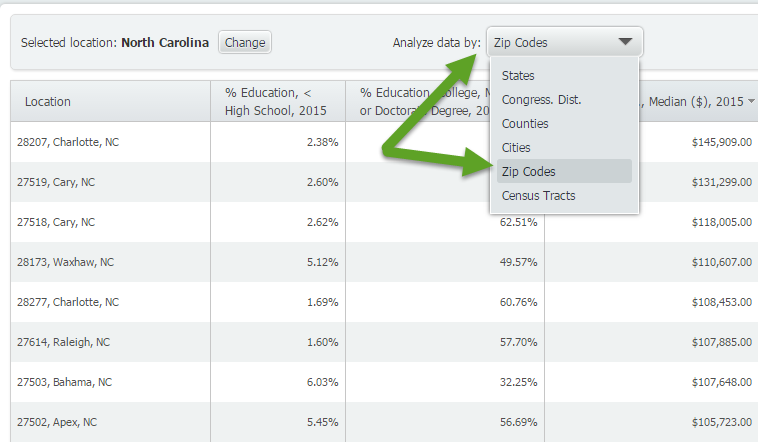
Once you’ve selected your variables, close out the Variables Panel and your report will be created. Be sure to select ZIP Codes from the Analyze Data By option that appears towards the top, shown below.
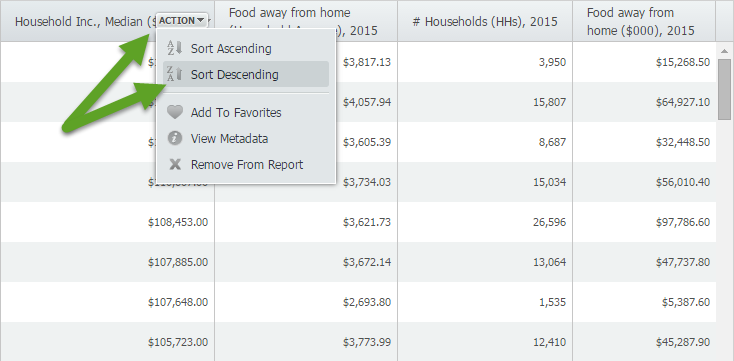
The last step is to choose a variable (column header) and Sort Descending. For example, if you sort descending for Median HH Income, you will get a ranked list (from high to low) of income by Zip Code. Scan the other columns to get a sense of education levels in these locations, and how much they tend to spend eating out.
Sort Descending Income Results:
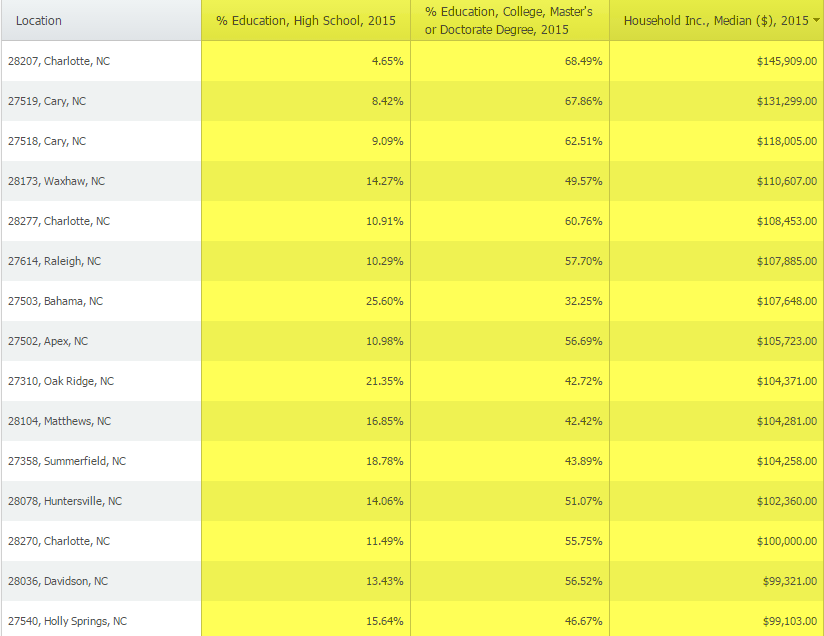
Conclusion: The results yield that higher median income areas tends to also have a higher percentage of residents who have at least a college degree. The money spent eating out was somewhat surprising as results did not vary significantly in lower median income areas (although it did go down and especially in the very low income areas).
Note: You may also want to look at # Households or Population Totals in these areas as the averages and percentages would be impacted by those figures.
These results seem to verify a relationship that’s already well known and somewhat intuitive, however, with more than 60,000 variables in SimplyMap you could study relationships between Median Income and Whiskey Drinking, or Pet Ownership, or Yoga Participation, Transportation to work... the possibilities are endless. We’ll be sure to revisit this same topic in the near future!
More from SimplyAnalytics


Posted on Aug 26, 2015 by Admin
Most people in the United States could probably guess which cities are popular amongst tourists - Los Angeles and New York. But can you guess how much money is spent in novelty and souven...
Posted on Nov 03, 2017 by Admin
This week we’ll talk about one of our favorite features in SimplyAnalytics - the custom combination location. This feature is a simple and effective means to create custom geographies whe...
Posted on Oct 08, 2019 by Admin
Hello readers! This week’s “From the Help Desk” is short & sweet. Let’s get to it! Question: How do I analyze all of the states at once in a report? Answer: The Ranking Report allows ...
Posted on Oct 30, 2018 by Admin
We are pleased to be exhibiting at this year's 30th Annual Charleston Library Conference! The Charleston Vendor Showcase will be held Tuesday, November 6, 2018, from 10:30 a.m. to 6:00 p....
Posted on Jun 08, 2023 by Admin
We are excited to announce Mansi Nishit Trivedi as the winner of the 2023 BRASS Student Travel Award sponsored by SimplyAnalytics! Mansi, a Master of Information student at Dalhousie, has...
Posted on Aug 30, 2009 by Admin
Jeff Zaslow, Wall Street Journal columnist and co-author of the The Last Lecture, will speak at the Orlando, FL Public Library on Friday, September 11 at 7 p.m. Zaslow helped the late Ran...
Posted on Oct 08, 2008 by Admin
Geographic Research, Inc. (GRI) is pleased to sponsor the fourth annual American Collegiate Retailing Association’s Undergraduate Student Retail Analysis Competition. This is the second ...
Posted on Feb 19, 2016 by Admin
Drop by booth #857 at PLA 2016 to meet the SimplyMap team and learn more about the features and functions behind SimplyMap. Have a Ghirardelli Chocolate while we present SimplyMap and off...
Posted on Mar 22, 2016 by Admin
Inspired by some recent support desk questions, this week’s SimplyMap report will provide some useful tips and tricks to help make the most out of your maps. Let’s get started! First, let...
Posted on Feb 27, 2009 by Admin
Geographic Research, Inc. is pleased to participate in the Statewide California Electronic Library Consortium's (SCELC) 12th Annual Vendor Day. SCELC members and librarians from other aca...