 Go up
Go up


SimplyMap Tip: Using the Variable Search
Posted on Sep 18, 2015 by Admin
With tens of thousands of variables available in SimplyMap, it’s common for users to wonder whether or not a particular variable they have in mind is available in SimplyMap. This is where the value of our variable search function comes in. The variable search allows you to type in a keyword or two, and will output any related results. Let’s take a look at an example.
We’ll start with something broad and go with a simple search for data related to income.
Open the Variables Panel and click on the Search icon. Enter your keyword, “income,” in the empty text box and hit the search button. Your results will be displayed (over 2,800 income related variables!).

By default, SimplyMap will display results ordered by the popularity of that given related variable among all SimplyMap users. In this example, popular income variables include: Family Income Average, Family Income Median, and HH Income ranges. Hover over a variable and select Use This Variable to add into your report or map.
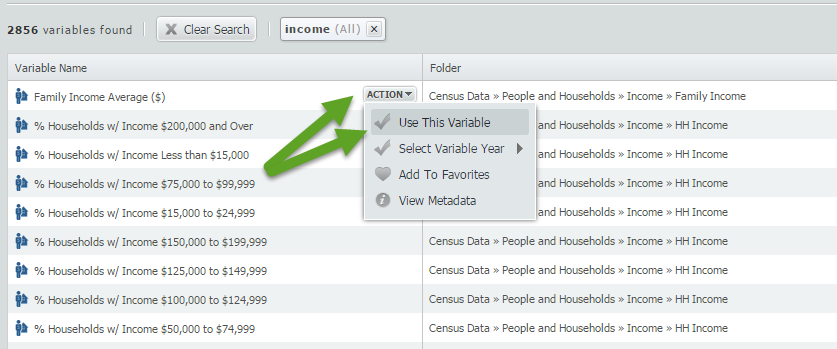
Using the basic keyword search is a quick way to determine the availability of a variable. Equally helpful is the ability to combine an additional keyword into your search.
To narrow down the 2856 “income” results displayed, return to the search box and add an additional query. In this example, we will look for all variables related to “income” and “Hispanic”.
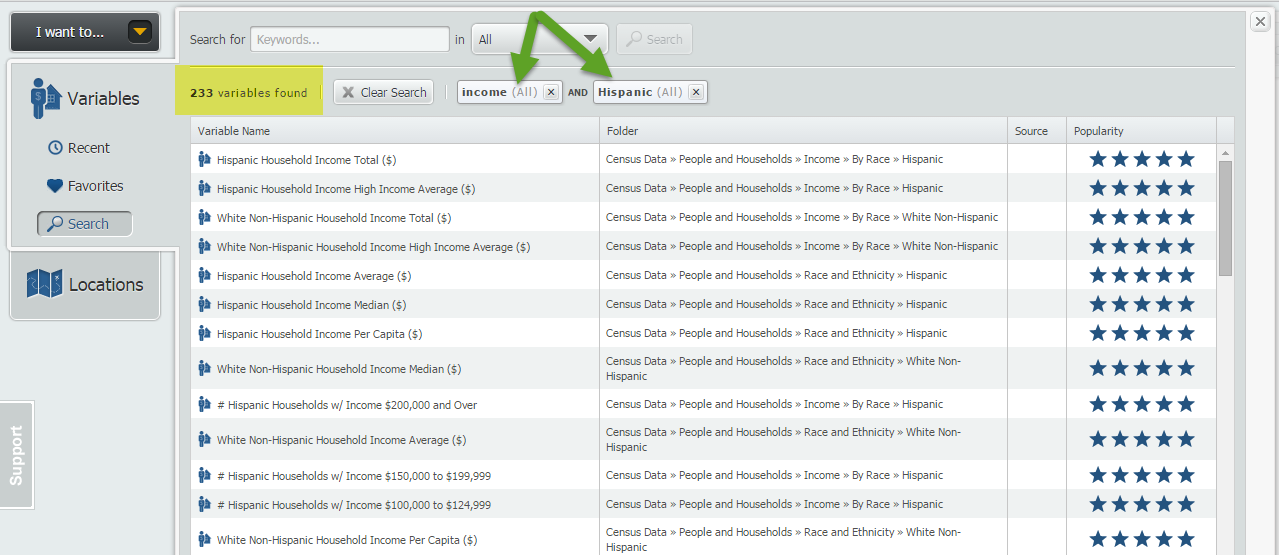
Your results will now be refined to display variables related to “income” and “Hispanic”, (233 in total), including Hispanic Household Income Average.
Final TIP:
There is a dropdown option located directly to the right of the keyword search function. This dropdown will allow you to specifically search by: Variable Name, Source Agency, Folder or All of the Above.
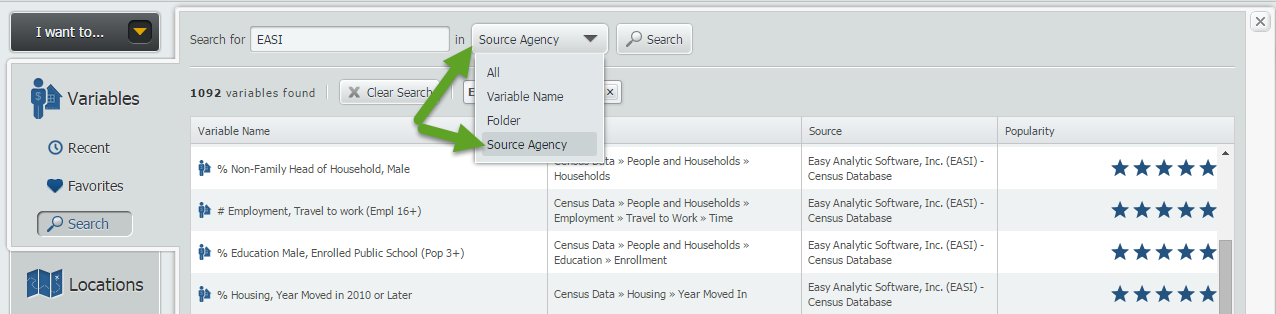
NOTE: If you do not select the dropdown box above, the keyword search will include all of the search options.
That’s it for this week’s tip, we hope that we’ve inspired some users to go out and try the variable search function.
Stay tuned for more tips and SimplyMap reports!
More from SimplyAnalytics


Posted on Jun 16, 2016 by Admin
This week’s SimplyMap report is a quick tip that we hope you find useful and time saving. Did you know that SimplyMap will save all recently searched business queries for future usage? Le...
Posted on Apr 21, 2015 by Admin
In this week’s edition of exploring SimplyMap data, we spotlight the Consumer Buying Power® data package in SimplyMap. What is it? The Nielsen Consumer Buying Power® database incorporates...
Posted on Jan 23, 2024 by Admin
We are excited to again make the trip to Los Angeles for SCELCapalooza 2024 hosted at Loyola Marymount University! Please drop by our table on Wednesday, Feb. 28th to learn more about Sim...
Posted on Dec 12, 2011 by Admin
Men's Health magazine has published a ranked list to help readers find the cities where Americans are the saddest and where they are living with big smiles on their faces. As they note, "...
Posted on Jan 07, 2015 by Admin
In this week’s exploration of SimplyMap data, we set out to find which cities in the United States have the highest percentage of older houses. To determine this, we used the variable “% ...
Posted on Dec 09, 2014 by Admin
In this week’s SimplyMap blog post, we set out to discover which large US cities spend the most money per year on their pets. To find this out we used the variable, “Pets, Household Avera...
Posted on Sep 10, 2010 by Admin
SimplyMap Canada is now available at several Canadian institutions, including York University and Ryerson University, in Toronto. SimplyMap Canada has all of the great features included i...
Posted on Sep 05, 2019 by Admin
We are pleased to be exhibiting again at the Charleston Library Conference, on Tuesday November 5th, 2019. The Vendor Showcase will be held in the Gaillard Center Grand Ballroom (95 Calho...
Posted on Apr 23, 2018 by Admin
Hello everyone and welcome to this week’s blog. This week we will discuss how to create and utilize filters for your research. Why Use a Filter? Filters are a great way to identify target...
Posted on Dec 15, 2014 by Admin
Custom Locations allow SimplyMap users to combine several locations into one larger region. For example, you can use this feature to combine three adjacent ZIP Codes to create your study ...