 Go up
Go up


How to Use the SIC Search Feature
Posted on Oct 29, 2015 by Admin
Did you know that SimplyMap allows you to search for businesses by NAICS or SIC codes? Searching by these codes is a great alternative to the general keyword search. Using the keyword search function to search for a business is the quickest method of compiling a business report or placing businesses onto a map. But searching by keyword may result in a broad mix of different business types. Narrow your search to a specific business classification type to generate more meaningful results.
Let’s take a look at an example of searching for coffee shops by SIC code in Austin, Texas.
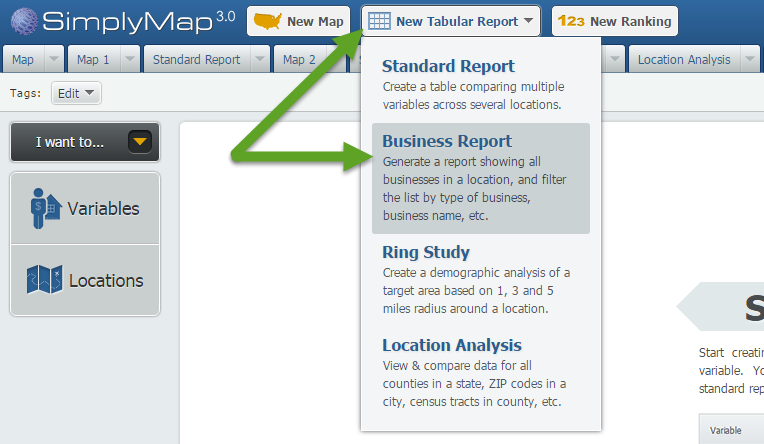
First, Click on New Tabular > Business Report to start a new report.
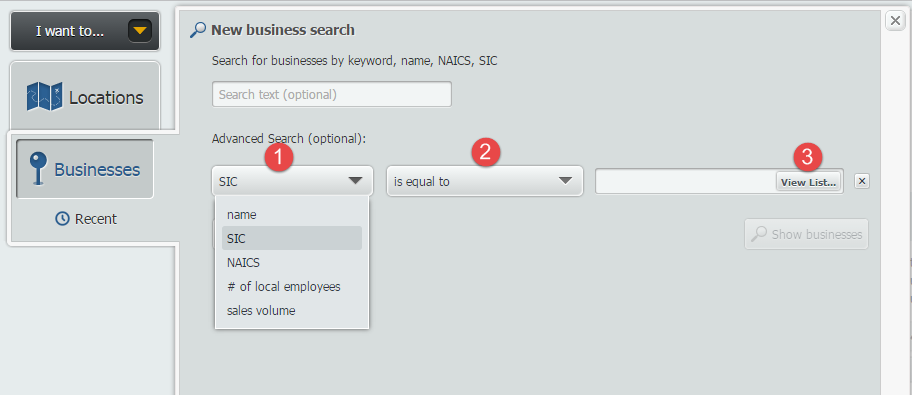
Open the locations panel, and search by City > Austin. Next, open the Businesses panel to bring up the New business search. Click on the Add Condition button to bring up your options.
1. Set the First dropdown to SIC
2. Second the second dropdown to “is equal to”
3. Click on View List to search by SIC codes.
The SIC Selector screen will open up. From here you may browse by industries or click on the Search tab (1) and type “coffee” (2). When you find the SIC code you are looking for, hover over the option and select Use This Code (3).

The “Count” column lists the number of data points for that SIC code, across the entire country.
It looks like there are a total of 22 coffee related SIC codes available. If the keyword “coffee” were used, your results would have searched through all codes (coffee roasters, coffee equipment stores, etc.).
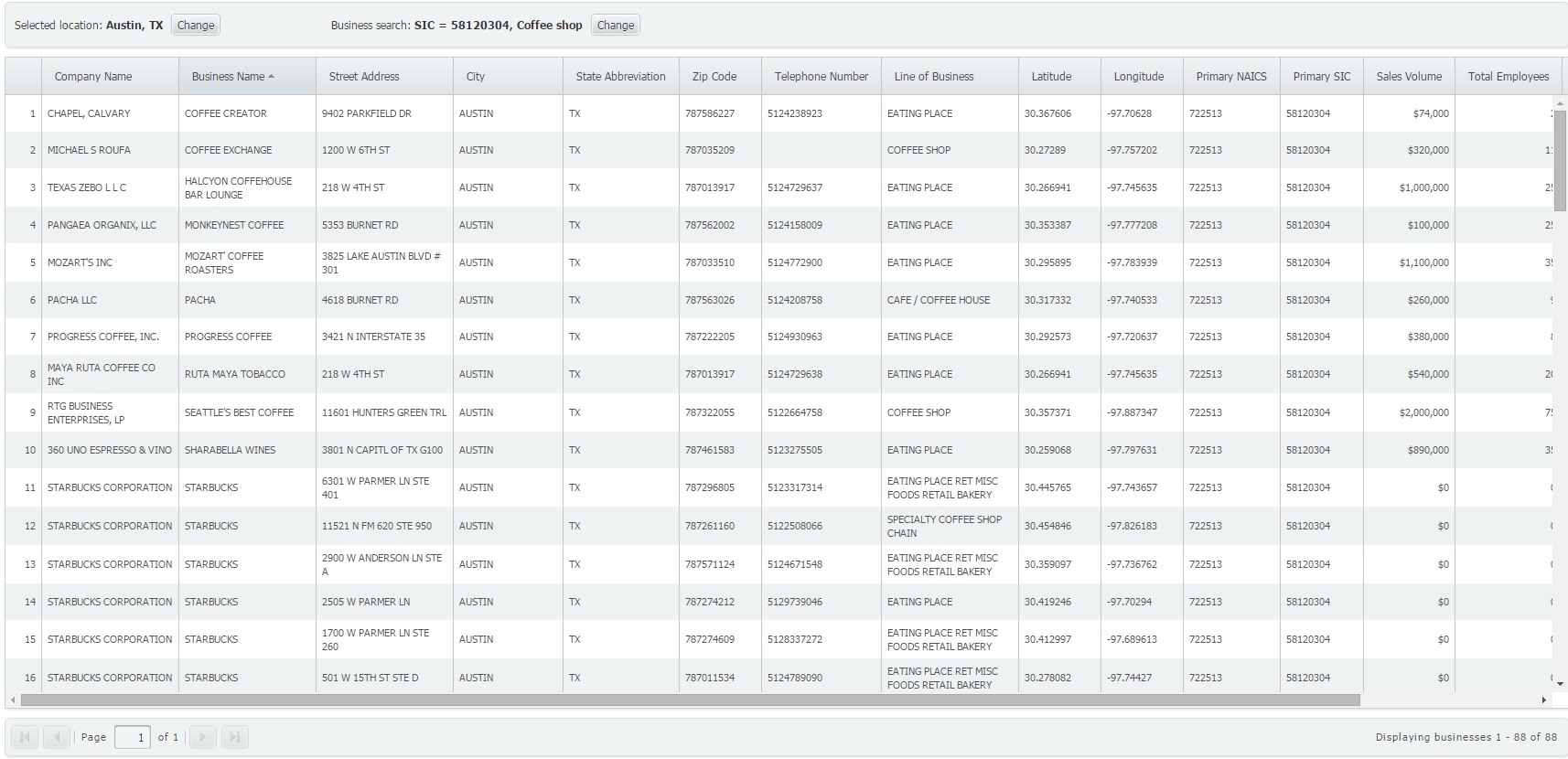
That’s all these is to it! Click on Show Businesses to generate your report. It looks like there are more than 80 classified coffee shops in Austin!
We hope you found this week’s report useful. Tune in for more SimplyMap reports and tips!
More from SimplyAnalytics


Posted on Jun 11, 2026 by Admin
SimplyAnalytics is excited to exhibit at ALA Annual 2026 in Chicago! Visit us at Booth #4336 to meet our team, ask questions, and learn more about the latest SimplyAnalytics features and ...
Posted on Jul 14, 2009 by Admin
Men's Health continues to utilize SimplyMap to identify and rank U.S. cities. This time they are studying "sports-obsessed citizenry," and here is how they did it: Our stat showdown began...
Posted on Feb 26, 2014 by Admin
The Statewide California Electronic Library Consortium is holding another packed week of workshops and networking during the SCELCapalooza event in March 2014. Geographic Research will b...
Posted on Feb 05, 2015 by Admin
In this week’s edition of exploring SimplyMap data, we take a look at America’s coffee drinkers. SimplyMap contains more than 100 coffee related variables, including consumer spending on ...
Posted on Dec 15, 2014 by Admin
Stop by the Geographic Research booth at the Ontario Library Association Super Conference to check out SimplyMap Canada. The conference will take place January 28-31 at the Metro Toronto ...
Posted on Aug 30, 2009 by Admin
Jeff Zaslow, Wall Street Journal columnist and co-author of the The Last Lecture, will speak at the Orlando, FL Public Library on Friday, September 11 at 7 p.m. Zaslow helped the late Ran...
Posted on Oct 16, 2015 by Admin
Did you know that SimplyMap includes the ability to export Shapefile data for use in desktop mapping software (such as MapInfo or ArcGIS)? This advanced feature extends the power of Simpl...
Posted on Mar 02, 2018 by Admin
In this week’s blog we’ll take a look at how to enter an address in SimplyAnalytics to find the Census Block Group or Census Tract. Let’s get started! Use Case: You want to analyze the ar...
Posted on Dec 08, 2017 by Admin
Good afternoon, readers! This week we’re going to talk about project management in SimplyAnalytics and how to best take advantage of it. Why are projects needed? Many users have multiple...