 Go up
Go up


Exporting Shapefiles in SimplyMap
Posted on Oct 16, 2015 by Admin
Did you know that SimplyMap includes the ability to export Shapefile data for use in desktop mapping software (such as MapInfo or ArcGIS)? This advanced feature extends the power of SimplyMap and allows for increased data manipulation and mapping capabilities for advanced users or GIS professionals. Let’s take a look at the exporting process with an example.
To export shapefiles from any map, select Actions > Export Shapefiles.
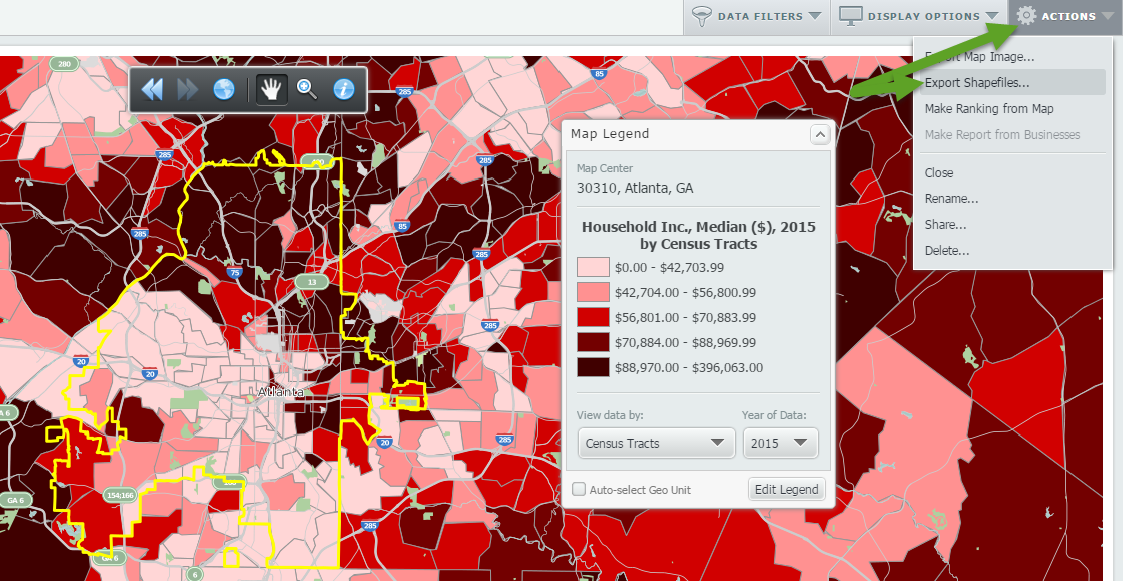
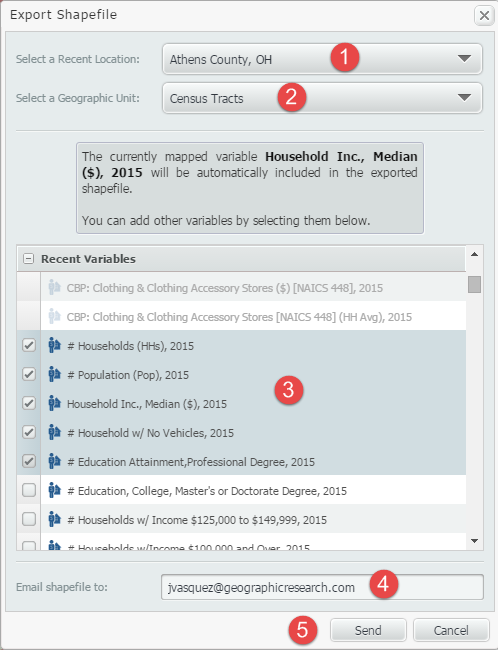
The shapefiles export menu will appear. Follow the 5 easy steps shown and depicted below to receive your shapefiles.
1. Select a Recent Location to export.
2. Select a Geographic Unit to export. You can select from States, Counties, Cities, ZIP Codes, Census Tracts and Census Block Groups.
3. Select data variables to export by clicking the checkbox located next to them. You can select from your Favorite or Recently-used Variables.
4. Enter an email address to send the shapefile to.
5. Click Send. A .zip file will be emailed to the address you entered shortly.
That’s all there is to it! When you receive the email, click on the link to download your files.
Note: Shapefile column names can only have a maximum of 10 characters, so we include a text file with your exported shapefile with complete variable names.
Stay tuned for more SimplyMap tips and reports. If there’s anything you would like to see explained more in depth, let us know below.
More from SimplyAnalytics


Posted on May 23, 2012 by Admin
We will be exhibiting at the Special Libraries Association (SLA) annual conference and Info-Expo at McCormick Place in Chicago Sunday June 15th - Tuesday July 17th. Visit us at Booth 124 ...
Posted on Feb 16, 2009 by Admin
Men's Health conducted their first survey of America's recycling habits, and used SimplyMap in their research. Here’s how the editors explain their methodology: To determine how well citi...
Posted on Mar 22, 2016 by Admin
Inspired by some recent support desk questions, this week’s SimplyMap report will provide some useful tips and tricks to help make the most out of your maps. Let’s get started! First, let...
Posted on Oct 07, 2024 by Admin
We're headed to Charleston! Come visit the SimplyAnalytics team on November 12th at the Gaillard Center at booth 41. We'll be doing live demonstrations of the database, answering question...
Posted on Jun 02, 2017 by Admin
We will be exhibiting at SLA in Phoenix, AZ on June 18th-20th. You can find the SimplyAnalytics team at Booth #905. Stop by and check out our groundbreaking new interface, have a chocolat...
Posted on Sep 21, 2009 by Admin
The North Carolina Library Association will hold its annual conference in Greenville, NC at the Greenville Convention Center from October 6-8, 2009. Geographic Research, Inc. will be exhi...
Posted on Jan 24, 2009 by Admin
Men's Health magazine took a look this month at where our wireless habits are most out of control. Their methodology includes the use of SimplyMap: First, we crunched data from SimplyMap...
Posted on May 24, 2023 by Admin
SimplyAnalytics is excited to attend. Swing by booth 1733 for a brief demo, and discover how our user-friendly demographics, business, health & marketing data analytics and visualizat...
Posted on Nov 06, 2014 by Admin
With over 75,000 variables in SimplyMap, you can find virtually any information you want. This week, we take a look at which U.S. locations spend the most money eating at restaurants or c...
Posted on Oct 30, 2018 by Admin
We are pleased to be exhibiting at this year's 30th Annual Charleston Library Conference! The Charleston Vendor Showcase will be held Tuesday, November 6, 2018, from 10:30 a.m. to 6:00 p....