 Go up
Go up


Managing Projects in SimplyAnalytics
Posted on Dec 08, 2017 by Admin
Good afternoon, readers! This week we’re going to talk about project management in SimplyAnalytics and how to best take advantage of it.
Why are projects needed?
Many users have multiple unique projects going on at the same time. For example, you could be doing: personal research, patron/student assistance, research for a presentation, etc. Projects help keep these unique activities separate from one another to avoid confusion.
What is stored in each project?
All of the locations, variables, business searches, favorites, views, etc. that you use are saved with the project - so each time you login, you can pick up right where you left off.
Getting Started:
The first recommendation we have is to rename your project. You can do this by selecting the “New Project” default title towards the top left of your screen.
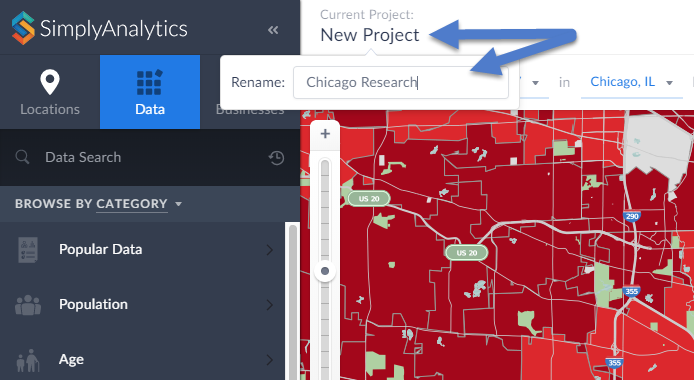
Enter a new name within the available text field and hit Enter to save your current project.
Managing Your Project:
Select Manage Project from the top-right of your screen. From here you will have some editing options available:
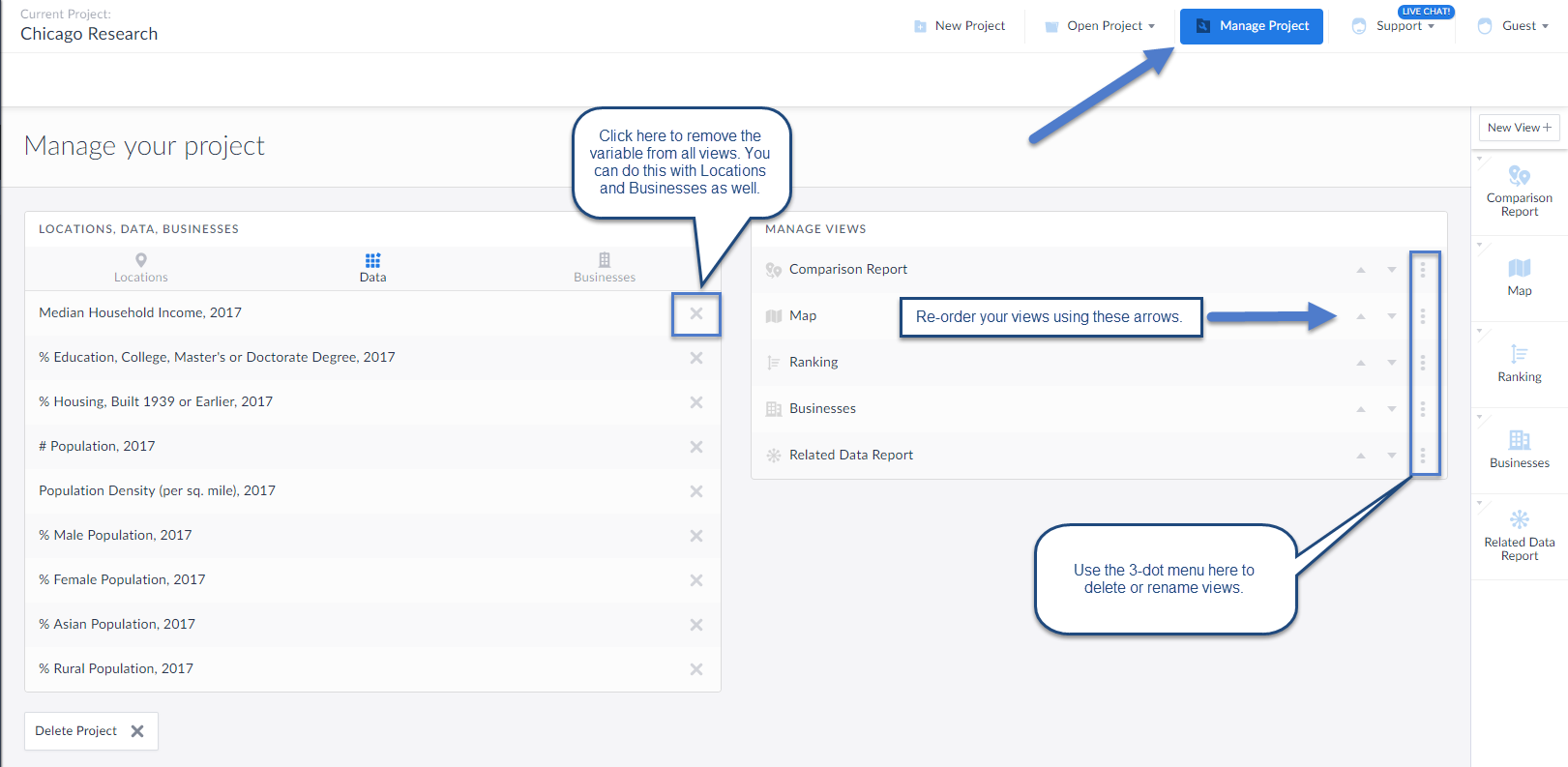
You can choose to remove any locations, data variables or searches within your project using the options available towards the left of your workspace. This will remove those items from all views they reside in along with removing them from the Edit View screen.
Manage Views: The three-dot menu within this area will allow you to delete or rename the view. Additionally, the up and down arrows will allow you to arrange your views in order of how they appear on the right-hand side of the interface.
Creating a New Project: Select New Project to get started with a brand new project (no locations, variables, searches).
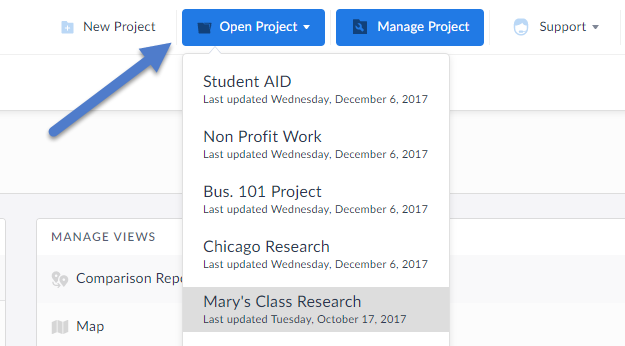
You can always select Open Project to toggle back to older projects.
That’s it for this week’s blog, stay tuned for more!
More from SimplyAnalytics


Posted on Sep 05, 2019 by Admin
SimplyAnalytics will be exhibiting at the biennial North Carolina Library Association conference, to be held this year at the Winston-Salem Benton Convention Center. If you are attending,...
Posted on Nov 06, 2013 by Admin
SimplyMap includes a number of helpful support tools; guided wizards available when and where you need them, detailed help files, and an online support center with FAQs and searchable kno...
Posted on Jan 10, 2024 by Admin
We are delighted to announce our sponsorship of the Midwest Entrepreneurship Case Competition! At SimplyAnalytics, we understand the power of data-driven decision-making in entrepreneursh...
Posted on Jul 20, 2020 by Admin
Hello readers! We hope you are doing well and staying safe. Today we are excited to introduce the Simmons NCS crosstabs functionality! This is a feature we’ve been working on for a while,...
Posted on Apr 18, 2017 by Admin
We look forward to attending the Texas Library Association Conference this week in San Antonio and visiting with the library community. Stop by our new SimplyAnalytics booth (2029) and ta...
Posted on Nov 11, 2014 by Admin
With Veteran’s Day in the US this week, we thought it would be an ideal time to explore some of the variables in SimplyMap that pertain to veterans. Specifically, we wanted to know which ...
Posted on Jan 18, 2009 by Admin
Michigan State University is offering their users a basic introduction to using SimplyMap. The 1.5 hour session will cover the basics of how to use SimplyMap to create maps and reports u...
Posted on Mar 21, 2018 by Admin
The Quick Report is one of the newest features added to SimplyAnalytics - let’s take a look at how it can support your research. This report instantly provides you with a curated list of ...
Posted on May 10, 2016 by Admin
One benefit of data and applications like SimplyMap is the ability to visualize information. In this week’s report, we’ll take a quick look at some branding preferences in contiguous Amer...
Posted on Jan 27, 2015 by Admin
In this week’s report exploring SimplyMap data, we take a look at where America’s bookworms reside. To find this data, we used the variable, Reading (Household Average), 2014 found in the...