 Go up
Go up


Introducing Histograms to SimplyAnalytics
Posted on Sep 14, 2021 by Admin
Welcome readers! Today we are excited to welcome histograms to SimplyAnalytics. We hope you enjoy this wonderful new visualization as much as we do. Let’s take a look.
What is a histogram?
In short, a histogram is similar to a bar chart, but instead groups values into ranges (referred to as “bins”). The height of each bar displays how many values fall within that bin.
Example
Let’s take a look at an easy to read example. The histogram view can be found under New View > Histogram in the program. The example below is showing the % of adults (pop 25+) with a bachelor’s degree or higher in States in the USA.
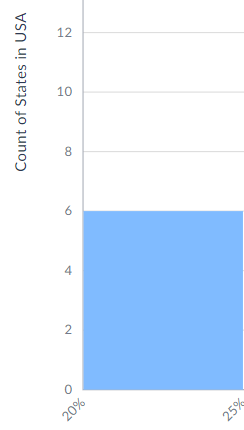
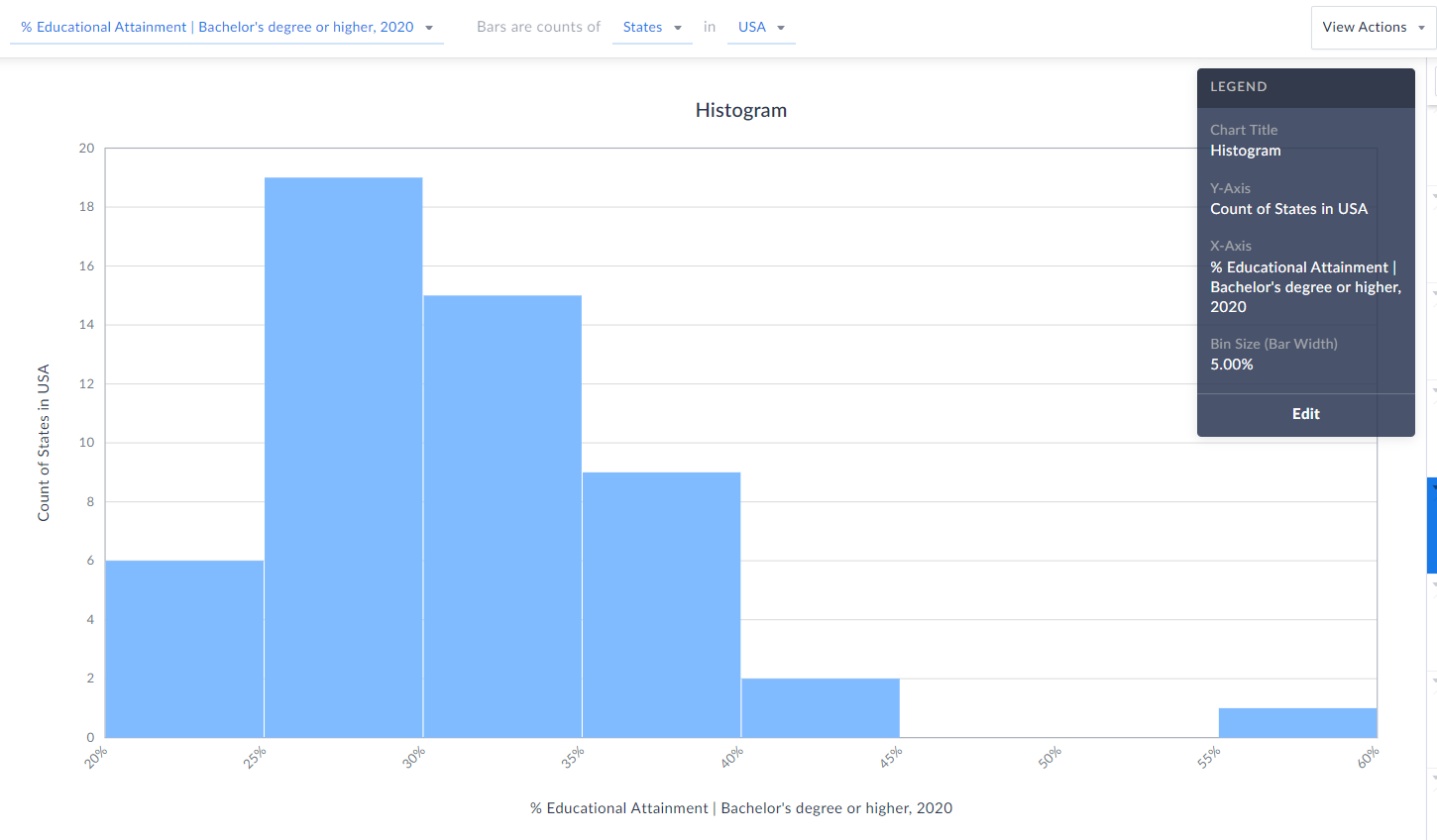 Each bin size, or bar width along the X axis represents a 5% range - so, 20-25%, 25-30%, etc. (zoomed in below)
 The height of each bin represents how many states fall within that bin/range. The example here means that 6 states in the USA have between 20-25% of the adult population who have a bachelor’s degree or higher.
 TIP: Reference the legend on your screen to help interpret the visualization.
Notice towards the far-right of our histogram there does seem to be a potential outlier in the data - there is 1 state where 55-60% of the population 25 and above have at least a bachelor’s degree! Can you guess what state that is?
Answer/Bonus Tip: Towards the top-right of your histogram, click on View Actions > Create Data Table.
TIP: Reference the legend on your screen to help interpret the visualization.
Notice towards the far-right of our histogram there does seem to be a potential outlier in the data - there is 1 state where 55-60% of the population 25 and above have at least a bachelor’s degree! Can you guess what state that is?
Answer/Bonus Tip: Towards the top-right of your histogram, click on View Actions > Create Data Table.
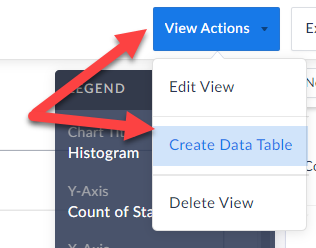 This will generate a Ranking Report for you, and you can quickly sort to find out the answer here…...drum roll…...it’s the District of Columbia, with a value of 57.15% - the lone state within that bin mentioned above.
Last Note: You can edit the color of the bars, title and bin sizes of your histogram by clicking Edit on the Legend.
This will generate a Ranking Report for you, and you can quickly sort to find out the answer here…...drum roll…...it’s the District of Columbia, with a value of 57.15% - the lone state within that bin mentioned above.
Last Note: You can edit the color of the bars, title and bin sizes of your histogram by clicking Edit on the Legend. 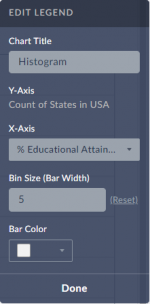 Feel free to make any changes here, and your histogram will automatically be updated.
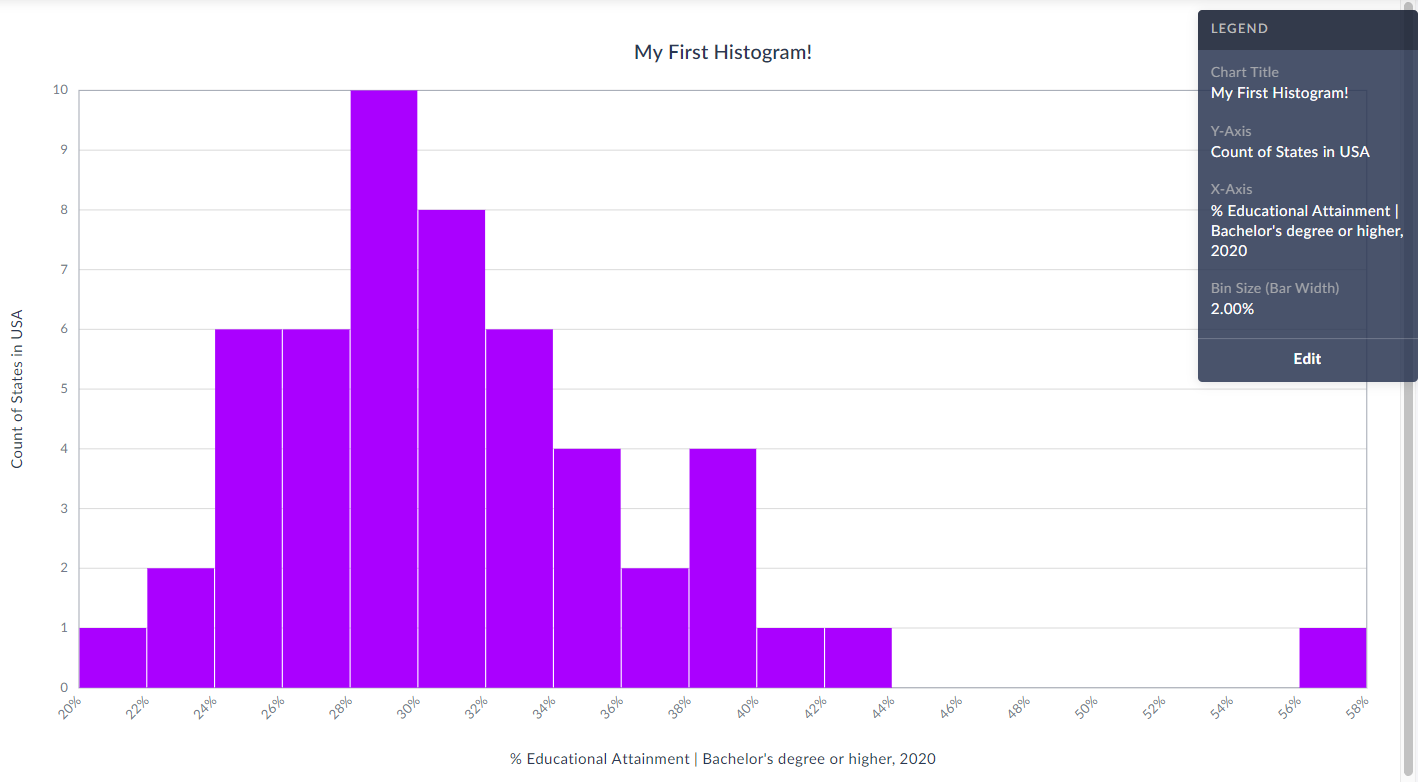
Check out our final histogram below with new colored bins, bin sizes set to 2% instead of 5%, and title.
As always, you are welcome to export your work by clicking on the Export button towards the top-right of the screen.
Feel free to make any changes here, and your histogram will automatically be updated.
Check out our final histogram below with new colored bins, bin sizes set to 2% instead of 5%, and title.
As always, you are welcome to export your work by clicking on the Export button towards the top-right of the screen.
 We hope you enjoy this new visualization! Feel free to contact us at anytime by emailing support@simplyanalytics.com
Each bin size, or bar width along the X axis represents a 5% range - so, 20-25%, 25-30%, etc. (zoomed in below)
 The height of each bin represents how many states fall within that bin/range. The example here means that 6 states in the USA have between 20-25% of the adult population who have a bachelor’s degree or higher.
TIP: Reference the legend on your screen to help interpret the visualization.
Notice towards the far-right of our histogram there does seem to be a potential outlier in the data - there is 1 state where 55-60% of the population 25 and above have at least a bachelor’s degree! Can you guess what state that is?
Answer/Bonus Tip: Towards the top-right of your histogram, click on View Actions > Create Data Table.
This will generate a Ranking Report for you, and you can quickly sort to find out the answer here…...drum roll…...it’s the District of Columbia, with a value of 57.15% - the lone state within that bin mentioned above.
Last Note: You can edit the color of the bars, title and bin sizes of your histogram by clicking Edit on the Legend. Feel free to make any changes here, and your histogram will automatically be updated.
Check out our final histogram below with new colored bins, bin sizes set to 2% instead of 5%, and title.
As always, you are welcome to export your work by clicking on the Export button towards the top-right of the screen.
We hope you enjoy this new visualization! Feel free to contact us at anytime by emailing support@simplyanalytics.com
The height of each bin represents how many states fall within that bin/range. The example here means that 6 states in the USA have between 20-25% of the adult population who have a bachelor’s degree or higher.
TIP: Reference the legend on your screen to help interpret the visualization.
Notice towards the far-right of our histogram there does seem to be a potential outlier in the data - there is 1 state where 55-60% of the population 25 and above have at least a bachelor’s degree! Can you guess what state that is?
Answer/Bonus Tip: Towards the top-right of your histogram, click on View Actions > Create Data Table.
This will generate a Ranking Report for you, and you can quickly sort to find out the answer here…...drum roll…...it’s the District of Columbia, with a value of 57.15% - the lone state within that bin mentioned above.
Last Note: You can edit the color of the bars, title and bin sizes of your histogram by clicking Edit on the Legend. Feel free to make any changes here, and your histogram will automatically be updated.
Check out our final histogram below with new colored bins, bin sizes set to 2% instead of 5%, and title.
As always, you are welcome to export your work by clicking on the Export button towards the top-right of the screen.
We hope you enjoy this new visualization! Feel free to contact us at anytime by emailing support@simplyanalytics.com
More from SimplyAnalytics


Posted on Jun 07, 2011 by Admin
We will be exhibiting at the Special Library Association Annual Conference in Philadelphia and the American Library Association conference in New Orleans later this month. Come and visit ...
Posted on Jul 09, 2009 by Admin
The American Library Association 2009 Annual Conference will take place in Chicago, IL from July 9- July 15, 2009 at McCormick Place West located at 2301 S. Lake Shore Drive Chicago, IL. ...
Posted on Nov 06, 2019 by Admin
Hello readers! We hope you’re having a wonderful week. Today we feature another entry from our From the Help Desk series. Let’s get started! Question: How do I analyze data for downtown? ...
Posted on Jun 08, 2015 by Admin
In this week’s report we take a look at one folder found within SimplyMap’s SimmonsLOCAL data package. SimmonsLOCAL is a powerful targeting and profiling system that provides insights int...
Posted on Jun 01, 2014 by Admin
Visit the SimplyMap team at the ALA Annual Conference and Exposition in Las Vegas later this month. We will be at booth 1271, offering product demonstrations, tips & tricks, and of co...
Posted on Feb 17, 2015 by Admin
Our recent trip to Chicago exhibiting at the ALA Midwinter Meeting inspired this week’s SimplyMap blog post. Today, we’re going to demonstrate how to use business points in SimplyMap to a...
Posted on Jun 02, 2017 by Admin
We can't wait for ALA Annual this Summer, and the opportunity to share SimplyAnalytics with the ALA community. Stop by the SimplyAnalytics booth (1339) and take a peak at what we've been ...
Posted on Oct 24, 2019 by Admin
Hi everybody! This week we wanted to bring you something unique, so we’re taking you behind the scenes to show you what goes in to setting up the SimplyAnalytics conference booth you’ve c...
Posted on Nov 29, 2009 by Admin
Legal Information Alert, a monthly newsletter covering what's new in legal publications, databases and research techniques, published a review of SimplyMap in their April 2009 issue title...
Posted on Apr 28, 2016 by Admin
In this week’s SimplyMap report we’ll take a look at one of our newer data packages offered, P$YCLE® by Nielsen. P$YCLE® is a segmentation system that evaluates consumers using key demogr...