 Go up
Go up


How to Use the SIC Search Feature
Posted on Oct 29, 2015 by Admin
Did you know that SimplyMap allows you to search for businesses by NAICS or SIC codes? Searching by these codes is a great alternative to the general keyword search. Using the keyword search function to search for a business is the quickest method of compiling a business report or placing businesses onto a map. But searching by keyword may result in a broad mix of different business types. Narrow your search to a specific business classification type to generate more meaningful results.
Let’s take a look at an example of searching for coffee shops by SIC code in Austin, Texas.
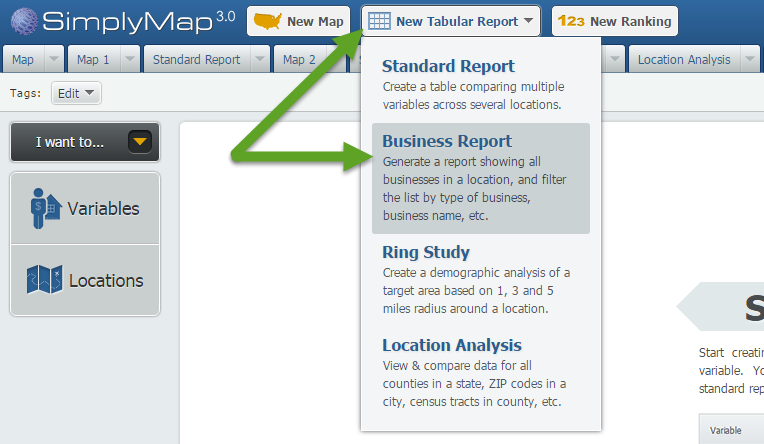
First, Click on New Tabular > Business Report to start a new report.
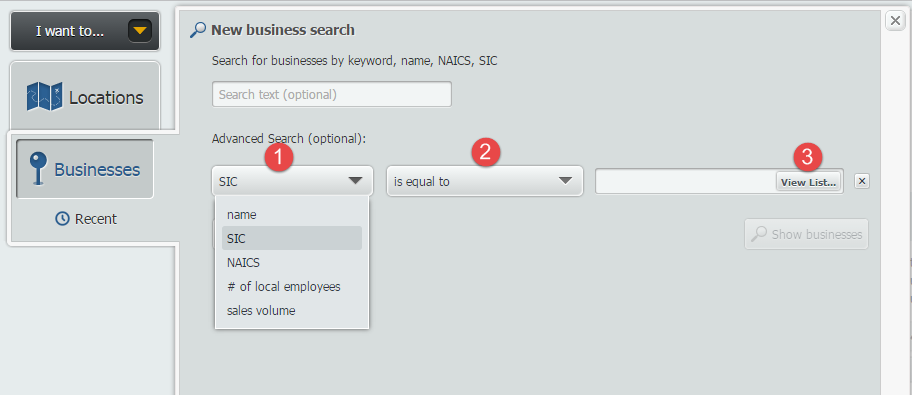
Open the locations panel, and search by City > Austin. Next, open the Businesses panel to bring up the New business search. Click on the Add Condition button to bring up your options.
1. Set the First dropdown to SIC
2. Second the second dropdown to “is equal to”
3. Click on View List to search by SIC codes.
The SIC Selector screen will open up. From here you may browse by industries or click on the Search tab (1) and type “coffee” (2). When you find the SIC code you are looking for, hover over the option and select Use This Code (3).

The “Count” column lists the number of data points for that SIC code, across the entire country.
It looks like there are a total of 22 coffee related SIC codes available. If the keyword “coffee” were used, your results would have searched through all codes (coffee roasters, coffee equipment stores, etc.).
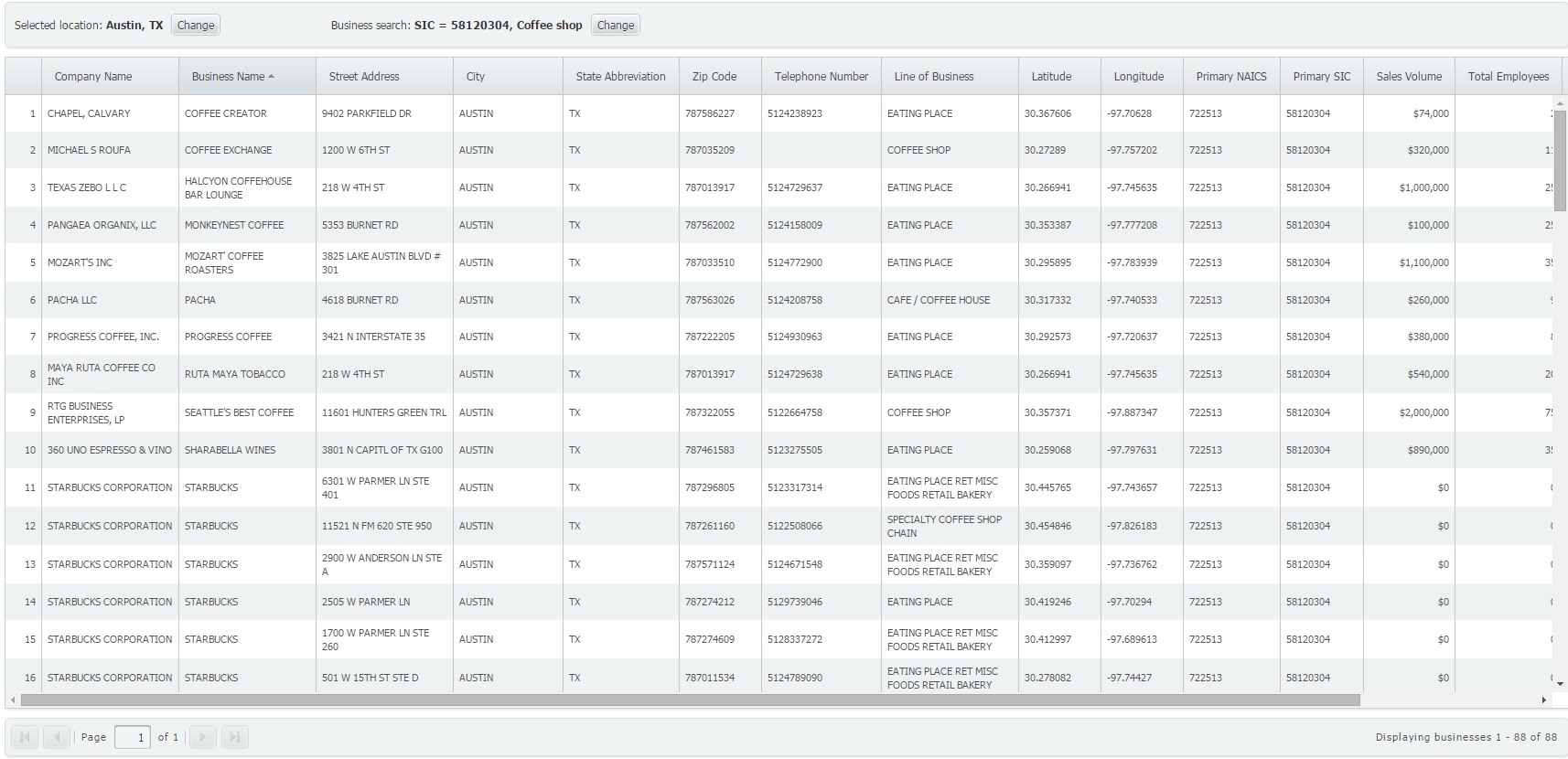
That’s all these is to it! Click on Show Businesses to generate your report. It looks like there are more than 80 classified coffee shops in Austin!
We hope you found this week’s report useful. Tune in for more SimplyMap reports and tips!
More from SimplyAnalytics


Posted on Jun 01, 2014 by Admin
Visit the SimplyMap team at the ALA Annual Conference and Exposition in Las Vegas later this month. We will be at booth 1271, offering product demonstrations, tips & tricks, and of co...
Posted on Mar 21, 2018 by Admin
The Quick Report is one of the newest features added to SimplyAnalytics - let’s take a look at how it can support your research. This report instantly provides you with a curated list of ...
Posted on Feb 02, 2024 by Admin
We are excited to be back exhibiting at PLA this April in Columbus, OH. Join us at Booth #2631 to discover how SimplyAnalytics can help libraries understand their service area, assist sma...
Posted on Apr 14, 2016 by Admin
This week’s SimplyMap report will provide an overview of one of the more advanced functionalities in SimplyMap - applying multiple filter conditions. Filters can be applied to any map or ...
Posted on Jun 21, 2019 by Admin
Come visit the SimplyAnalytics booth (#3010) at the upcoming ALA 2019 show in Washington, D.C.! Our team will be on hand offering quick demos of SimplyAnalytics, answering questions and s...
Posted on Jan 10, 2024 by Admin
We are delighted to announce our sponsorship of the Midwest Entrepreneurship Case Competition! At SimplyAnalytics, we understand the power of data-driven decision-making in entrepreneursh...
Posted on Sep 10, 2010 by Admin
SimplyMap Canada is now available at several Canadian institutions, including York University and Ryerson University, in Toronto. SimplyMap Canada has all of the great features included i...
Posted on Jun 27, 2009 by Admin
The library faculty at Regent University in Virginia recently spotlighted SimplyMap in their Library Faculty Recommendations blog, highlighting its powerful ability to create professional...
Posted on Jan 23, 2015 by Admin
SimplyMap offers a total of 5 unique types of reports: Standard Report, Ranking Report, Business Report, Ring Study, and Location Analysis. This brief write up will define what each repor...
Posted on Jan 18, 2009 by Admin
Michigan State University is offering their users a basic introduction to using SimplyMap. The 1.5 hour session will cover the basics of how to use SimplyMap to create maps and reports u...