 Go up
Go up


Exporting Shapefiles in SimplyMap
Posted on Oct 16, 2015 by Admin
Did you know that SimplyMap includes the ability to export Shapefile data for use in desktop mapping software (such as MapInfo or ArcGIS)? This advanced feature extends the power of SimplyMap and allows for increased data manipulation and mapping capabilities for advanced users or GIS professionals. Let’s take a look at the exporting process with an example.
To export shapefiles from any map, select Actions > Export Shapefiles.
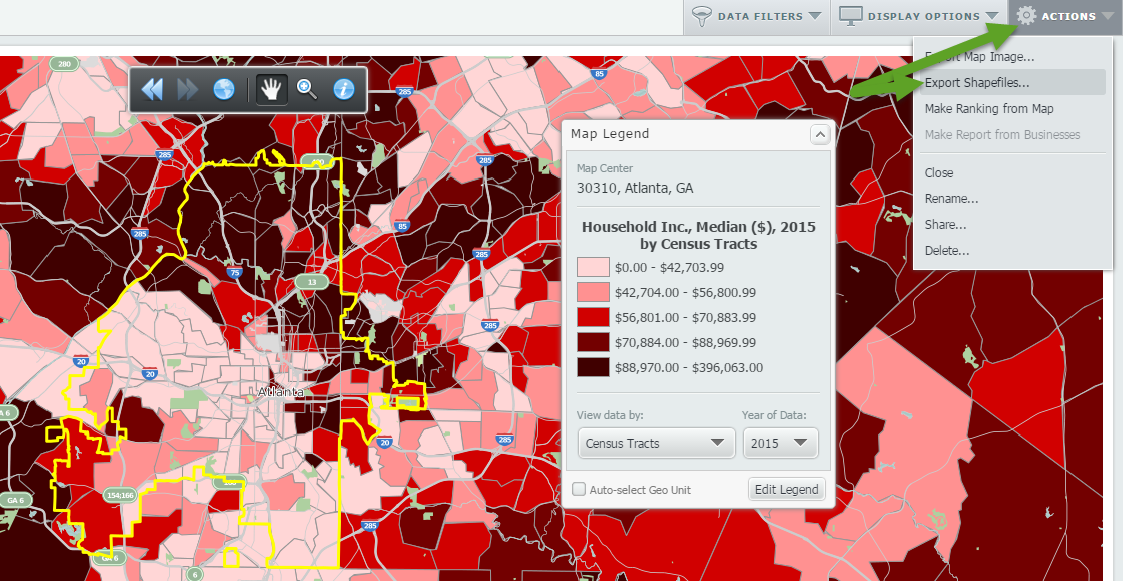
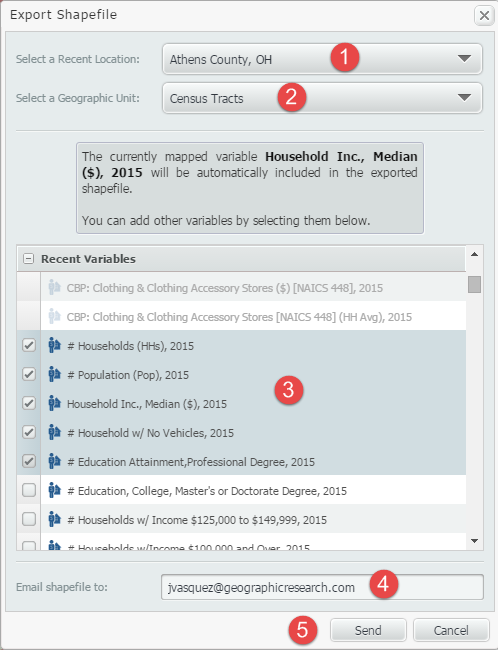
The shapefiles export menu will appear. Follow the 5 easy steps shown and depicted below to receive your shapefiles.
1. Select a Recent Location to export.
2. Select a Geographic Unit to export. You can select from States, Counties, Cities, ZIP Codes, Census Tracts and Census Block Groups.
3. Select data variables to export by clicking the checkbox located next to them. You can select from your Favorite or Recently-used Variables.
4. Enter an email address to send the shapefile to.
5. Click Send. A .zip file will be emailed to the address you entered shortly.
That’s all there is to it! When you receive the email, click on the link to download your files.
Note: Shapefile column names can only have a maximum of 10 characters, so we include a text file with your exported shapefile with complete variable names.
Stay tuned for more SimplyMap tips and reports. If there’s anything you would like to see explained more in depth, let us know below.
More from SimplyAnalytics


Posted on Nov 11, 2015 by Admin
Inspired by a recent help desk ticket, we wanted to discuss how users may utilize SimplyMap to identify relationships between unique variables. For example, does having a college degree s...
Posted on Feb 25, 2020 by Admin
SimplyAnalytics will be exhibiting at the PLA Conference, held this year at the Music City Center in Nashville, TN on February 26 - 28. Visit the team at Booth 1444 with your questions, f...
Posted on May 17, 2016 by Admin
This week’s SimplyMap report is a quick reader challenge. Can you guess what the map of the United States below is depicting? Keep in mind the legend colors - lighter is less, and darker ...
Posted on Sep 07, 2011 by Admin
Geographic Research will be exhibiting and presenting during a vendor showcase session at the upcoming North Carolina Library Association (NCLA) Biennial Conference, October 4-7, 2011 in ...
Posted on Oct 02, 2015 by Admin
In this week’s SimplyMap tip, we wanted to do a quick write up reminding users about the Saved Tabs feature within SimplyMap. Did you know that SimplyMap will automatically save all of yo...
Posted on Apr 18, 2008 by Admin
A team of librarians at Drexel University has developed a detailed poster to introduce SimplyMap as a new research tool for the student body. The poster was launched on Drexel Research Da...
Posted on Sep 05, 2019 by Admin
SimplyAnalytics will be exhibiting at the biennial North Carolina Library Association conference, to be held this year at the Winston-Salem Benton Convention Center. If you are attending,...
Posted on May 17, 2012 by Admin
We will be exhibiting at the American Library Association (ALA) Conference in Anaheim Friday June 22nd - Monday June 25th. Visit us at Booth 421 to learn more about SimplyMap and enter ou...
Posted on Jul 30, 2008 by Admin
Cornell’s Albert R. Mann Library has subscribed to SimplyMap. They provide some tips and access to the SimplyMap Quick Reference Guide, variable list, and some information on the EASI dat...
Posted on Jan 08, 2018 by Admin
The SimplyAnalytics team will be exhibiting at ALA Midwinter in Denver February 9-12. Stop by booth 2152 for a visit and a tour of SimplyAnalytics, the best-in-class analytics and data vi...